IES not working

Forum Archive IES not working

Viewing 7 posts - 1 through 7 (of 7 total)
  • Author
    Posts
  • #19620
    Shannon Lenz
    Participant

      I have downloaded several files from IES-Library (what a mess, you can barely see the files for all the advertisements.) None of the files seems to have any effect on the point light. Any help here?

      #92900
      Sascha Feider
      Participant

        Could you post a screenshot of your light and the node setup, so we can help troubleshoot?

        #92901
        Dwayne Savage
        Participant

          Also make sure you are using cycles not eevee

          #92902
          Martin Bergwerf
          Participant

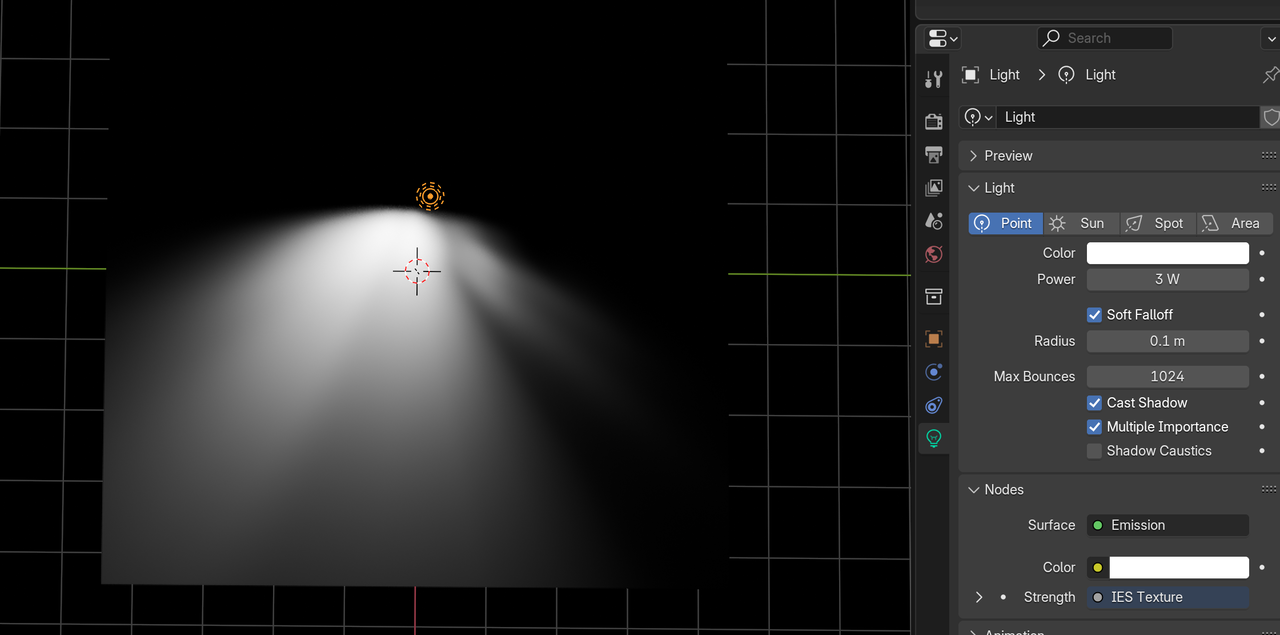
            Things that can influence how much of the effect you see are the Power of the Light the Radius and even the position.

            IES.png

            #92903
            Omar Domenech
            Participant

              Yeah sometimes we’re trying to see the pattern but the conditions are not right. Perhaps you have a well lit scene already. As Martin did, when testing it out, trying turning off all the lights and world environment as well, and place your light very near a surface so the pattern can be easily spotted.

              #92904
              Shannon Lenz
              Participant

                I was able to download a free pack of IES lights fromLeomoon.  https://leomoon.com/store/shaders/ies-lights-pack/ 

                These seem to work. 

                #92905
                Martin Bergwerf
                Participant

                  Well @hawkline13 ,

                  The one I showed, was downloaded from the IES Library website, that was mentioned in the course, so those should work as well, but yes, the leomoon website is fine too.

                Viewing 7 posts - 1 through 7 (of 7 total)
                • The topic ‘IES not working’ is closed to new replies.