I have some faces lines showing in the object shading workspace in cycles

Forum Archive I have some faces lines showing in the object shading workspace in cycles

Viewing 7 posts - 1 through 7 (of 7 total)
  • Author
    Posts
  • #15361
    stephane martin
    Participant

      Can you help me get rid of those faces lines ? They dont appear on the preview material with evee.

      https://flic.kr/ps/3eC8wU

      #75123
      Martin Bergwerf
      Participant

        Hi @stephanemg ,

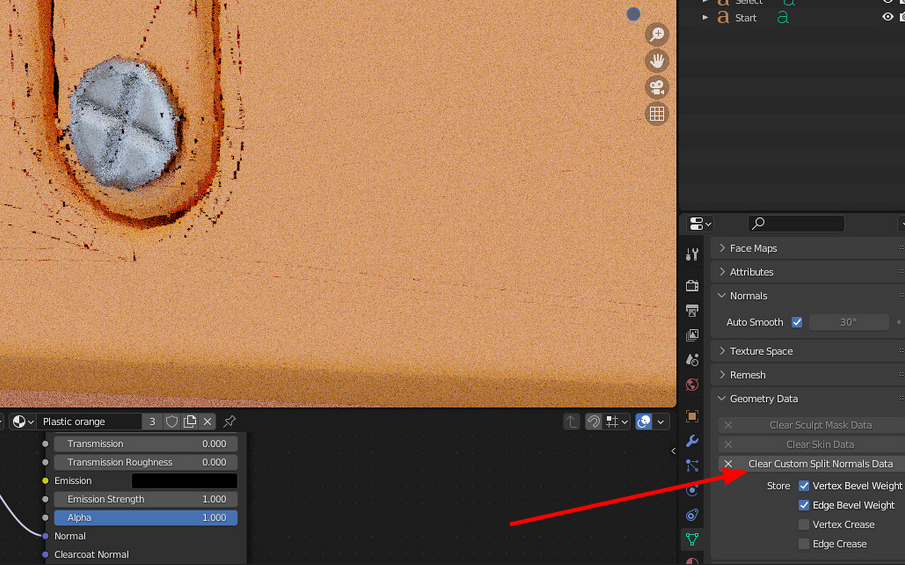
        Your Autosmooth isn’t working (the Treshold Angle is greyed out). Try clearing the Custom Split Normals Data here:

        Nrm.png

        Maybe that’ll already be enough.

        Otherwise you might try lowering the Angle a bit, if there still are those shading artefacts…

        Better even is to adjust the Geometry a bit, but we’d need to see your .blend file to be able to see if that is necessary.

        You can upload your .blend to Googledrive, Dropbox, or similar and post a link here.

        We actually did a Livestream on Discord  only two days ago, that covered this situation in depth (among other subjects). The recording should be available soon.

        #75124
        Martin Bergwerf
        Participant
          #75125
          stephane martin
          Participant

            Hi,

            I’ve seen this problem since the start when I created the faces, sometimes those lines appear, and I dont know why. 

            I’ve cleared the normals data, reduced the auto smooth to 20 deg but the problem is still here.

            Here’s the link to my actual work : 

            https://www.icloud.com/iclouddrive/006vQ3ChTFlyyYwdyl9JLJ_UA#press_start

            I’ll check now the other issue that Martin send above to see if I can gather some other solutions to this problem.

            Anyway, thanks for helping me, great community on this site.

            #75126
            Martin Bergwerf
            Participant

              Thanks for the file! That really helps:

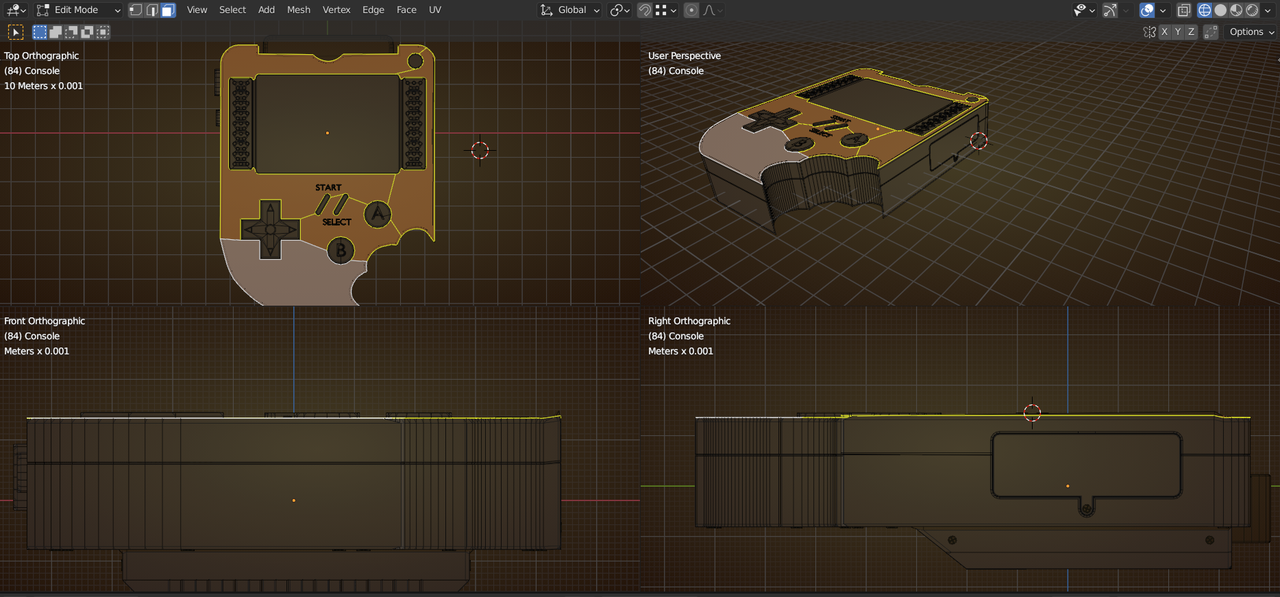
              first, your top Faces that should be flat are not, which you can see in the Front and Side Orthographic Views:

              Start1.png

              Select them and then pres S, Z, 0.

              Then there also some Double Vertices that are causing problems (especially with the Bevel Modifier).

              Select everything (press A, in Edit Mode!) and then M > Merge by Distance.

              I think that is all, but let us know if there are still issues left that I may have missed.

              #75127
              stephane martin
              Participant

                I’ve done the flatten and removed the duplicates and that did it.

                Then I only applied the duplicates removal, and it was the problem. Next time I’ll be more careful when doing extrudes.

                Thanks a lot for your help !

                #75128
                Martin Bergwerf
                Participant

                  @stephanemg ,

                  Just in case you are interrested, here’s the link to the Livestream recording:

                Viewing 7 posts - 1 through 7 (of 7 total)
                • The topic ‘I have some faces lines showing in the object shading workspace in cycles’ is closed to new replies.