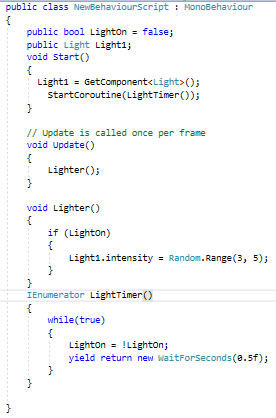
How would you slow this down so it doesn't flicker as quickly?

Forum Archive How would you slow this down so it doesn't flicker as quickly?

Viewing 5 posts - 1 through 5 (of 5 total)
  • Author
    Posts
  • #4770
    rapineda
    Participant

      How would you slow this down so it doesn’t flicker as quickly?

      #23051
      Jonathan Gonzalez
      Participant

        You could add in a delay within a while loop. To use the delay within C# you’ll want to use a Coroutine such as:

        IEnumerator LightFlicker()
        {

        while (true)

        {
        lightBulb.intensity = Random.Range(1.5f, 10.5f);
        yield return new WaitForSeconds(1);

        }

        }

        Making sure that you start the coroutine in the Start function:

        void Start ()
        {
        StartCoroutine(LightFlicker());
        }

        So in the Coroutine you flicker the light from the random range value, wait one second then do it again. The “while true” part means that while the condition is true I want you to keep looping through this. That can be replaced with any condition you want to check yourself. 

        #23052
        alimert
        Participant

          I am a little late but…

          You can see to my question “a better flickering” to see how it works.

          #23053
          Nicholas Yang
          Participant

            This can also be achieved with FixedUpdate(), right? Is there a rule for when to use FixedUpdate() and when to use Coroutines?

            public float timer = 0;
            public bool lightFlickering = false;
            
            void Update() {
                if (lightFlickeringOn) {
                    lightBulb.intensity = Random.Range(1.5f, 1.9f);
                    lightBulb.range = Random.Range(8, 15);
                }
            }
            		
            void FixedUpdate() {
                timer += Time.deltaTime;
                if (timer > 1.0f) {
                    timer = 0;
                    lightFlickeringOn = !lightFlickeringOn;
                }
            }
            
            #23054
            Jonathan Gonzalez
            Participant

              There really isn’t a set rule. Typically if I just want to loop through something a set amount of time or I really want to control the timing of something I find it easier to use a Coroutine. Update methods constantly get called multiple times per second, so a Coroutine allows you to replicate that but you can decide how often to update something.

              Usually you can replicate the effect within one of the update methods. FixedUpdate is typically used with physics since it updates every .02 seconds or whatever you have your physics time step set to. For this effect you could include everything within the Update method. 

            Viewing 5 posts - 1 through 5 (of 5 total)
            • The topic ‘How would you slow this down so it doesn't flicker as quickly?’ is closed to new replies.