How to set correctly Texture Paint Opacity?

Forum Archive How to set correctly Texture Paint Opacity?

Viewing 15 posts - 1 through 15 (of 15 total)
  • Author
    Posts
  • #8844
    Maxim Timakov
    Participant

      My Texture Paint Opacity just don`t work in Texture Paint Mode. My viewport shading is Solid, and Texture Opacity is 1.0, but i can only see material with color of my texture. Hope, I explained it clearly.

      #29471
      Kent Trammell
      Participant

        You did a fine job explaining, but this is the kind of thing I need to see to understand. If you could record your screen as a GIF to illustrate the issue, that’d be ideal. To do this I record with OBS (or any screen recorder to outputs an mp4 video file) then convert to gif with this website.

        #29472
        Maxim Timakov
        Participant

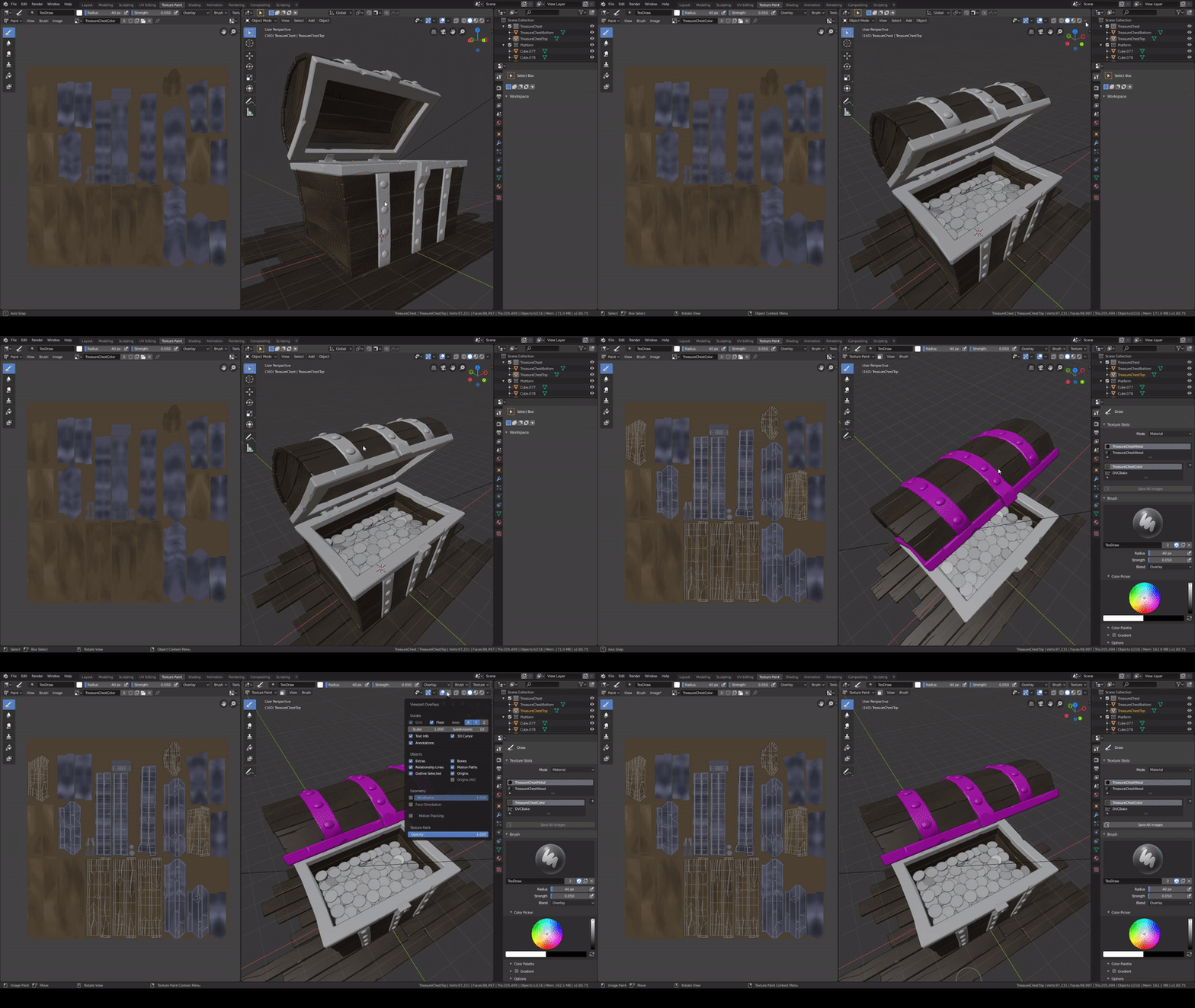
          Sorry, i don`t have previuos file, when all objects was separated, but it should be enough. Also, my metal parts has become pink. Why?

          #29473
          Kent Trammell
          Participant

            Thanks for recording a gif for me to see what’s going on better! It looks like you metal pieces don’t have the material applied. The metal needs the same material applied as your wood. Can you check that?

            #29474
            Maxim Timakov
            Participant

              Metal material is fine. I`ve already did visualization. And what about opacity settings? All my models have the same problem. It`s not a big issue, but…

              #29475
              Kent Trammell
              Participant

                Any time you see that bright pink color in Blender it means a texture is trying to be sourced erroneously. So that has to mean your metal rim object doesn’t have either A) the material applied or B) there’s no texture plugged into the material that is applied.

                Once your texture is applied and no more pink the opacity slider should function as expected.

                #29476
                Maxim Timakov
                Participant

                  So strange. Material is applied, and texture is plugged. Anyway, thanks for help!

                  #29477
                  Kent Trammell
                  Participant

                    Now I want to know what’s going on! HA

                    If you pack your .blend file (to include textures), save it separately (add “_packed” to the filename), then upload to dropbox, google drive (or equivalent) and post a download link here, I’ll take a look at the file.

                    #29478
                    Maxim Timakov
                    Participant

                      For a second I thought that packing can fix this… https://yadi.sk/d/6GpwGTU0JBiuXg

                      #29479
                      Kent Trammell
                      Participant

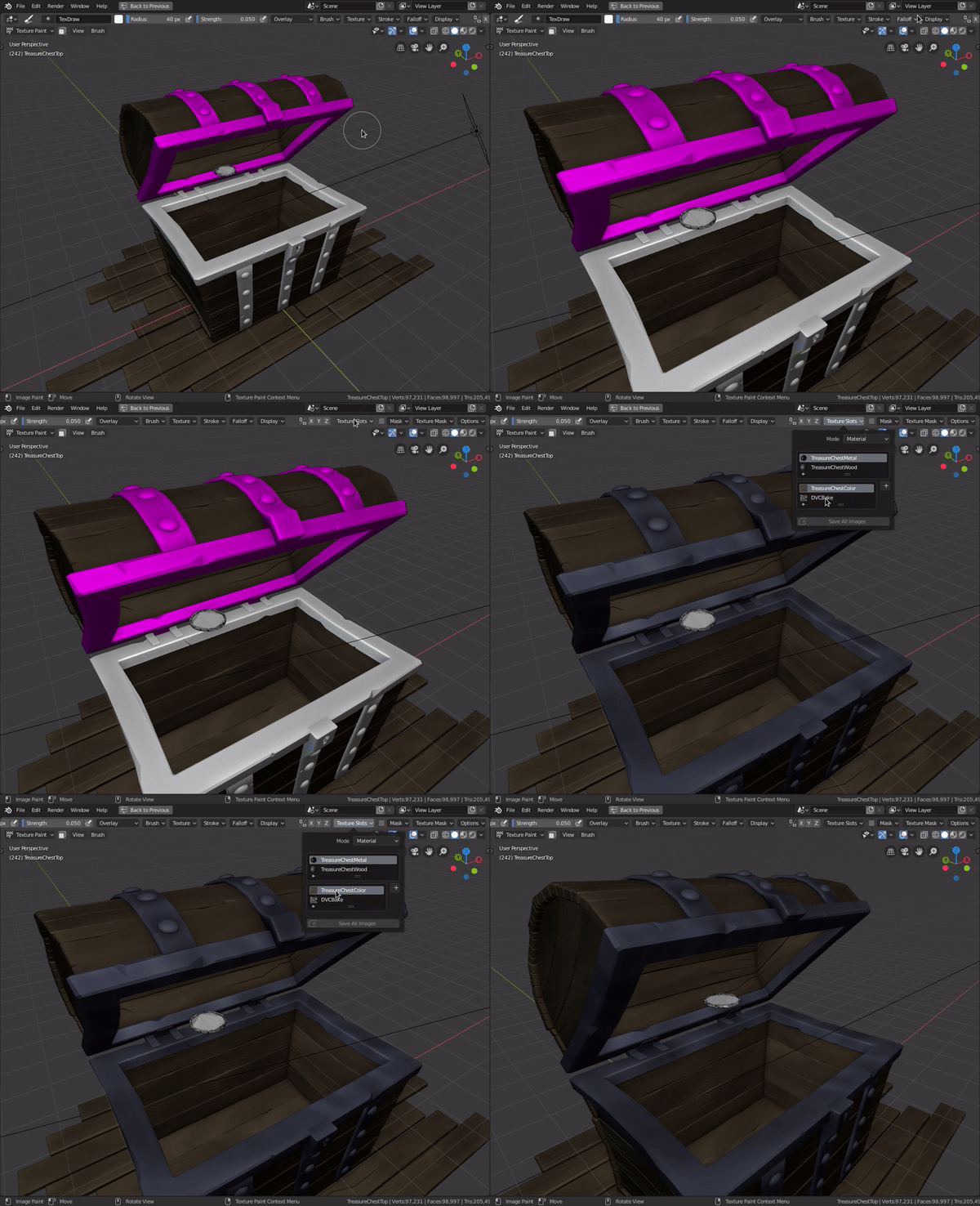
                        Thanks for the file. I can confirm that it was pink for me too. Though I found that to fix it I needed to select a texture slot:

                        I don’t know why the pink was showing. Almost like the texture slot needed a “refresh” since you can see all I did was select the already-selected slot. Weird.

                        #29480
                        Maxim Timakov
                        Participant

                          Thanks! I`ll keep that in mind for the future.

                          #29481
                          John
                          Participant

                            Hello there, folks! Did you manage to isolate what was causing “Texture Paint Overlay” to not work?:

                             And what about opacity settings?   All my models have the same problem. It`s not a big issue, but…

                            I think I’m in the same boat: My models are always lit, even the selected object in texture paint mode.  My overlay Opacity is also set to 1.  This results in my sampled viewport colours not being true to the texture.    Perhaps it’s a bug?

                            I can switch to “Flat Lighting” for everything in the mean time ( or sample from the texture window instead), but I can see the appeal of having that overlay functional.

                            I’d be interested to know if Kent saw the same overlay behaviour when opening your file.

                            Hopefully this isn’t too much of a hijack, I didn’t want to fill up the question section with a duplicate issue!

                            #29482
                            Maxim Timakov
                            Participant

                              Yeah, i also use “Flat”. But it doesn`t seem to work like that. I think that if Kent did not answer this question, it is a bug.

                              #29483
                              Kent Trammell
                              Participant

                                @emericanized @timakovmm Sorry I glossed over that part about the texture overlay – I went back to the file and can confirm that the slider did nothing for me either. I’m not sure what’s going on there 🤔 Very possibly 2.8 quirkiness.

                                #29484
                                Maxim Timakov
                                Participant

                                  Thanks! Now i can relax 🙂

                                Viewing 15 posts - 1 through 15 (of 15 total)
                                • The topic ‘How to set correctly Texture Paint Opacity?’ is closed to new replies.