How to find and turn on Face Normals in 4.3.2?

Forum Archive How to find and turn on Face Normals in 4.3.2?

Viewing 9 posts - 1 through 9 (of 9 total)
  • Author
    Posts
  • #19690
    Patty Hatfield
    Participant

      I follow Edit Mode , Overlays Dropdown, …but in 4.3.2 Normals is not shown. But I did find normals under Edit mode. Mesh dropdown Normals. which do I chosse? Set from Faces or Set Face Strength? I am lost.

      #93142
      Martin Bergwerf
      Participant

        Hi @pattybhat ,

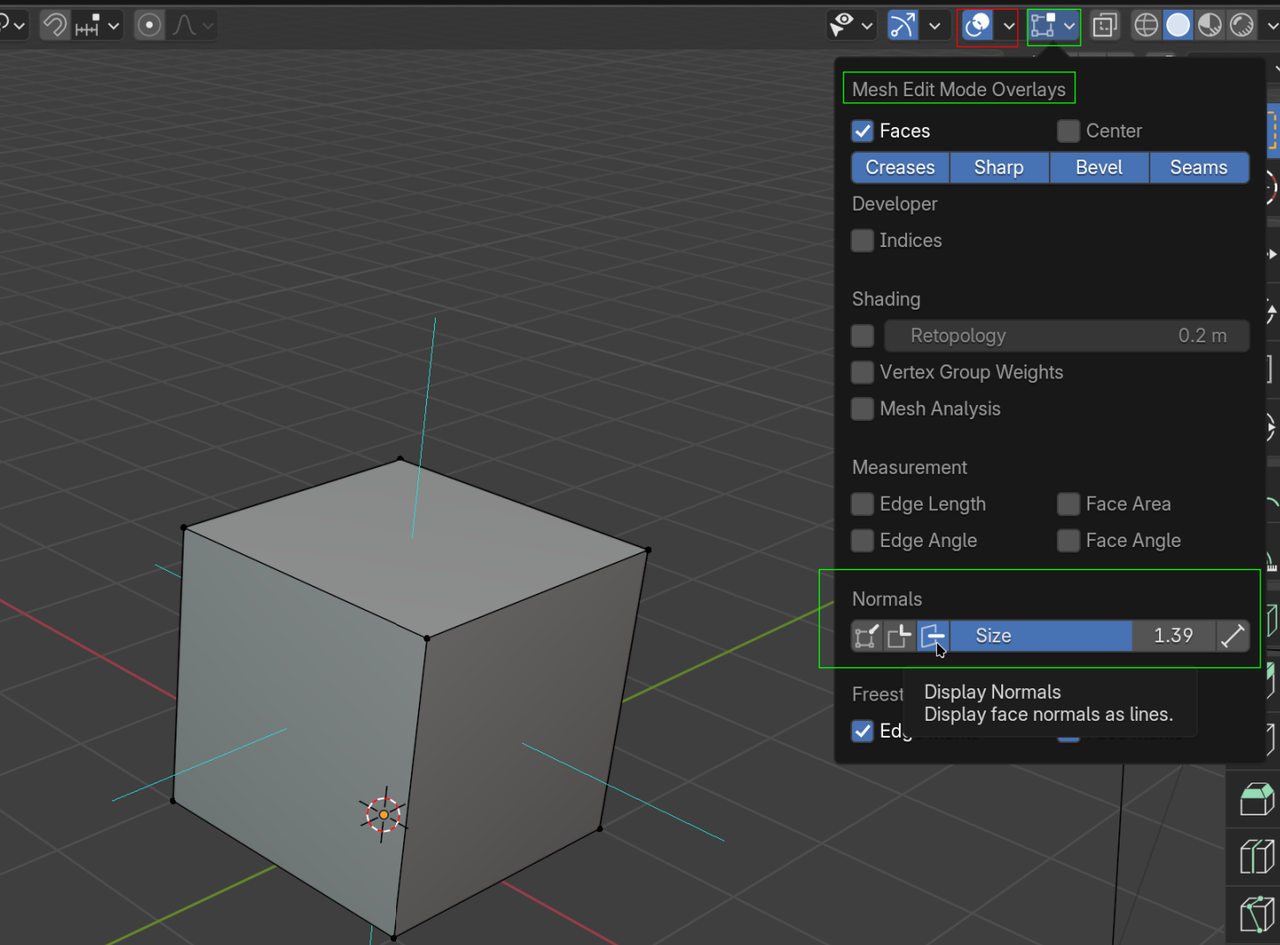
        You got me confused;  do you mean the Normals don’t show in the Mesh Edit Mode Overlays, when in Edit Mode?

        Nrm.png

        Be aware, that in Edit Mode (and all other Modes, except Object Mode) there are 2 Overlay dropdowns menus. A general one, and one specific to the Mode you are in.

        #93143
        Omar Domenech
        Participant

          Yeah I too got a bit lost trying to understand the question. But you only have access to the Normals option when you are in edit mode. When you are in Object Mode you wont see the option for showing the Normals. Because Normals are not at the object level, but at the object data level of each mesh.

          #93144
          Patty Hatfield
          Participant

            Yes.. Thank you Martin….I appreicate the visual. Yes,   I now  see the special Mesh Edit Mode overlay. 

            #93145
            Patty Hatfield
            Participant

              How does one determine the size of the normal?  In the visual its set at 1.39 and its pointing out from all sides! So it has 4 normals? 

              #93146
              Patty Hatfield
              Participant

                so I only work with the normal (side or face) I select?……interesting.

                #93147
                Omar Domenech
                Participant

                  Every face has a normal. Every vertex also has Normals and probably even edges has Normals. Their length I think only matters when it comes to baking most likely. But you don’t have to worry about any of that right now, it’s only the Blender Basics and Normals are a very technical and kind of advance topic. So for the moment I think the most important thing to know is that the front of the face is where the normal is pointing, and the opposite is the back of the face, this matters because is how Blender will know what to do with the surface of your object. 

                  #93148
                  Martin Bergwerf
                  Participant

                    I increased the Length slider, because the default of 0.10 is a bit hard to see on the default Cube.

                    #93149
                    Patty Hatfield
                    Participant

                      Awesome clarification. Thanks

                    Viewing 9 posts - 1 through 9 (of 9 total)
                    • The topic ‘How to find and turn on Face Normals in 4.3.2?’ is closed to new replies.