
How to Check for Overlapping Meshes and Fix Them?
Forum Archive › How to Check for Overlapping Meshes and Fix Them?
- This topic has 10 replies, 4 voices, and was last updated 2 years ago by
Dwayne Savage.
-
AuthorPosts
-
August 24, 2024 at 10:53 pm #18558
Hello again!
This might be a beginner question, but I haven’t been able to find a solution. How can we check if objects are overlapping or duplicated in object mode?
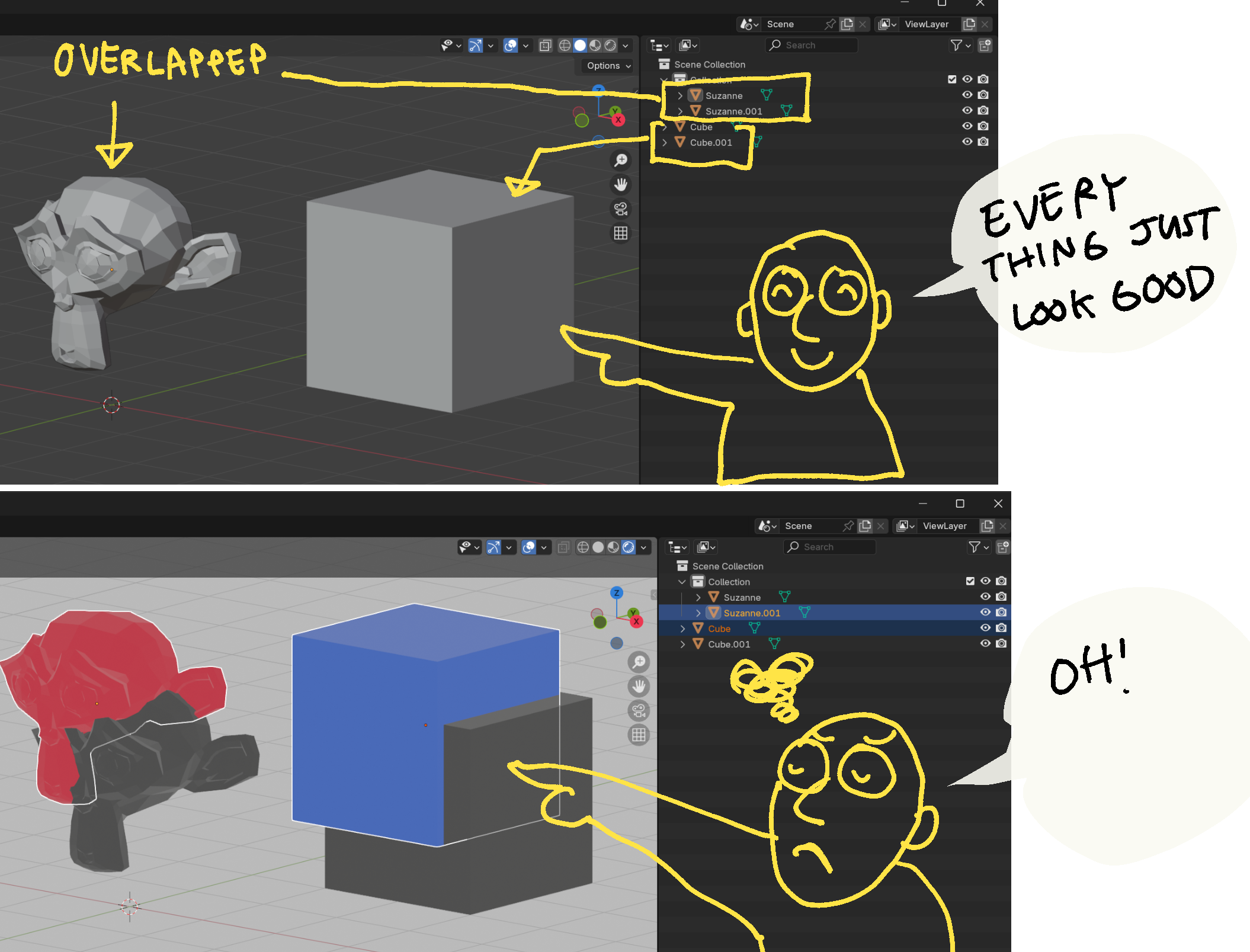
In simple cases, it’s easy to spot in the outliner, but in larger projects with lots of objects, finding duplicates becomes really challenging.
Right now, I’m manually fixing it by deleting objects I suspect are overlapping, but it’s pretty time-consuming. Is there a tool or addon that can automatically check and fix this?
Thanks so much for your help!
August 25, 2024 at 1:17 am #88642Hi Kwin,
I do not know of a way to easily check and ‘fix’ that for many Objects at once.
There might be an Addon for it, but I don’t know that either.
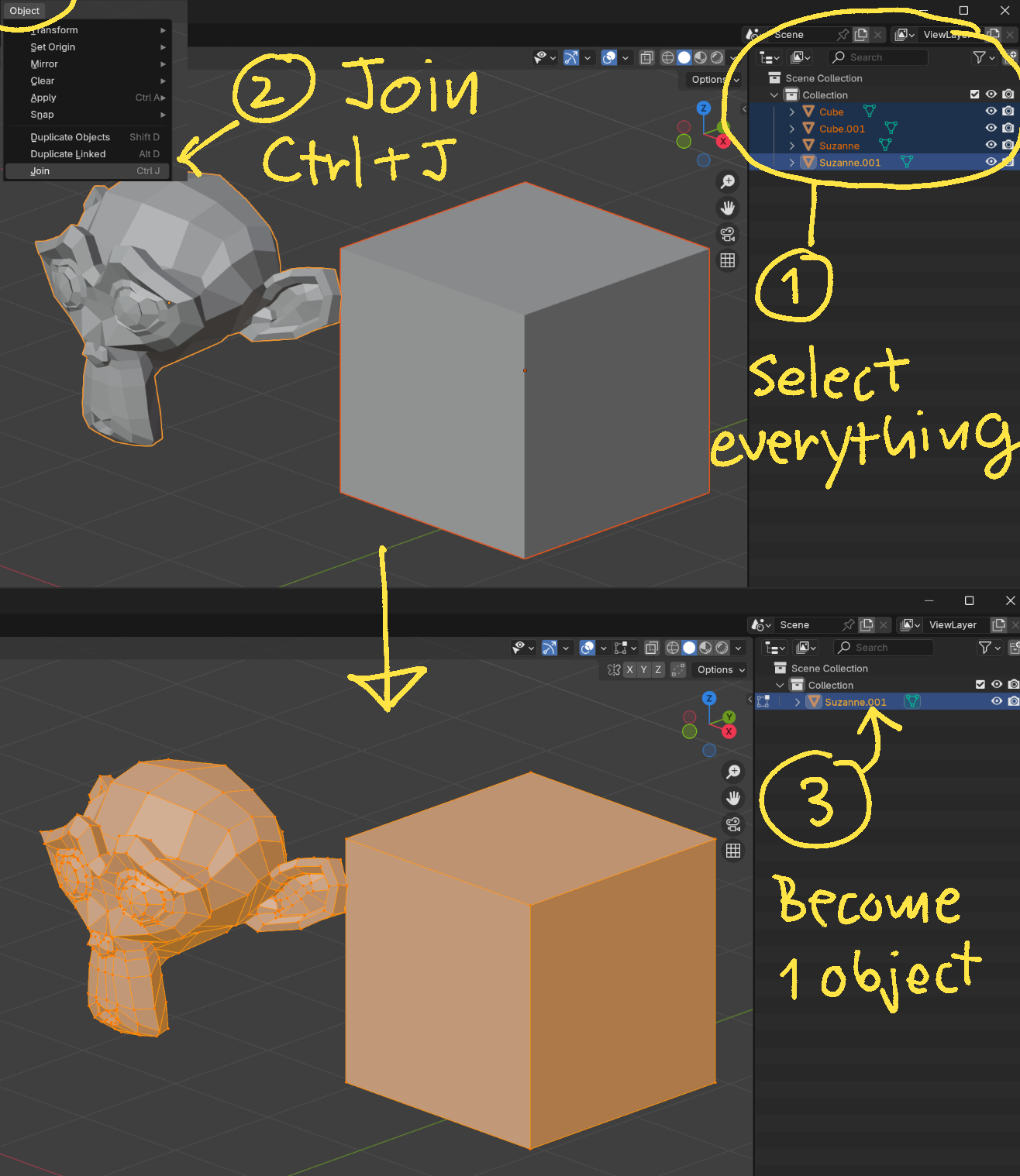
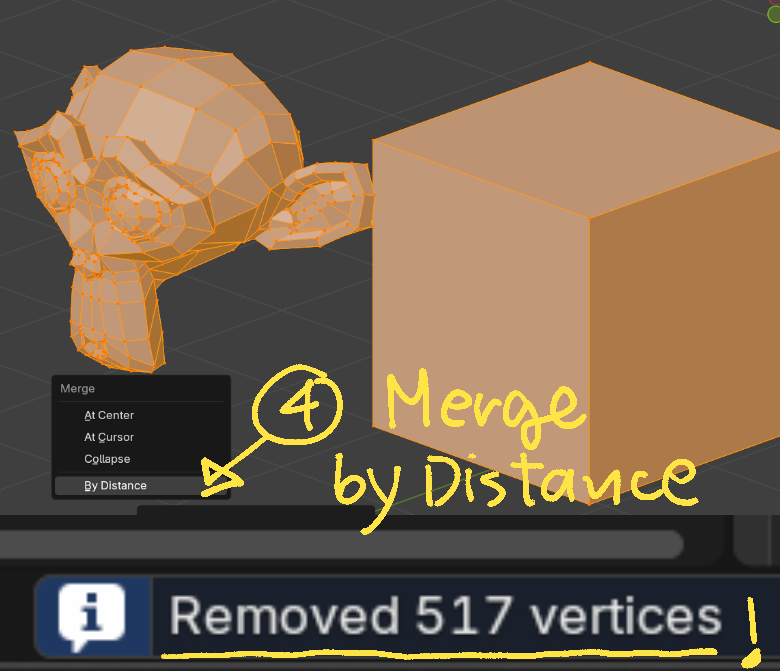
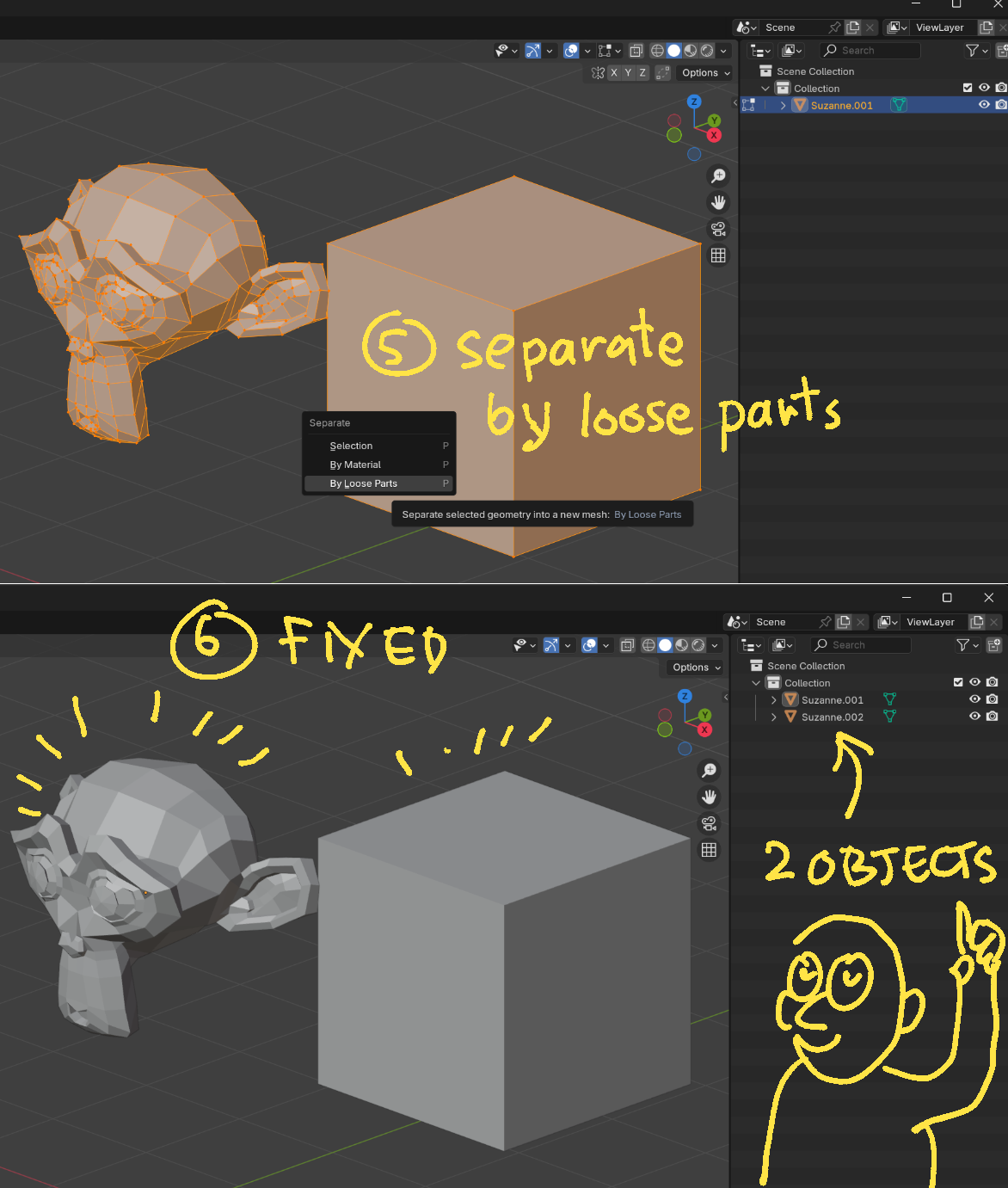
The only way, I can think of, is to Select all Mesh Objects (use the Selection Filter), CTRL+J. Go into Edit Mode. A to Select everything and then M > Merge > By Distance. Then P > Separate > By Loose Parts. The huge disadvantage of this method is, that your Object Names are ruined. As well as any Collection structure.
August 25, 2024 at 2:11 am #88643Hi Martin,
Thanks again for your help!
I tried your method, and it works well. This approach is useful when the scene isn’t too large.
However, if there are a lot of objects, it can be challenging to join them all.
At least I’ve learned one way to fix it, which is great progress.
I hope someone creates an addon to help users spot overlapping objects and maybe even auto-fix them.
 August 25, 2024 at 4:10 am #88644
Hi Kwin,
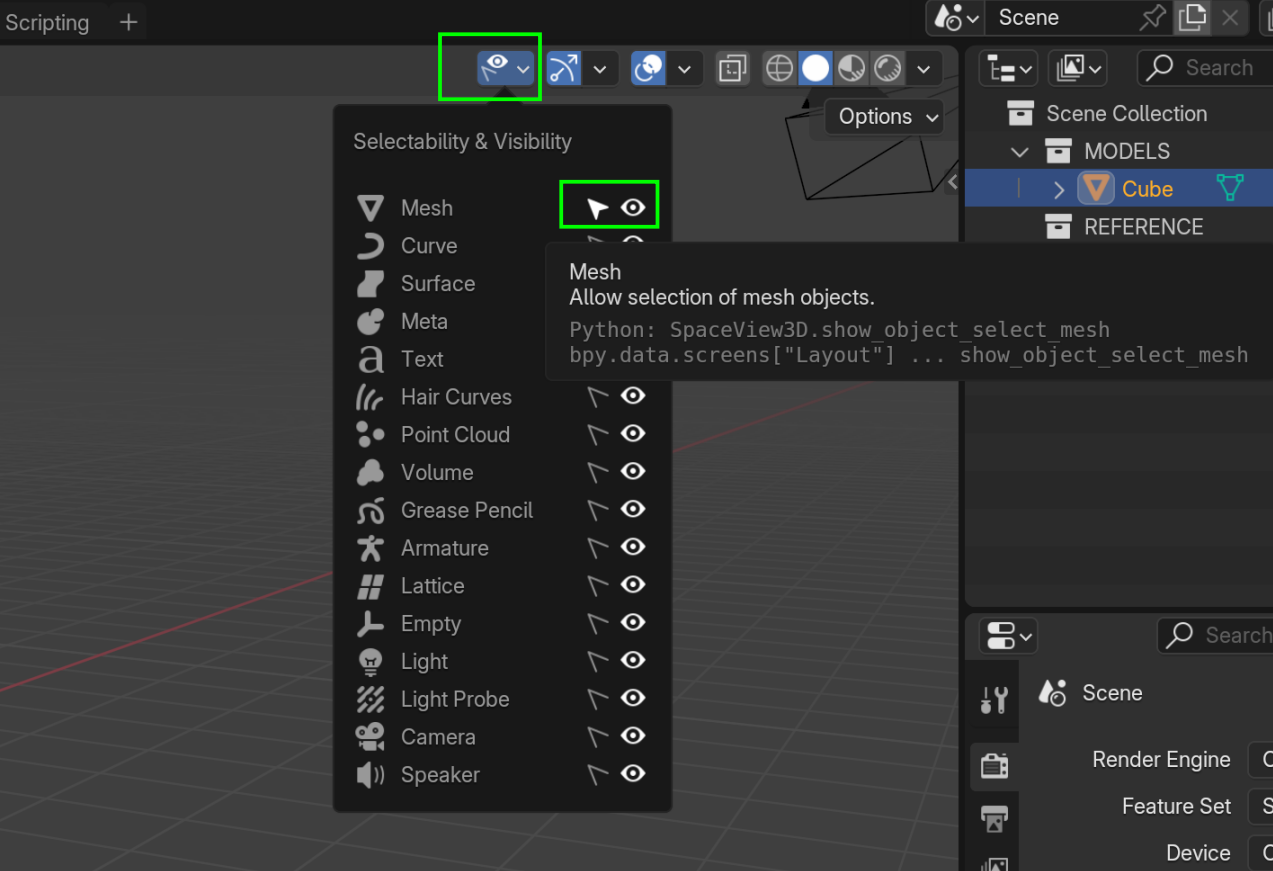
sorry I wasn’t clear enough, but you can disable the Selectability of everything but Mesh Objects and then simply Select All in the Viewport (with A):
 August 25, 2024 at 4:34 am #88645
Hi Martin,
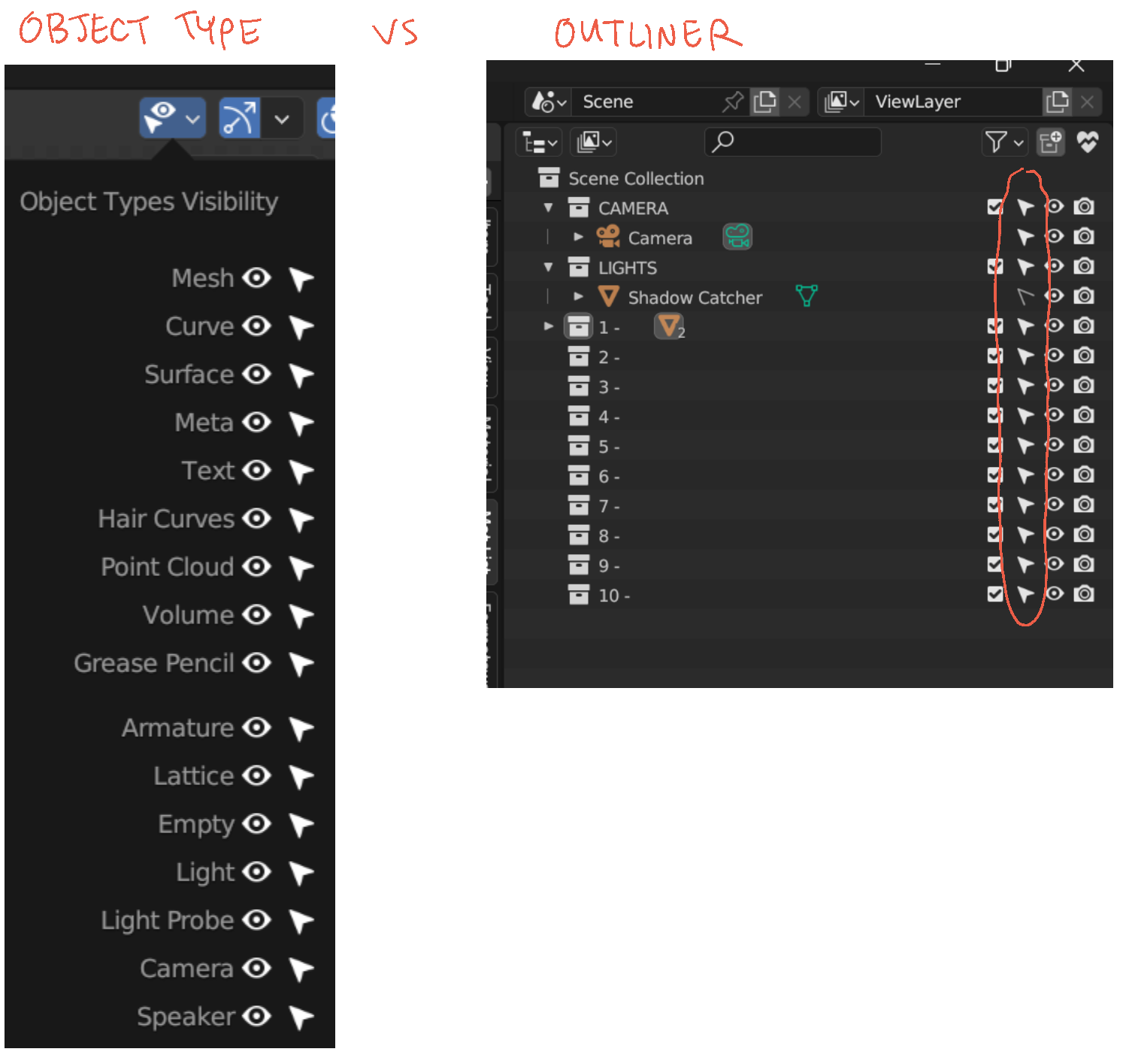
Oh! I just found out today that the Object Types Visibility menu can be used to manage selections too!
I’ve only been toggling selectable/non-selectable objects from the outliner window.
This feature has probably been around for a while, but I just noticed it today.
Thanks for letting me know—Noted!
 August 25, 2024 at 5:39 am #88646
That feature was introduced in 2.80 (I just checked, to be sure), which was released July 29 2019, so a bit over 5 years ago.
It happens to me as well, that I still discover features in Blender that have been around for ages…and I’ve been using Blender since 2011.
August 25, 2024 at 9:26 am #88647Well I think it shouldn’t be a problem really, because it is not going to be very likely that you will duplicate an object and leave it in the same place over and over again, with each object. When you’re modeling you tend to have very good control of your model, enough to know you haven’t made a duplicate of all the vertices and left it in the same place. Sometimes it tends to happen that you extrude and you need to undo and you don’t undo enough and you leave some duplicated vertices, but that tends to be very noticeable since it introduces shading errors and it makes you go in and see what is going on. So I wouldn’t worry too much on having this problem, you’ll get the hang of it as you model more and more.
August 25, 2024 at 9:47 am #88648Thank you, Omar
If this isn’t a major issue, I might just move ahead. I usually spend a lot of time organizing and cleaning my models because I’m always worried something might go wrong later. But with your advice, I think I’ll try a new approach—only fixing things like shaders or other issues when they actually come up.August 25, 2024 at 10:08 am #88649Make use of collections(M) and name everything(F2). If you’re majorly into organizing things and always name your objects you can quickly identify duplicates by the period and 3 numbers at the end. This will make it easy to search and filter in the outliner. for example: click the funnel icon and at the bottom uncheck object content(This removes data names from your search. Then in the search you can just type period and 0.(.0) If you want to get fancy you can use ranges by placing square brackets. For example say you only use period and 2 numbers instead of the 3 numbers that blender uses. You can ignore those by typing “.00[0-9]” (Without the quotes). You could replace the 2 zeros with [0-9] if you think you would have more than 9 duplicates of the same object.(.[0-9][0-9][0-9]). Hope that helps
You may want to look into the collections manager addon. It’s under extensions now. for older versions of blender it comes with the download.
***Edit*** Change it from 4 to 3. Blender adds 3 numbers not 4.August 25, 2024 at 10:16 am #88650Hi Dwayne
Thank you very much. Good for me to learn how to search with this number tip.
I will definitely try it !
August 25, 2024 at 10:28 am #88651Yeah the search and filter features of the outliner are often times overlooked. For example if you uncheck object children it won’t show any children objects. Something I run into is getting blend files that have a lot of collection. Like hundreds…well maybe not hundreds but it feels like it. So I’ll start organizing it by unchecking objects so that all I see are the collections. Then again I haven’t done that since someone introduced me to collection manager. I don’t leave it on, but when I have to organize a blend file’s collections I find it really helpful.
-
AuthorPosts


- The topic ‘How to Check for Overlapping Meshes and Fix Them?’ is closed to new replies.