How to assign material only part of a mesh??

Forum Archive How to assign material only part of a mesh??

Viewing 3 posts - 1 through 3 (of 3 total)
  • Author
    Posts
  • #15614
    maxcady
    Participant

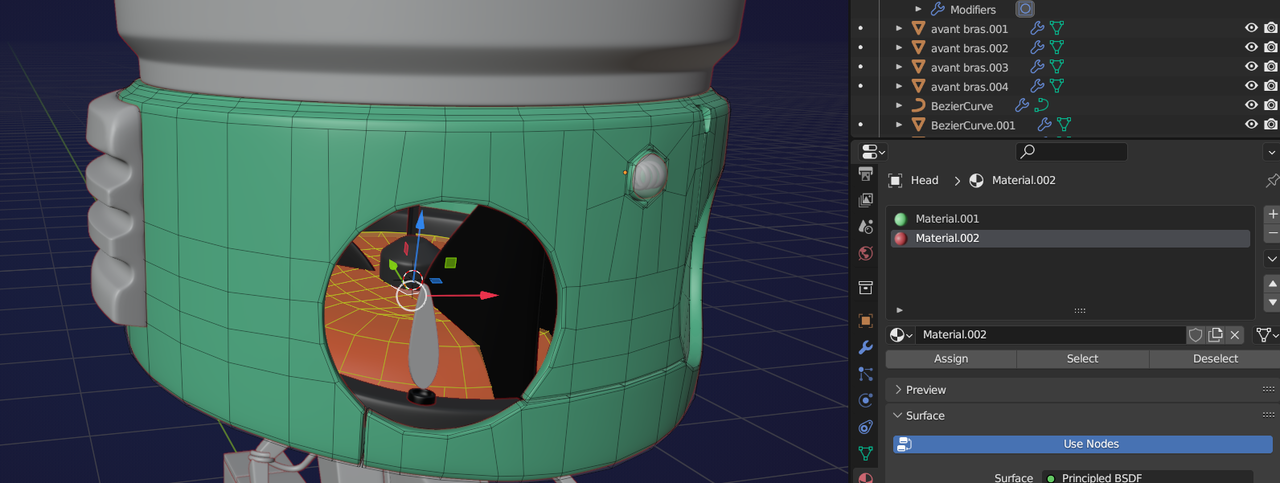
      I do exactly as the teacher. I just want to assign black color to the interior of the head, but as soon as I hit assign after I made a selection of faces, all the head becomes black. I don’t want that…

      Topology finished!

      thx

      #76250
      Martin Bergwerf
      Participant

        Hi @maxcady ,

        You need at least 2 Materials; the first Material is the default and gets assigned to the whole Mesh. If you then Assign the second Material to a Selection (in your case the inside), you get what you want:

        Materials.png

        #76251
        maxcady
        Participant

          wasnt obious. thank you.

        Viewing 3 posts - 1 through 3 (of 3 total)
        • The topic ‘How to assign material only part of a mesh??’ is closed to new replies.