
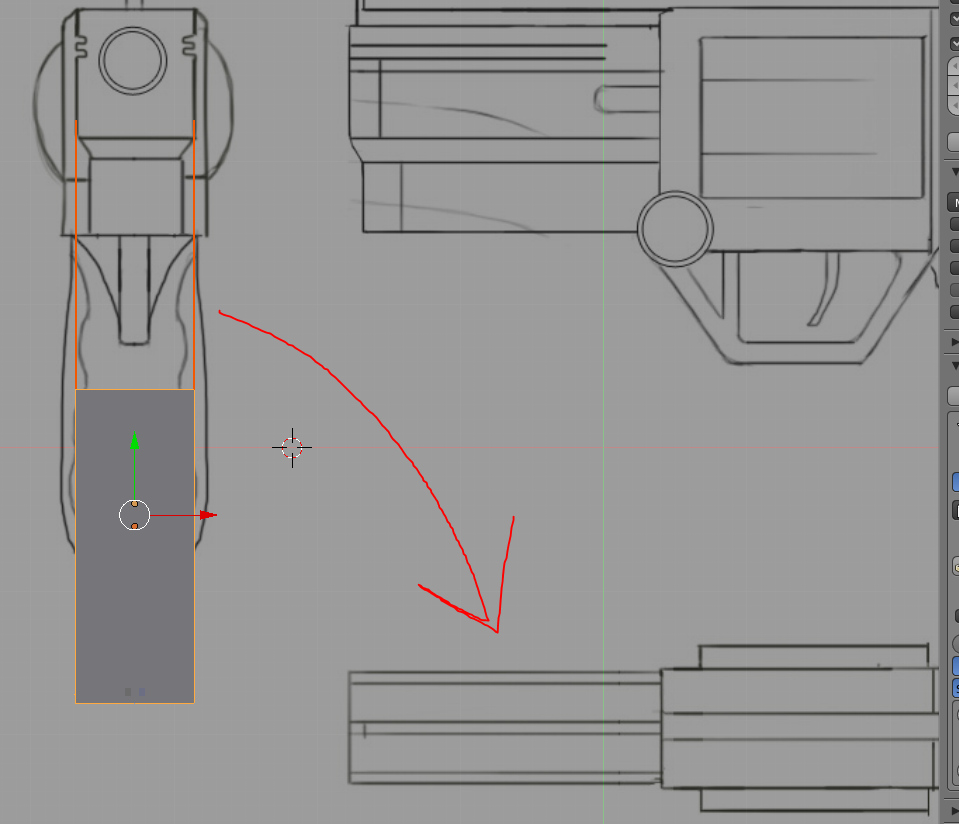
how do you make it so that when going into top view, it sits on the top view drawing?

Forum Archive how do you make it so that when going into top view, it sits on the top view drawing?

Viewing 6 posts - 1 through 6 (of 6 total)
  • Author
    Posts
  • #12652
    Jonathan Nunez
    Participant

      I can’t rotate the object, or other wise it will ruin it for the side view and front view with the background image. Help!

      #60096
      spikeyxxx
      Participant

        If you can’t rotate the object, then you should rotate the background image.

        This has not always been possible but it can be done in 2.79+ and even in some older versions of Blender. Don’t know exactly what the first version was that had a rotation for the background images…

        #60097
        Jonathan Nunez
        Participant

          Yeah, I’m able to rotate the background image. But if you notice in the video at 6:03. He goes to top view and the object is already aligned with the top view of the drawing. How? 

          #60098
          Jonathan Lampel
          Participant

            Spikey is right on! I already moved or rotated the background images into place before starting the video. 

            #60099
            Jonathan Nunez
            Participant

              Ok so you have more than 1 background image is what you mean?

              Update: nevermind, i was so blind that i could add another background image. pay no mind to my question.

              #60100
              Jonathan Lampel
              Participant

                All good! Glad it worked out 

              Viewing 6 posts - 1 through 6 (of 6 total)
              • The topic ‘how do you make it so that when going into top view, it sits on the top view drawing?’ is closed to new replies.