How do I enable the reflections of something, but DISable the object itself?

Forum Archive How do I enable the reflections of something, but DISable the object itself?

Viewing 3 posts - 1 through 3 (of 3 total)
  • Author
    Posts
  • #19363
    Sid Edwards
    Participant

      I’m experimenting with photorealistic qualities in renders. One way I’m investigating of making something photorealistic is by placing relevant miscellaneous objects around the scene to add to the lighting.

      But there’s a problem: I don’t actually want these objects to show up in my final render, I just want them to effect the backdrop and target subjects mostly.

      So how do I tell blender to make the reflections affect the backdrop, yet be invisible in the final render?

      #91832
      Martin Bergwerf
      Participant

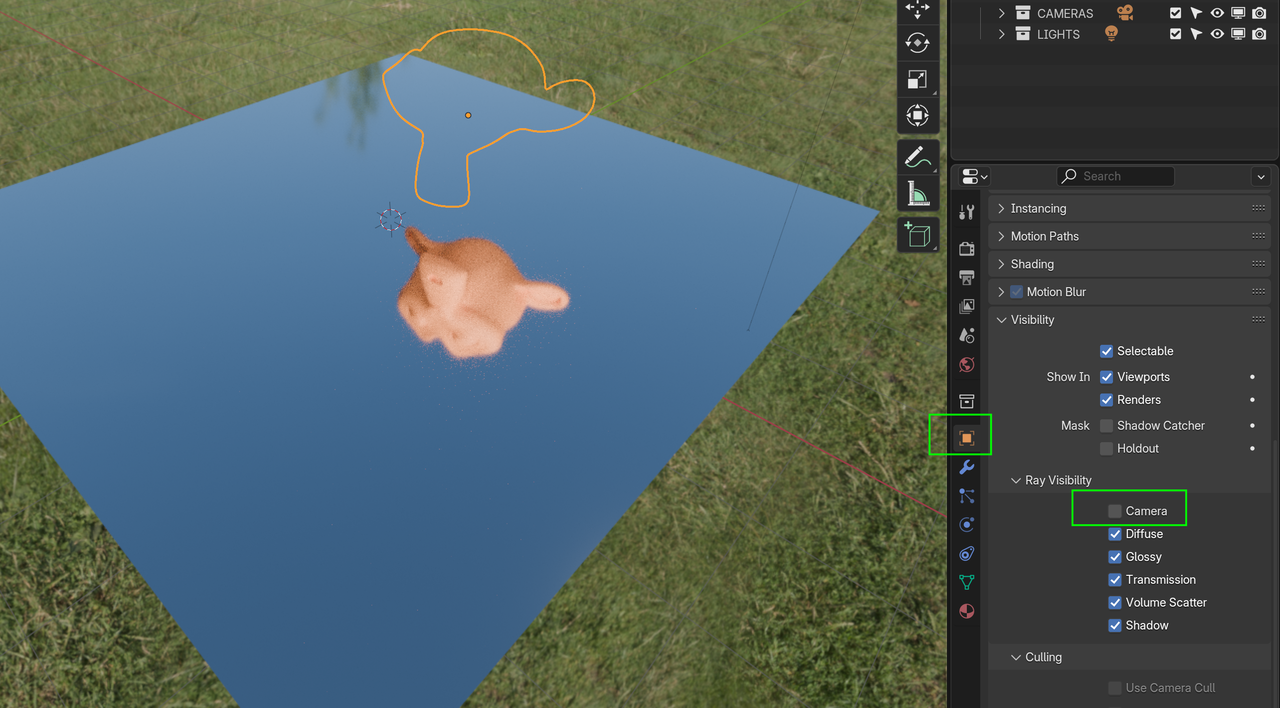
        You could simply disable the Camera Ray Visibility:

        Camera Ray.png

        (Maybe also the Shadow, if that gets in the way.)

        Mind you, that doesn’t sound very photo realistic to me😉

        #91833
        Sid Edwards
        Participant

          Thank you for the tip! I’ll play around with that.

        Viewing 3 posts - 1 through 3 (of 3 total)
        • The topic ‘How do I enable the reflections of something, but DISable the object itself?’ is closed to new replies.