How can I save my rendering for compositing later?

Forum Archive How can I save my rendering for compositing later?

Viewing 5 posts - 1 through 5 (of 5 total)
  • Author
    Posts
  • #19351
    Sid Edwards
    Participant

      One thing I’m annoyed by is that, every single time I open blender, I have to re-render my image and just sit there waiting.

      But, I tried “packing” my render and it had no effect. How can I save my final render output so that I can easily open up the file again and jump into compositing the previous image without having to re-render it?

      #91774
      Martin Bergwerf
      Participant

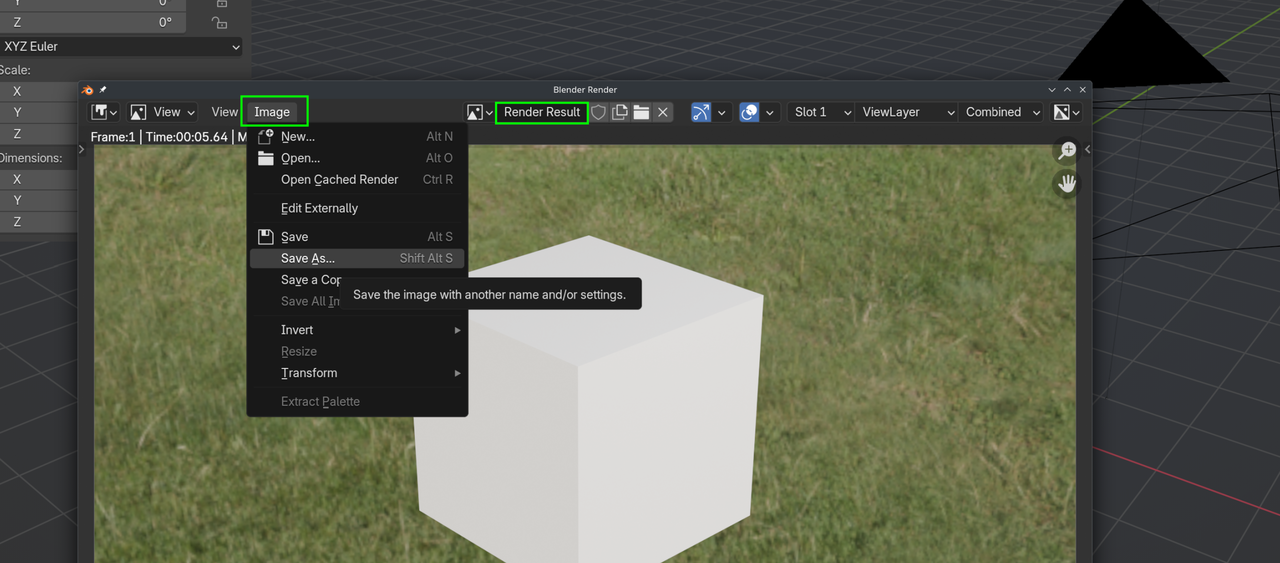
        Save.png

        #91775
        Martin Bergwerf
        Participant

          …and in the Compositor, don’t use the Render Layers Node, but an Input > Image Node.

          #91776
          Omar Domenech
          Participant

            When you render, Blender is holding that render in the buffer I think it’s the term? It is not yet a proper real file. You have to Save As the render as Martin showed, as an image file for it to exist for reals. Then that image file you saved in your computer, you can open in Blender, and once it is loaded into Blender, when you use the “pack” feature is that it will be packed into your .blend file. So rendering alone is not enough, it’s like it is still in the Blender womb and it hasn’t been born. For proper born you have to actually save the image as a file on your computer. 

            #91777
            Dwayne Savage
            Participant

              This is covered in CORE: Fundamentals of compositing. Here is the actual video https://cgcookie.com/lessons/saving-and-using-your-render-in-compositing

            Viewing 5 posts - 1 through 5 (of 5 total)
            • The topic ‘How can I save my rendering for compositing later?’ is closed to new replies.