
Help! Using Textures to Control Density and Hair Length in Blender 2.9

Forum Archive Help! Using Textures to Control Density and Hair Length in Blender 2.9

Viewing 3 posts - 1 through 3 (of 3 total)
  • Author
    Posts
  • #13406
    bkol
    Participant

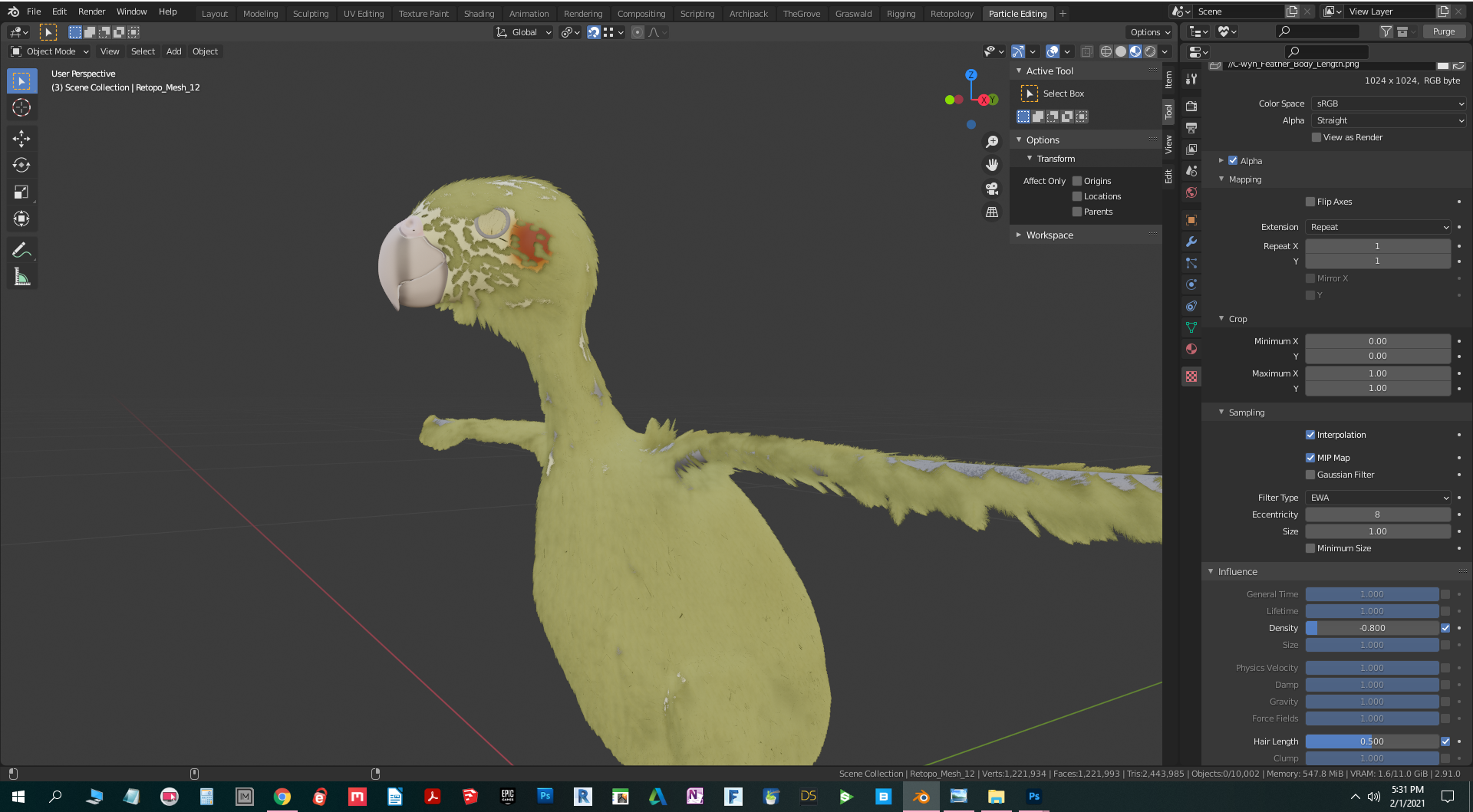
      I’ve created and applied the density texture image and the length texture image, and individually they appear to work, but when I try to use the length texture image to create higher density when feathers are smaller and lower density when they’re larger, changing the density influence setting for the length texture image doesn’t have any effect. In the image I’m attaching, you can see the smaller feathers on the face are sparse, and they remain this way whether density is checked or unchecked and regardless of the factor I change it to. Any ideas for how to make this work in 2.9?

      #62687
      Kent Trammell
      Participant

        We had another member extensively test density control with textures in 2.9 in this thread. I have a feeling your answer lies within!

        #62688
        Ingmar Franz
        Participant

          @bkol You have probably assigned the texture after grooming the hairs so that you need to activate “Children Hairs” in order to make the “Density Texture” affecting the “Hair Density”. Please read my post here, especially the “Summary”.

        Viewing 3 posts - 1 through 3 (of 3 total)
        • The topic ‘Help! Using Textures to Control Density and Hair Length in Blender 2.9’ is closed to new replies.