
Having an issue with the solidify modifier on the top clamp

Forum Archive Having an issue with the solidify modifier on the top clamp

Viewing 5 posts - 1 through 5 (of 5 total)
  • Author
    Posts
  • #14075
    Casey G
    Participant

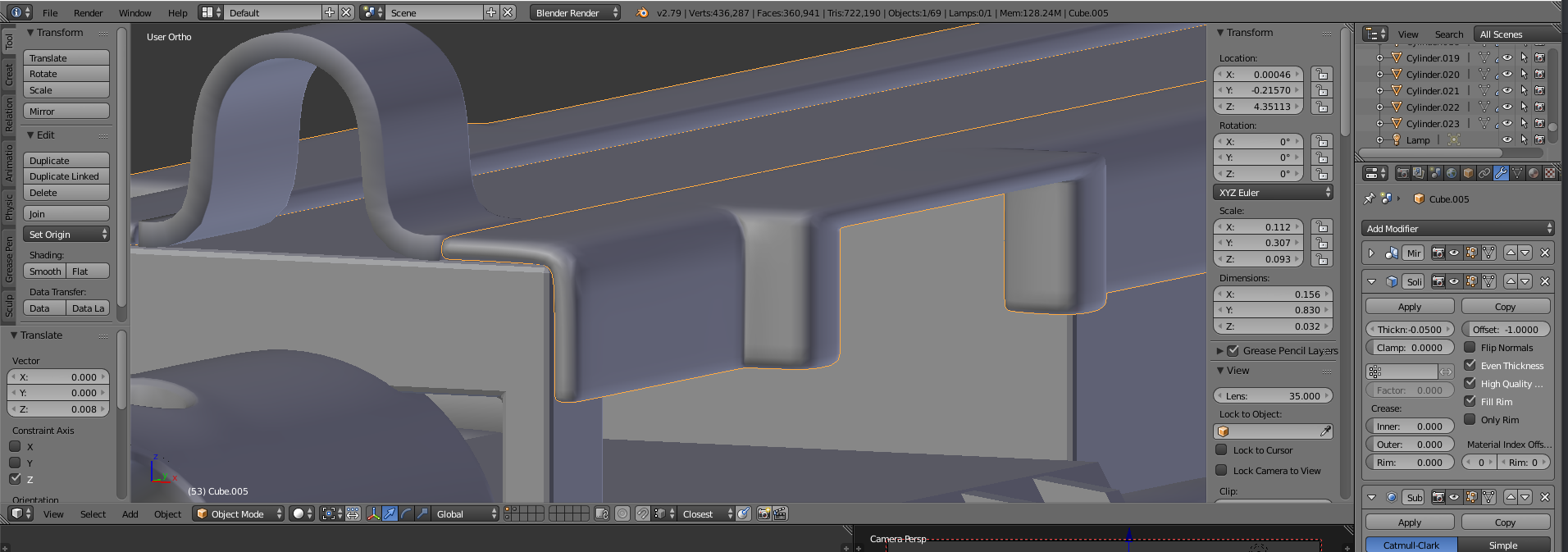
      I’m having an issue with the thickness of the top clamp when the extrusion is made around the 3 minute mark. It seems significantly thicker than the rest and I don’t know how to fix it.

      #69078
      Adrian Bellworthy
      Participant

        Hey @skeletonball 

        Looks like you need to apply the scale. With the object selected, in object mode press CTRL + A and select scale, this will reset the scale value to 1

        #69079
        Mark Smith
        Participant

          you will find that scale, rotation and sometimes location will cause much trouble

           when left not applied and then using more modifiers and such

          #69080
          spikeyxxx
          Participant

            Almost always Apply the Scale,  it is usually better to not Apply the Rotation (and try to always rotate in Object Mode), although it is not crucial. But almost never Apply the Location; that can often get you in real trouble!

            (Those two uses of ‘almost’ are only there to cover possible cases that I haven’t encountered yet, but that maybe exist, where it is better to not Apply the Scale, for instance…)

            #69081
            Casey G
            Participant

              thanks to everyone who answered, applying the scale fixed the issue.

            Viewing 5 posts - 1 through 5 (of 5 total)
            • The topic ‘Having an issue with the solidify modifier on the top clamp’ is closed to new replies.