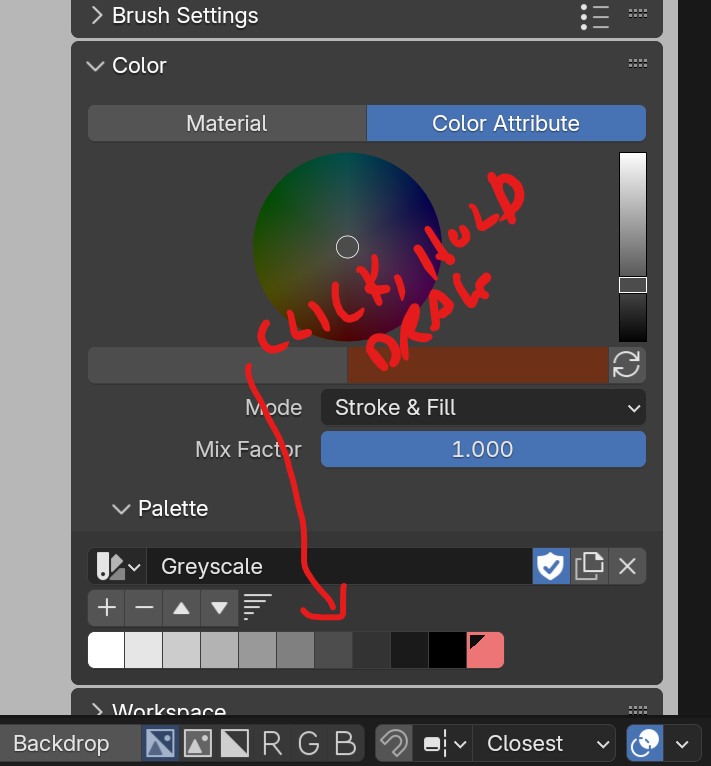
Greyscale Color Pallete – All Swatch Values Add as 1.0

Forum Archive Greyscale Color Pallete – All Swatch Values Add as 1.0

Viewing 9 posts - 1 through 9 (of 9 total)
  • Author
    Posts
  • #18555
    Jade Williams
    Participant

      Ok, I’ve watched this section at least 10 times, following exactly what he does in the video. I change the Value of the swatch and the swatch shows as being lighter than the last one, with the Value reflecting my change. I click the “+” icon, but when it adds, the little color box under the Pallet appears the same as the rest, and when clicking on it, the value had reverted back to 1.0. Every swatch I add ends up being 100% black.  I’m stuck…

      #88627
      Jade Williams
      Participant

        What a bummer. I’ve tried watching other videos and doing it their way, and I’ve tried adding colors to the default pallete, but no luck. Every color I create before clicking the “+” icon, reverts to black when it adds to the pallete.

        #88628
        Omar Domenech
        Participant

          It could be a bug on Blender. Try downloading the latest version of Blender and if you already have the latest one, then download the previous version, because there is a good chance that the bug isn’t there if it is a bug. So in other words, download different Blender versions and try it out to see if it works properly. 

          #88629
          Paul Caggegi
          Participant

            Hi Jade, this is currently a bug in 4.2.0 LTS. It has been fixed AFAIK in 4.2.1 RC and should be stable when 4.2.1 bug fix release drops. The workaround: add a swatch to your palette, then drag and drop the color onto it.

            #88630
            Martin Bergwerf
            Participant

              The current Release is 4.2.1 already, btw.

              #88631
              Paul Caggegi
              Participant

                thanks Martin! This must have been mere hours after I posted. Good to know! Am downloading and updating now to check.

                #88632
                Paul Caggegi
                Participant

                  Can confirm: download latest bug-fix release 4.2.1 and this now works fine.

                  #88633
                  David Soares
                  Participant

                    Had the same problem, resolved now, only importing the coolors generated svg in Blender only gives me 5 colors on the palette instead of the 8 colors original.

                    #88634
                    Paul Caggegi
                    Participant

                      Hey Don, want to send me the SVG? I’d like to test this and confirm.

                    Viewing 9 posts - 1 through 9 (of 9 total)
                    • The topic ‘Greyscale Color Pallete – All Swatch Values Add as 1.0’ is closed to new replies.