Grease Pencil – increase / decrease brush size system

Forum Archive Grease Pencil – increase / decrease brush size system

Viewing 7 posts - 1 through 7 (of 7 total)
  • Author
    Posts
  • #18407
    Jan Vsetecka
    Participant

      Hi.

      I use square brackets for increase and decrease of brush size a lot. Really a lot. But I have little problem with understanding the logic behind increment/decrement size. Because the size of increment changes, which is ok, but is different (which is not ok) when you go up and different when you go down. To be exact, this is current increment sizes:

      1,2,3,4,5,6,7,8,9,10,11 … 20 (increment by 1),  20,22,24,26,28 (increment by 2)
      then 31, 34, 37 (increment by 3),  then 41, 45, 50, 55 (increment by 4 and 5),
      then 61, 67 (increment by 6), 74, 82, 91, 101, 112, 124

      This is logic when you go up, but when you go down sizes differs:

      124, 111, 99, 89, 80, 72, 64, 57, 51, 45, 40, 36, 32, 28, 25, 22, 19, 17, 15

      Photoshop has simple but consistent system and same when you go up and when you go down:
      1,2,3,4,5,6,7,8,9,10,15,20,25,30,35,40,45,50,60,70,80,90,100

      Is it possible to have simple consistent default increase/decrease system ?
      Is there any possibility to configure it in Blender preferences ?

      Sorry for long question and thanks for your replies. 🙂

      Jan

      #87878
      Martin Bergwerf
      Participant

        Hi Jan @vsete ,

        I didn’t know these shortcut keys for Brush Size, I always just use F to change the Radius.

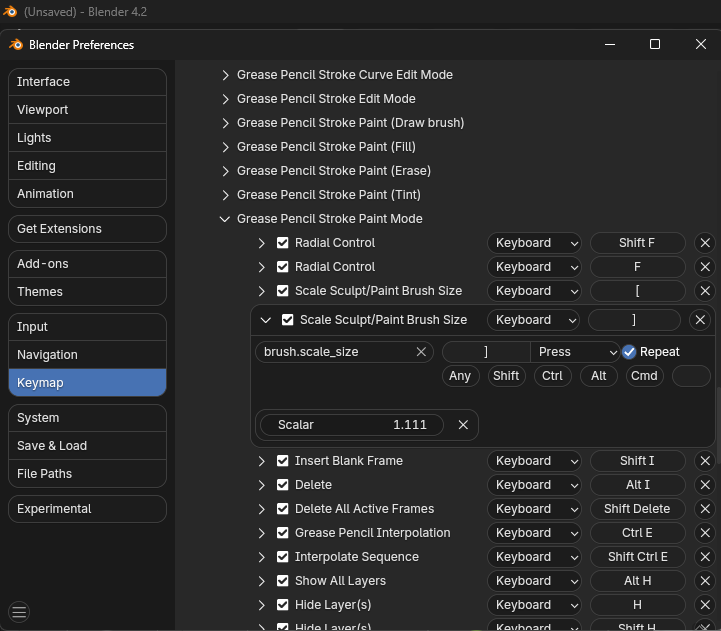
        But the [ and ] keys Scale the Radius by 0.900 and 1.111 respectively, so it’s not additive (incremental), but multiplicative.

        As far as I know, you cannot change that (unless you change Blender’s Source Code), although you can change the Scalar values if you want.

        But because the Radius is in Pixels and always a (positive) Integer, you probably always get a different result going up or down (due to rounding).

        #87879
        Omar Domenech
        Participant

          Well, it’s always a pain switching software’s, but in the end you always get use to it if you give it time. Your mind will adapt to Blender’s system and stay adapted to Photoshop’s one at the same time. I say just give it time, it’ll be easy.

          #87880
          Adrian Bellworthy
          Participant

            You can change the scaler amount in the preferences,

            GPscaler_pref.png

            But this won’t help, as Martin said [ and ] scale the brush size. So a value of 2 will multiply the size by 2…
            1, 2, 4, 8, 16, etc., etc..
            You could swap the radial control (Shift F and F) hotkeys with the scale size ( [ and ] ) hotkeys, if you prefer to use those.

            #87881
            Jan Vsetecka
            Participant

              Hi guys.
              Thanks for your replies! Knowing that is possible to configure scalar increment/decrement helps.
              Photoshop doesn’t have such option. 🙂  Maybe I’ll try to set decrement to 0.5 and increment to 2.
              This will give me same numbers up and down. Too steep, but same. 🙂
              Thanks a lot.

              Jan

              #87882
              Paul Caggegi
              Participant

                Adrian, I learned something today! It’s not something I paid much attention to, I’ll admit. I use the dial on my drawing tablet and generally if it looks big enough/small enough, I go with it. But this is REALLY great information. Thankyou!

                #87883
                Martin Bergwerf
                Participant

                  Hey Jan @vsete ,

                  Setting the Scalar values to 0.5 and 2, doesn’t make up and down always the same.

                  For instance, if you have a Radius of 7, going down would result in 3.5, which gets rounded to either 3 or 4 Pixels. Going up then would result in either 6 or 8 Pixels.

                  How does PS go up from a value of 13? (I would suspect it goes up to 15 and then back down to 10…)

                Viewing 7 posts - 1 through 7 (of 7 total)
                • The topic ‘Grease Pencil – increase / decrease brush size system’ is closed to new replies.