Getting rid of internal geometry?

Forum Archive Getting rid of internal geometry?

Viewing 6 posts - 1 through 6 (of 6 total)
  • Author
    Posts
  • #8271
    tobles
    Participant

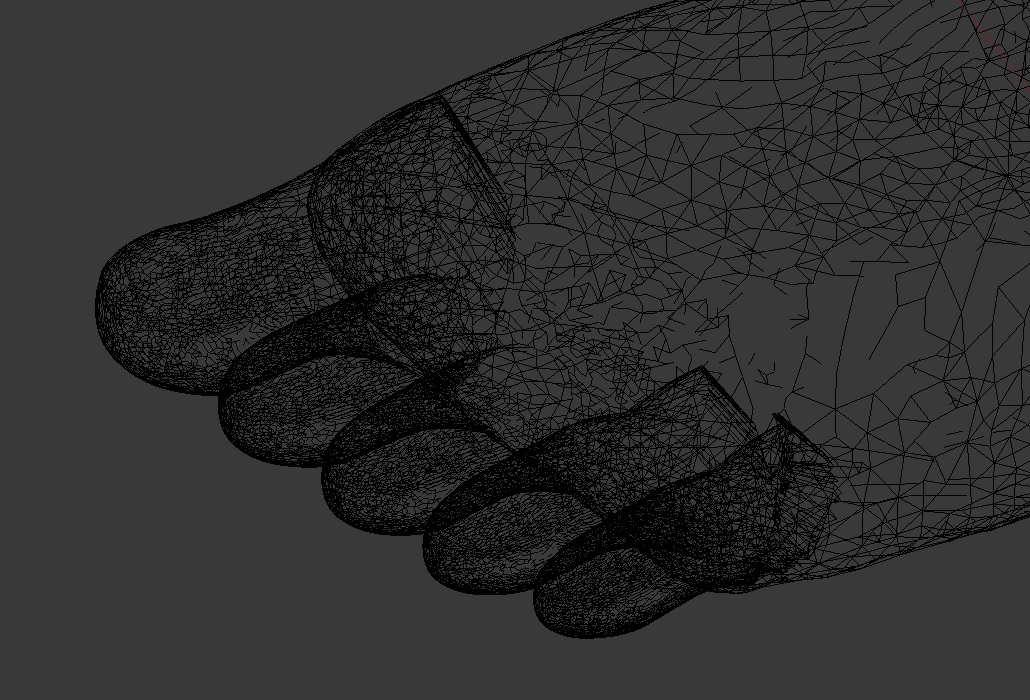
      I just did the modeling for the toes but when I join them with the model the geometry stuck inside the foot won’t be deleted. Somebody know how to solve this?

      #28433
      Kent Trammell
      Participant

        @tobles Can you post a screenshot of the issue and possible a download link for you .blend file?

        #28434
        tobles
        Participant

          Hey Kent,

          it’s a little hard to recognize, it’s about the big toe and the last two (pinky toe and that other guy).
          Right now I don’t know where to upload that blend file. Is it possible to mail it to you?

          #28435
          Kent Trammell
          Participant

            Ok yes I can see the internal geometry problem with 3/5 toes. Most people use dropbox, google drive, or equivalent cloud storage service to upload their .blend and then share a download link to it.

            #28436
            tobles
            Participant

              Problem solved.
              I don’t know why this worked but instead of starting with the big toe I started from the pinky … and everything worked fine.

              #28437
              Kent Trammell
              Participant

                Hmm sounds like the boolean was the issue. Indeed sometimes tweaking the order of operations will make booleans behave..[shrugs]. Glad you solved it!

              Viewing 6 posts - 1 through 6 (of 6 total)
              • The topic ‘Getting rid of internal geometry?’ is closed to new replies.