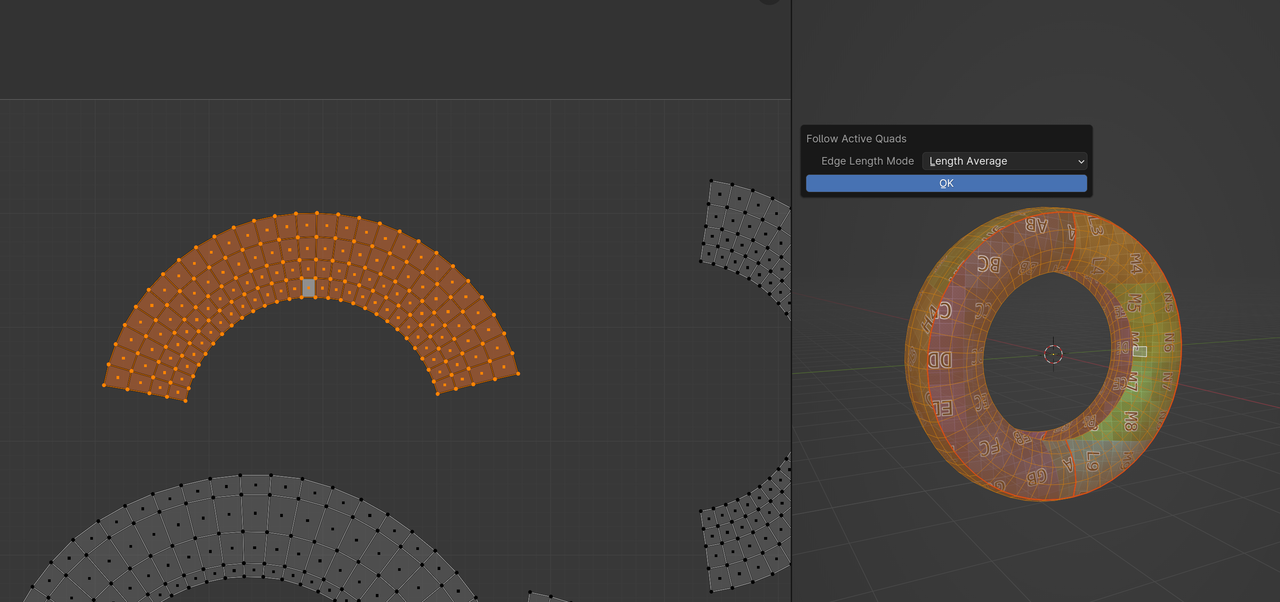
finally…I used a different square/quad and got a better result. All from the right side of the screen, using the UV instead of the right-click method. Why would it work there and not the other way? Is bug or is my MacOS still not fully dev’d up yet? or what? Not wearing the correct socks? This has been frustrating. Thanks for all the words everyone.
Martin, I followed exactly as described in the video. What I understand is I should be in face mode and select the quad and nothing else. Just run the Follow Active Quads. I have watched it over and over…starting at 11:11 in the video. Maybe you mean all the other islands? I haven’t even touched those, I just did this island.
You are not selecting all the quads on the island In Blender v4.0+ you need to select all the quads.
We do advice using the version used in the course. By using a different version, what you see in the video may not be exact info. A simple thing such as selecting the whole island is the only difference here, and we mentioned the solution at the beginning of the thread.
I never used it like that, but in 3.6 this worked as seen in the Course, but in 4.0, you need to select the Island, that you want to use the Follow Active Quads as mentioned a few times before…so like this:
As a note, it is better (for ‘beginners’) to use the Blender Version used in the Course, when following along.
Sorry if i reopen the case, was having same issue with version 4.1.0. After long try and search what worked for me was selecting the active face and then selecting linked. Wonderfully everything straightened up.

.