Found the Annotate Settings

Forum Archive Found the Annotate Settings

Viewing 3 posts - 1 through 3 (of 3 total)
  • Author
    Posts
  • #16524
    Brad Wheeler
    Participant

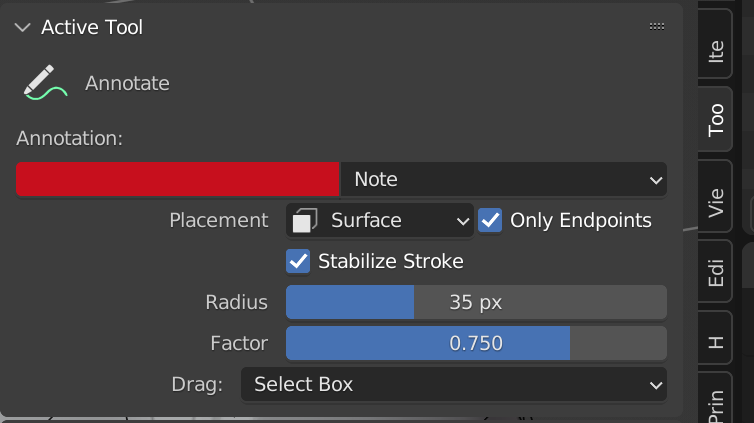
      In case anyone is looking for the Annotate settings that aren’t in the Annotate Layer settings;

      Select the Annotate icon in the T panel and go to Active Tool in the N panel. See pic below

      I had to stop and hunt around to find the little dickens, so I hope this may help someone in the future.

      I am using Blender 3.3.7 so hopefully it’s the same for the later versions

      #79834
      Martin Bergwerf
      Participant

        Thanks Brad!

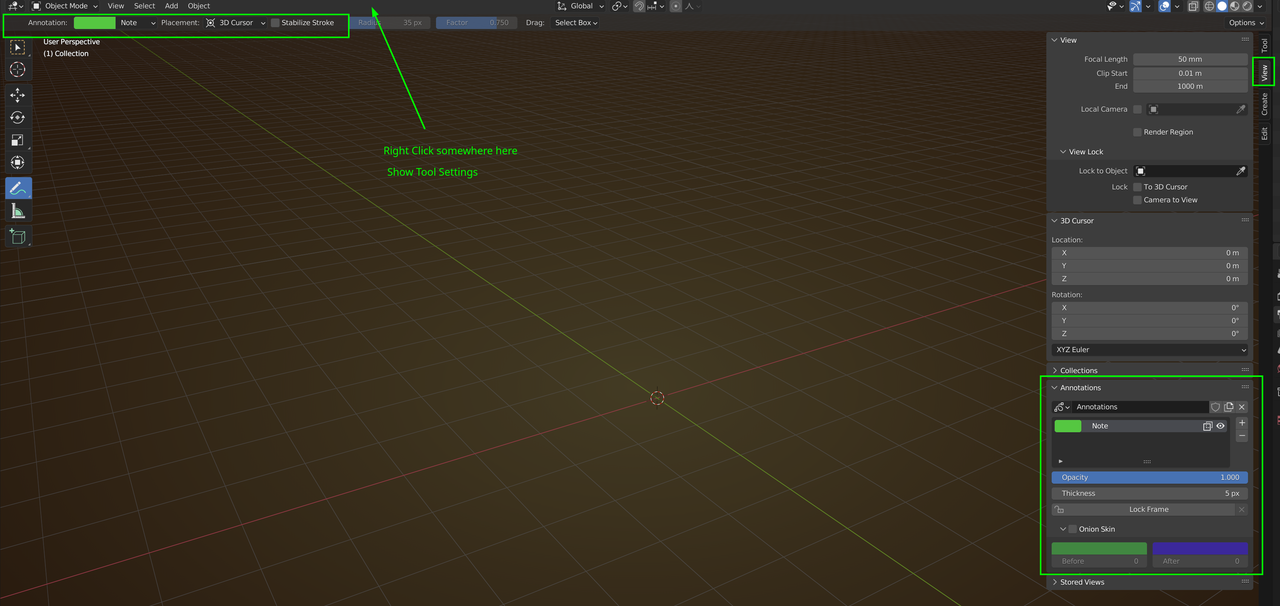
        You can also right click on the Header and enable Show Tool Settings to see those at the same time as the layers:

        Annotate.png

        #79835
        Brad Wheeler
        Participant

          Yep, I had the annotation layers tab ok and all the tool settings were turned on, it was the other settings I had to hunt for and find. The key was to have the Annotation icon clicked so it appeared in the Active Tools, a discovery I made by pure chance, lol.

          Thanks

        Viewing 3 posts - 1 through 3 (of 3 total)
        • The topic ‘Found the Annotate Settings’ is closed to new replies.