
Force Headers to Top: Load without UI didn’t find it in the position shown

Forum Archive Force Headers to Top: Load without UI didn’t find it in the position shown

Viewing 3 posts - 1 through 3 (of 3 total)
  • Author
    Posts
  • #11678
    Trevor Simpson
    Participant

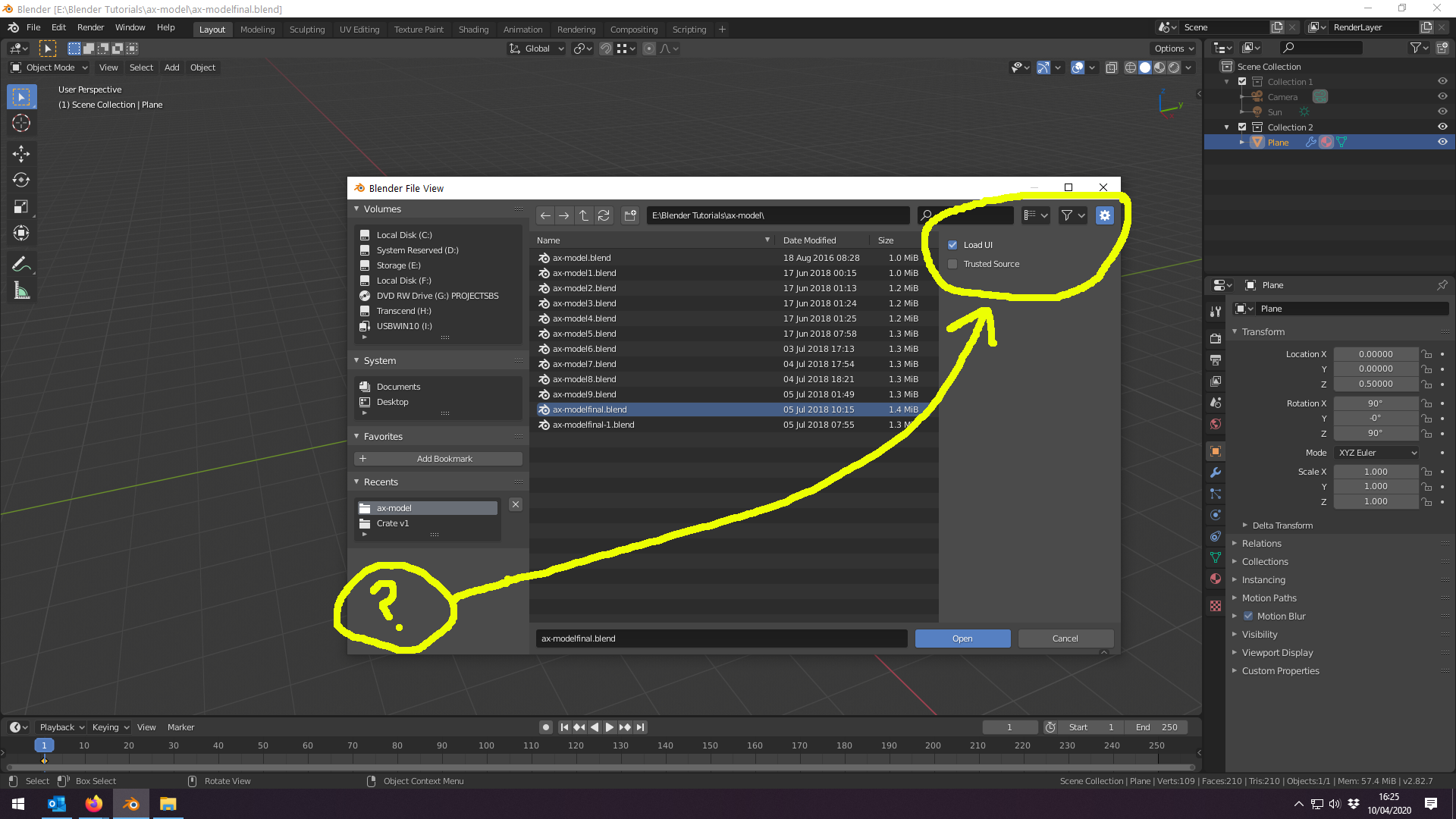
      Following along with this video, importing a 2.79 without the UI, I found the interface is in a different to shown here. The Load UI toggle is under a cog icon called Toggle Region (shortcut N) at the top right not below the Blender File. 

      I’m using release 2.82a. I thought it might just help someone else.

      #55770
      spikeyxxx
      Participant

        Thanks Trevor, I’m sure that will be helpful, because it’s hidden quite well;)

        #55771
        Shawn Blanch
        Participant

          Yeah they changed the location when 2.82 got released if I remember correctly.

          I’m not a fan of the change. I liked it better when it was in the Edit Preferences to be honest.

        Viewing 3 posts - 1 through 3 (of 3 total)
        • The topic ‘Force Headers to Top: Load without UI didn’t find it in the position shown’ is closed to new replies.