
Fill not connecting vertices

Forum Archive Fill not connecting vertices

Viewing 7 posts - 1 through 7 (of 7 total)
  • Author
    Posts
  • #17160
    Rachel Richardson
    Participant

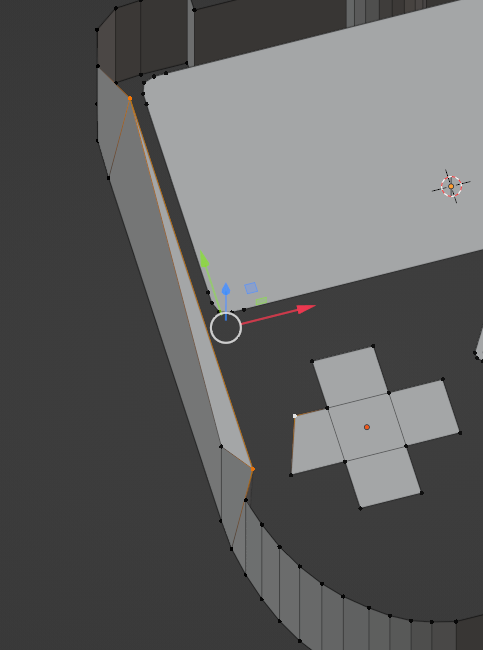
      For some reason, instead of connecting two vertices with an edge, it causes a new face to be formed on the side of the console or no edge connection pops up at all. Any reason why this is doing this?

      #82516
      Charles
      Participant

        Are you pressing J to join rather than F to fill?

        I don’t know exactly what you’re trying to connect but the position of the vertices is messed up in that screenshot – if that the before or after?

        #82517
        Martin Bergwerf
        Participant

          Hi Rachel @rayenic ,

          Make sure that the whole Mesh is 1 Object (if not: Switch to Object Mode. Select the 2 or more Objects and press CTRL+J. Then return to Edit Mode and try again.)

          If you have Added the inner parts (screen & Co.) in Object Mode, they are their own (separate) Objects. You can be in Edit Mode on more than 1 Object at the same time, but you cannot connect them (with F, for instance).

          #82518
          Omar Domenech
          Participant

            I think Rachel means that those two vertices that you see selected on the screenshot, when you hit F only an edge should be formed between them, instead a face is being added, not just an edge to connect those two vertices. I think that is just Blender assumes you want to fill the whole thing and saves you a step. Sometimes those macro functions work against you, sometimes they save you time. 

            #82519
            Martin Bergwerf
            Participant

              Omar, “…those two vertices that you see selected on the screenshot…” I can see 3 Selected Vertices  and I think there are more (I suspect some double Vertices as well), but the ‘cross’ and side not connecting, smells like more than one Object to me…

              #82520
              Omar Domenech
              Participant

                A video screen recording could be great to diagnose the mystery Rachel. 

                #82521
                Rachel Richardson
                Participant

                  Sorry for keeping you waiting! Yes, it looks like I forgot to join the objects before filling. Thanks for the assistance.

                Viewing 7 posts - 1 through 7 (of 7 total)
                • The topic ‘Fill not connecting vertices’ is closed to new replies.