extruding the edges, when creating the directional pad.

Forum Archive extruding the edges, when creating the directional pad.

Viewing 4 posts - 1 through 4 (of 4 total)
  • Author
    Posts
  • #18143
    Nicholas Britton
    Participant

      when I press E then S + X to scale the sides out, it doesn’t move. What I’m doing wrong?

      #86775
      Martin Bergwerf
      Participant

        Hi Nicholas,

        Could you give us a bit more information (a screenshot might be very helpful here..please not in top, orthographic view).

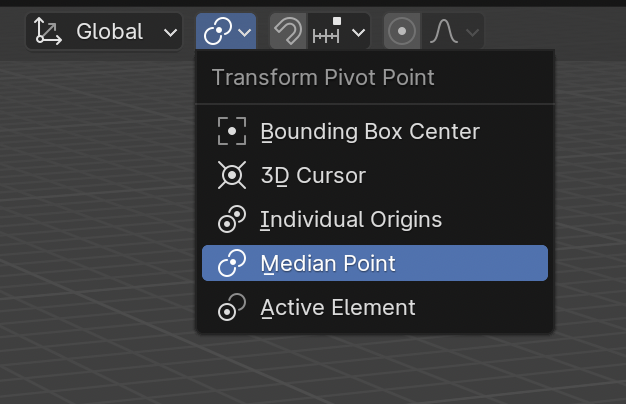
        Two things that come to mind, are that you don’t have the correct Faces or Edges Selected, or you have Individual Origins enabled as Pivot Point.

        But, seeing that you have a problem with Extruding, please consider watching this first:

        https://cgcookie.com/courses/blender-basics-an-introduction-to-blender-4-x

        #86776
        Adrian Bellworthy
        Participant

          Hey Nicholas,
          It may seem trivial, but make sure you are in edit mode and have selected the faces you want to extrude.
          As Martin said try the Blender basics first.

          Press Start is an awesome first project, however the Basics and the Fundamentals are the ultimate starting point as a beginner.

          #86777
          Omar Domenech
          Participant

            I agree, the Fundamentals and the Basics is the way to start and then come back to Press Start. But yes, if you’re trying to scale and it doesn’t move, there must be a pivot setting that is doing that.

            Transform Pivot.png

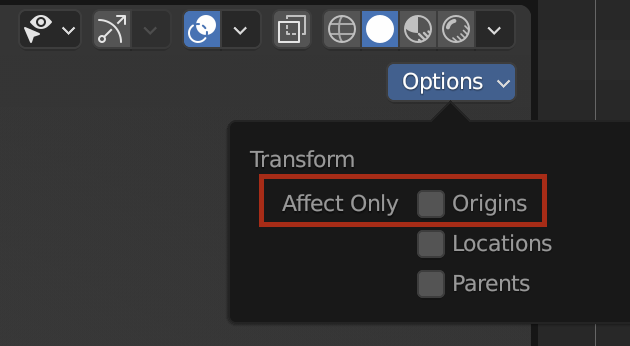
            Or maybe in the options you have Affect only set to Origins or Locations, check just in case.

            Origins.png

          Viewing 4 posts - 1 through 4 (of 4 total)
          • The topic ‘extruding the edges, when creating the directional pad.’ is closed to new replies.