
Exporting a Blender Animation with Audio to Unity
Forum Archive › Exporting a Blender Animation with Audio to Unity
- This topic has 7 replies, 2 voices, and was last updated 4 years, 5 months ago by
Deepak Jai.
-
AuthorPosts
-
April 7, 2022 at 11:38 am #15027
Hi, I exported an animation in Blender with an audio track to an FBX file and imported it to Unity. I could see the animation in Unity however I could not figure out how to have the audio played. I was wondering if it is supported and if so how I can have the audio played.
April 8, 2022 at 3:48 am #73997Hey @deepakj,
In Unity you will need to add an audio source object to the scene.
Click the Game Object menu and select Audio > Audio Source,
you should see an object in the scene that resembles a speaker and in the Hierarchy panel an Audio Source,
select the Audio Source in the Hierarchy and go to the Inspector panel,
you can drag and drop the audio file into the Audio Clip field.
This will play the audio at the location of the Audio Source in the scene, meaning the further you are from the Audio source the more it fades to a distant sound.
To Add the audio to an object, as with your animation,
select the object with the animation, go to the Inspector panel, at the very bottom you should see, Add Component,
click on it and select Audio > Audio Source.
Drag and drop the audio clip to the Audio Clip field.
Now the audio will be associated with the object.
For example, a handgun with an animation and sound effects will play at the location in the scene of the handgun.
🍪
April 8, 2022 at 7:39 am #73998Thank you @Adrian. I was kind of hoping that there is an Audio tab along with the following Model, Rig, Animation, and Materials Tabs when importing an FBX file that is exported from Blender.
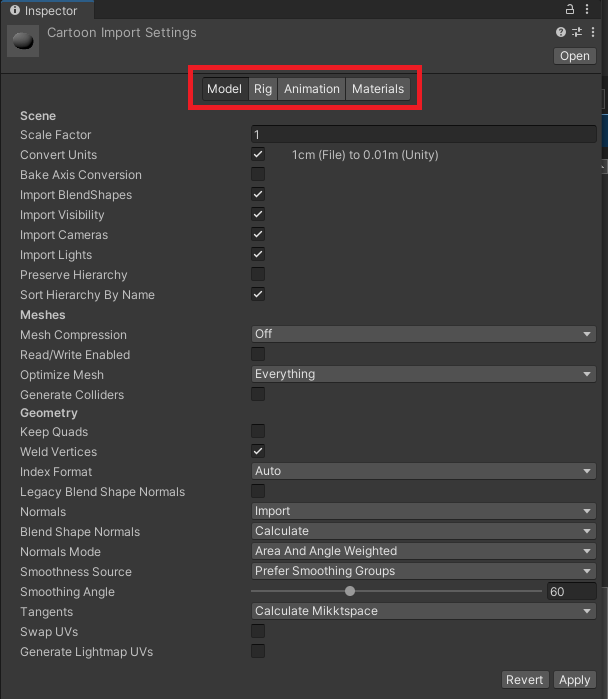
That way, any Blender animation with an audio track could either be
- rendered as a Video file from Blender or
- exported to Unity little to no further configuration
April 8, 2022 at 9:22 am #73999I’m struggling to understand what you are trying to do.
The image you posted above is of the inspector panel for a model.
A video file with sound is different to a .fbx file.
A .fbx file is like a .blend file, but can be opened in different software.
A .fbx file contains the model, texture maps, normal maps, animations, etc., all the components for the 3d model.
A video file contains a series of 2d renders of the animated model, with sound, over a set period of time.
If you are exporting your model to Unity to create a game, then you are still working with a 3d model, using 2d video on a 3d model for the animations wont work.
If you want a audio file to play at the same time as an animation, go to the animation tab, near the bottom you will see an Event section, click the little icon to the left to add a new event, as far as I can remember you add the type of event as audio and add the audio file.
Its been a while since I used Unity, it may have changed.
I suggest you either look through the courses here at CGCookie, Game search
and/or take a look at learn.unity.
April 8, 2022 at 9:45 am #74000Please allow me to clarify @Adrian. Let’s say I have a Blender file with a model and an audio track (with the model animated to be in lip sync with the audio). I was kind of hoping that when I export this Blender file to FBX format and import to Unity, the audio clip would also be available to be imported and configured within Unity (similar to the other contents of the FBX file like Model, Rig, Animation, Materials like in the snapshot above which Unity recognizes and allows us to configure). That way the same Blender file could either be rendered to a video or exported to Unity without having to do additional steps in Unity for the audio.
Here is a little schematic for further clarification:
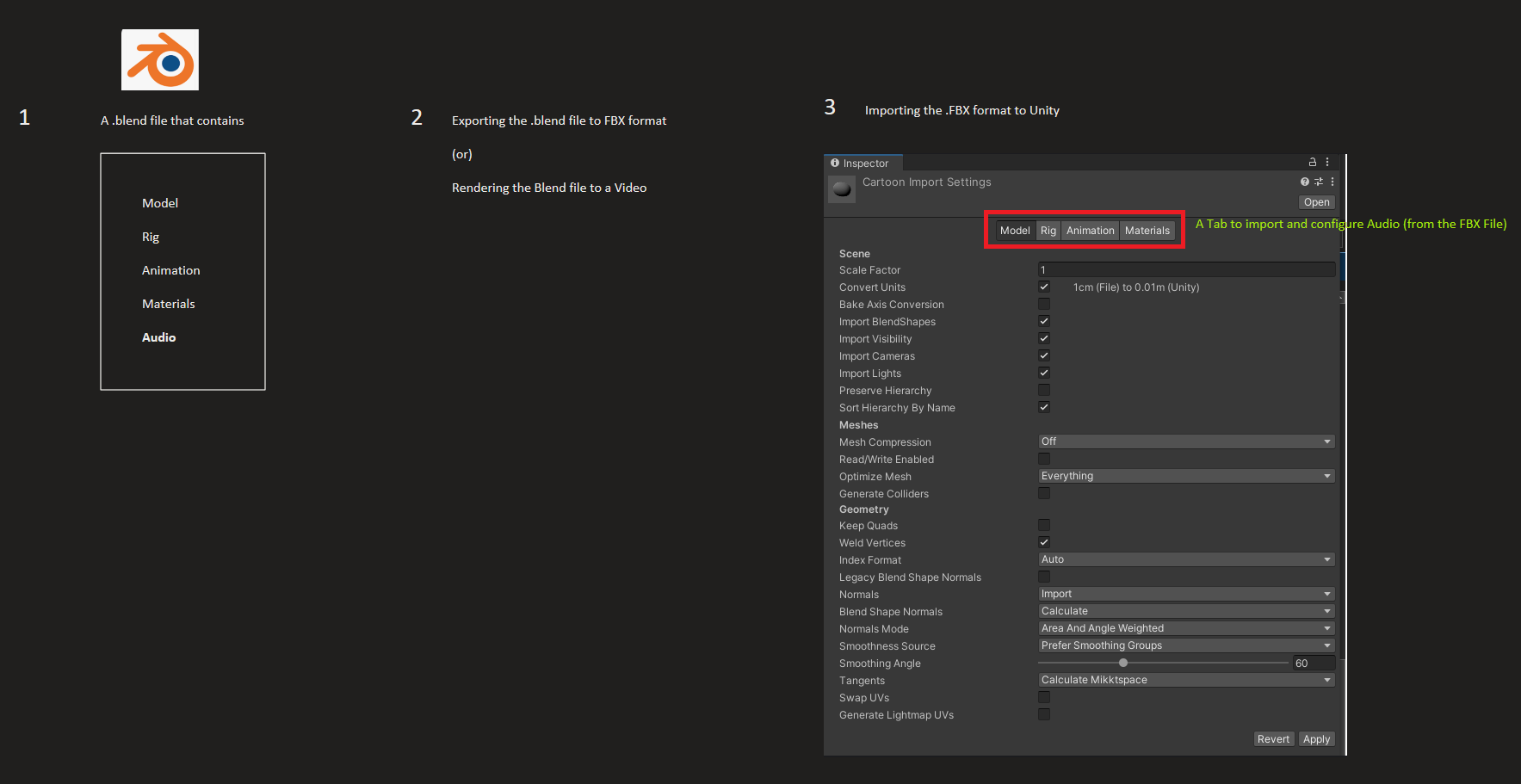
1. I have .blend file with a Model rigged and animated and with an audio track
2. I exported the .blend file to FBX format (which would contain the contents of the .blend file)
3. I import the FBX file to Unity and I expect Unity to recognize the audio in the .FBX file and allow me to readily import the audio as is or allow me to configure it.
I hope I am able to convey my point across this time. 🙂
April 8, 2022 at 10:29 am #74001One other thing you must have in your scene is a camera.
The camera has an audio listener component automatically included, it is equivalent to your ears perceiving sound propagating in the game environment, from the perspective of the camera’s listening position.
The Audio Listening component is not configurable and must only be present once per scene.
April 8, 2022 at 10:34 am #74002Does the audio file appear in the project panel?
April 8, 2022 at 1:35 pm #74003No, it does not, which is why I posted the question wondering if I am doing something wrong. I would have expected the audio to have been available as well as I don’t see a reason why it can’t be exported from Blender and imported into Unity for ease of use. If time permits, I’d like to dig into the content FBX format (somehow) and see if it includes the audio or not.
-
AuthorPosts


- The topic ‘Exporting a Blender Animation with Audio to Unity’ is closed to new replies.