[ENDED] BC4-1810 – October 2018 Class Homepage – Shading & Lighting with Blender

Forum Archive [ENDED] BC4-1810 – October 2018 Class Homepage – Shading & Lighting with Blender

Viewing 15 posts - 166 through 180 (of 403 total)
  • Author
    Posts
  • #41508
    Aaron Rudderham
    Participant

      Out of curiosity what do the asterisks next to people’s names in the report card mean? I *think* it means that they are or have been a volunteer but if any of yous could give me a more concrete answer I’d appreciate it. Thanks!

      #41509
      Zsolt Cseh
      Participant

        @thecabbagedetective Aaron yes Kent probably would like to distinguish the VA’s for the easier recognition on the spreadsheet, although he might will confirm that perception yet. 

        Regarding that as in different classes sometimes other VA’s participated, the formulas on the ‘Consolidated Report Card’ sheet slightly became confused and then by that also on the Total XP chart, when the ‘*’ got to the name.

        But seeing the example of Miranda now I have fixed that for others too, so @theluthier Kent feel free to continue your logic, it should not cause more issues 

        #41510
        Aaron Rudderham
        Participant

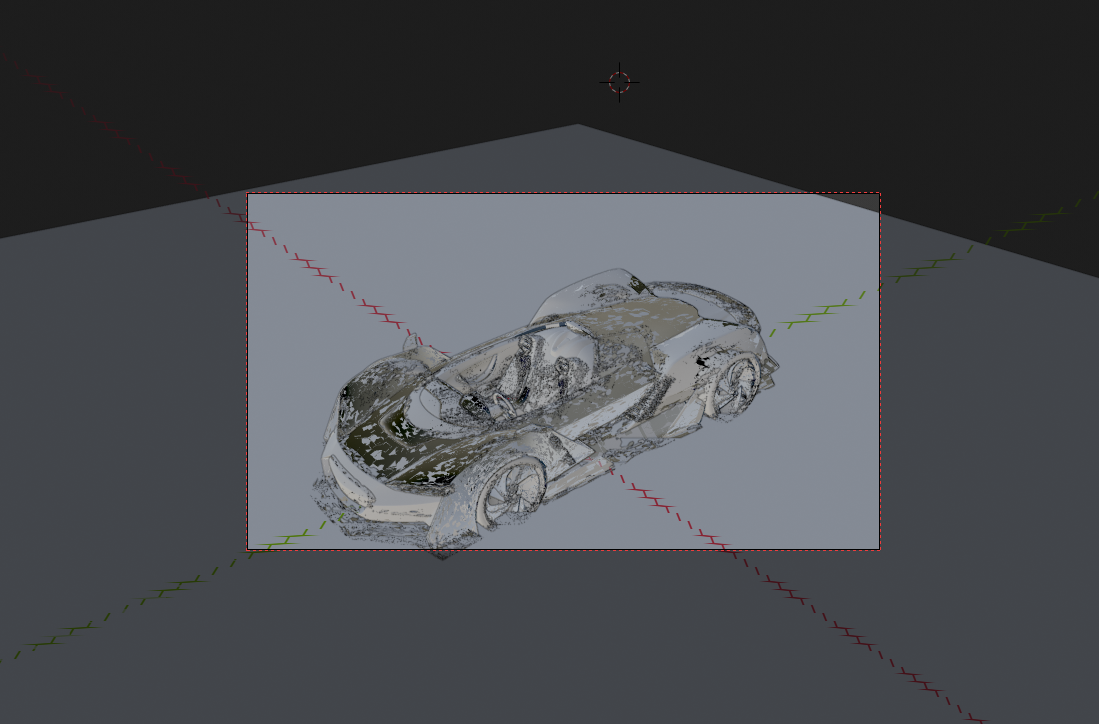
          Hey @silentheart00 you’ve been modeling cars recently, don’t suppose you encountered @arev‘s problem?

          #41511
          Aaron Rudderham
          Participant

            @csehz Aha, cheers for the clarification!

            #41512
            Morten Fjellheim
            Participant

              @thecabbagedetective Has nothing to do with the fact that its a car i think.

              #41513
              Aaron Rudderham
              Participant

                @arev Yeah you’re probably right, I just haven’t the faintest what’s going on there.

                #41514
                smurfmier1985
                Participant

                  @csehz Thank you Zsolt 😊

                  #41515
                  Zsolt Cseh
                  Participant

                    @thecabbagedetective Aaron no probs and in general just everyone – please feel free to mention when perceiving any issue, then we will improve it 🙂

                    There is one thing which could cause some slight discrepancies in the calculation, if someone once participated with user name in the class, then in some other with first and surname. 

                    I just perceived this based on the case of @williamatics , because remembering to his tank model from June as William Miller, while in August presumably he was the same person as Williamatics. William eventually if you confirm your two lines could be merged to one 🙂

                    #41516
                    William Miller
                    Participant

                      @csehz I confirm; I am both William Miller and Williamatics.

                      #41517
                      yukino hatake
                      Participant

                        @arev hmm really Strangedid you tryed to select all and remove doubles. I doubt this will fix but as far as my experience go that is all I can think off 🙁

                        #41518
                        silentheart00
                        Participant

                          @thecabbagedetective Well, I’ve noticed once I put on a solidify modifier the geometry looked like that, so I just took them all off for better viewing.  I’m modeling in 2.7, though, so I don’t know how it changed in 2.8 if at all.

                          #41519
                          silentheart00
                          Participant

                            @arev Any modifiers?

                            #41520
                            Morten Fjellheim
                            Participant

                              @yukinoh1989 I tried to remove doubles and recalculate normals.

                              silentheart00: I have tried to remove all modifiers too.

                              It began when i started shading the body of the car.  Since it was only in camera perspective i thought it might have to do with the camera, so i deleted it and added a new one. The issue persists but i have to scroll further away to see it now….

                              #41521
                              Morten Fjellheim
                              Participant

                                @theluthier  Your car model has an issue. Not sure whats causing it, but i have linked an image. In this image it ios very noticable, though in a fresh download you can stil see it if you scroll the camera away from the model.

                                #41522
                                Pavel Mazanik
                                Participant

                                  @arev  this problem may appear because of a veeery large size of a car. It’s 128 meters long. Try to scale it down to like 4-5 meters and it, probably, will solve your problem

                                Viewing 15 posts - 166 through 180 (of 403 total)
                                • The topic ‘[ENDED] BC4-1810 – October 2018 Class Homepage – Shading & Lighting with Blender’ is closed to new replies.