Driver did not work.

Forum Archive Driver did not work.

Viewing 6 posts - 1 through 6 (of 6 total)
  • Author
    Posts
  • #15852
    Craig Wieland
    Participant

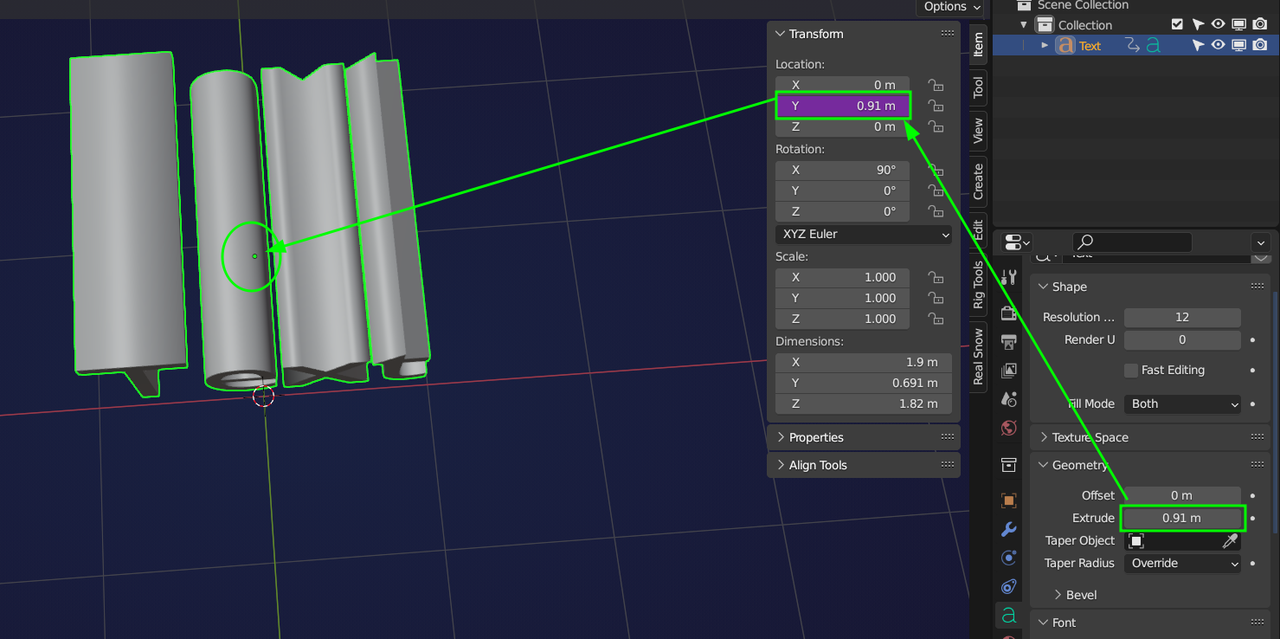
      Copied as new driver from the Text properties/ Geometry / Extrude. Then  Pasted the driver in 3D viewer/ N panel/ location Y.

      front Text object still moves back?

      #77175
      Martin Bergwerf
      Participant

        Hi Craig, if done right, it should look something like this:

        Tilt.png

        What does yours look like?

        #77176
        Craig Wieland
        Participant

          sorry, I do not get Notifications, even when I click on the bell.

          #77177
          Wayne Dixon
          Participant

            Did you get this one solved Craig?

            #77178
            Rob Koehler
            Participant

              Mine looks exactly likes this yet when I move the driver from the N panel its snaps the numbers back to the original numbers. I believe I followed instructions exactly. At first I was working from the x axis. Then I tried it from the y. Same problem. Will try a new file and start from scratch. 

              #77179
              Rob Koehler
              Participant

                Ok what did work for me ( in 4.2) Not sure if this is a case of multiple ways of doing the same thing or its just wrong, but I did it completely backwards from the tutorial and it worked. Copy as a Driver from the N panel on whichever axis you are working, from then paste it on the Extrude value. 

              Viewing 6 posts - 1 through 6 (of 6 total)
              • The topic ‘Driver did not work.’ is closed to new replies.