double loop cut? how?

Forum Archive double loop cut? how?

Viewing 6 posts - 1 through 6 (of 6 total)
  • Author
    Posts
  • #16884
    Skyler Blaise
    Participant

      we’re putting in a loop cut in the lids after we bevel. in the demo he’s able to apply 1 cut into both lids at once but i don’t understand how. tried shit + ctrl on both and tabbed into edit mode but only able to put 1 cut into one of the lids.
      Did he parent them together at one point or something else?

      #81260
      Martin Bergwerf
      Participant

        When is that?

        It might have to do with the fact that the two lids are Linked.

        Maybe, after you Applied the Scale, you didn’t re-Link them?

        #81261
        Skyler Blaise
        Participant
          #81262
          Martin Bergwerf
          Participant

            Hi Skyler,

            The lids are linked in your file, meaning that anything you do on one of them will also happen on the other.

            This is your file; the Object Cube.001 (yellow) uses the Mesh Data (Vertex Positions) of Mesh Cube.002 (green). And Object Cube.002 (red) also uses the Mesh Data of Cube.002 (green)Links.png
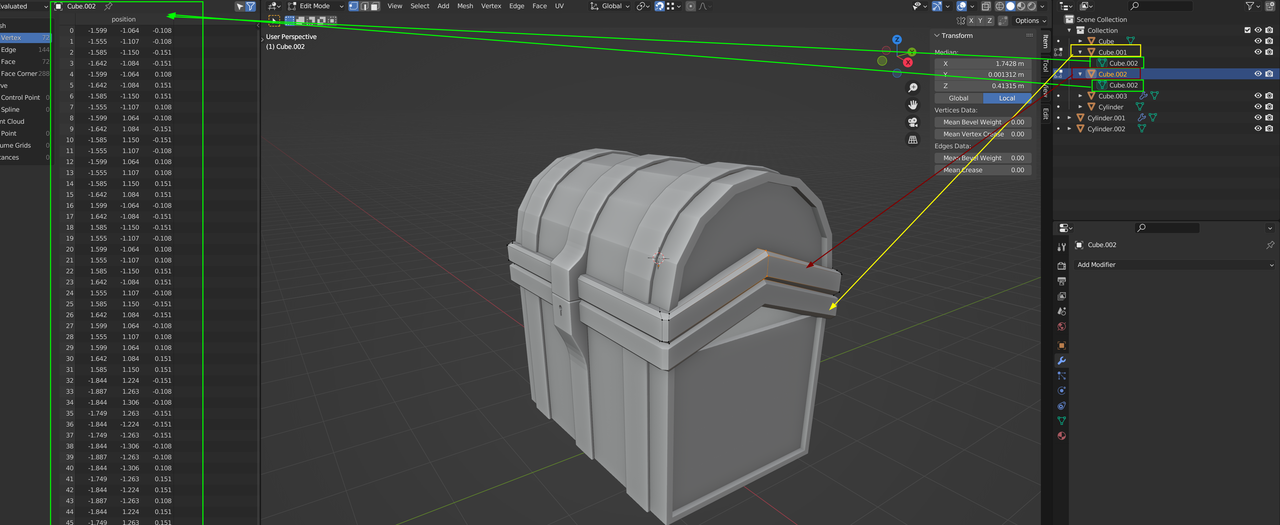
            A Loop Cut made in one of those Objects, will also be made in the other, but if you are in Edit Mode on only one of them, you won’t directly see that that same Loop Cut is made in the other.

            If you have already watched the Blender 3.0 Basics course, you should consider watching it again (sorry).

            #81263
            Skyler Blaise
            Participant

              let me try it this way. In the 16:07 mark he’s in edit mode for two different lid cubes at the same time. how? something with linking but there’s different linking options and he didn’t say anything about it. all kinds of lost now

              #81264
              Martin Bergwerf
              Participant

                Both lids are already Linked in your file (as I showed above).

                Select one lid, then SHIFT+Select the other Lid and then go into Edit Mode.

                If you have already watched the Blender 3.0 Basics course, you should consider watching it again (sorry).

              Viewing 6 posts - 1 through 6 (of 6 total)
              • The topic ‘double loop cut? how?’ is closed to new replies.