
Displacement in Version 4.2.1 LTS – hidden or gone?
Forum Archive › Displacement in Version 4.2.1 LTS – hidden or gone?
- This topic has 7 replies, 4 voices, and was last updated 9 months, 4 weeks ago by
Grady Pruitt.
-
AuthorPosts
-
November 6, 2025 at 3:31 pm #20979
Hi there, I just encoutered the issue that there is no option for a “displacement” option in the cycles bake: Can anyone indicate where to find it in this version or give a reason why it doesn’t show? Does it only appear if the highpoly meshes are modeled in multires? I’m trying to bake from one mesh to another with just a subdiv modifier applied to the initial model (working on another character). I guess there is no need to bake it given that I can just reduce it to a lowpoly mesh without bake? I intended to learn the baking process with these easy meshes first, though. 🙂 And another question: what can I do if the scale doesn’t apply (error occurs, the mesh melts down to a mess, maybe because it was scaled on one axis differently)? Does it have negative effects on the UV unwrap? I tried ALT+S because that worked once before but to no effect this time. – as always: thanks for the great course and for the link to the resource (where to find CC data to work with)! I’m looking forward to apply some of your pancake painting methods to a first item today.
November 6, 2025 at 3:51 pm #97856Hi @label1 ,
Please add a timestamp to show where in the video, Kent Bakes Displacement in Cycles, without using Multires. As far as I know, Displacement Baking in Cycles has always only been possible via Multires.
You should always Apply the Scale, when you forgot and try to do it later, some things might behave unexpectedly, like when you have a Bevel Modifier and then Apply the Scale, the Bevel might be a lot larger or smaller than before…all sorts of things can go wrong, impossible to tell what exactly you did wrong.
November 6, 2025 at 3:59 pm #97857OH wait, was that Baking in the Blender Internal Engine? That had Displacement Baking, but the Blender Internal has been replaced in 2.80 by Eevee (now EEVEE).
And, again as far as I know, EEVEE doesn’t have Baking options (yet).
November 7, 2025 at 7:06 am #97858I remember that being a thing, when they eliminated Blender internal in favor of Cycles. Because people changed to Blender internal to do the baking, but when that wasn’t an option, all hell broke loose if I remember correctly. And yes as Martin says, always apply the scale.
November 7, 2025 at 8:57 am #97859Thanks a lot for your reply! The issue is not related to the course content, I guess. I didn’t know that multires is necessary to even see the option of displacement bakes (which makes sense to me now: After I applied the subdiv modifier and implemented a multires modifier on the same model, it baked without the error message and displayed the correct option (in Cycles). It’s still not working 100%, for some reason there is no data transfer but the character I built has several different meshes, so I’ll just repeat the process with other meshes first (some are built with multires according to a prior course which is why I entered this course :-). As for the Scale: Do you apply it each time you applied any scale on a mesh? I thought I could apply it only once at the end of the modeling process to clean it up? Thanks a lot for your quick replies!
November 7, 2025 at 9:06 am #97860You have to get into the habit of as soon as you scale an object, immediately press Control + A and apply scale, each and every time. Applying it once at the end is definitely the worst mistake.
November 7, 2025 at 11:09 am #97861Yes, as Omar says!
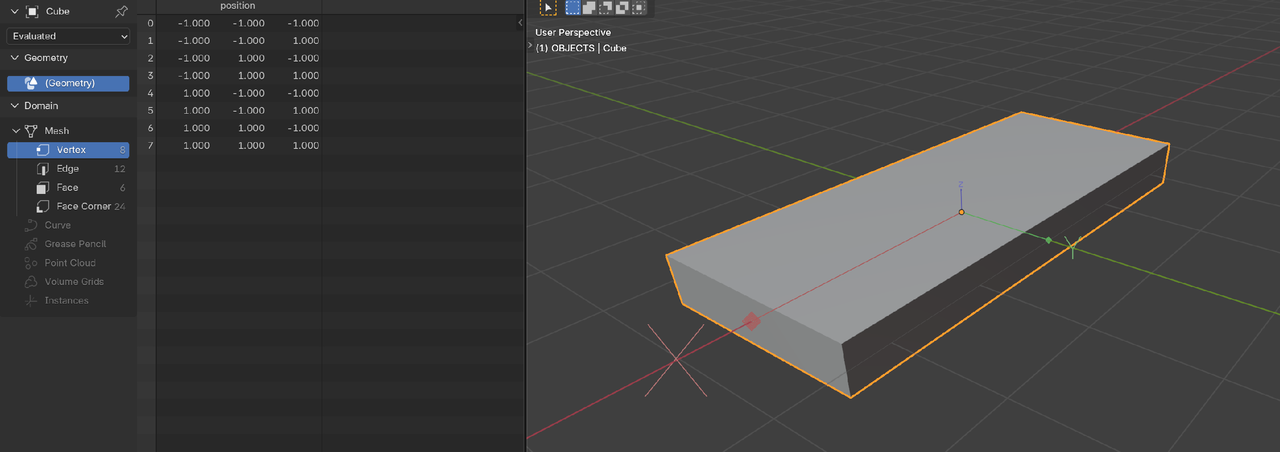
When you Scale a Mesh in Object Mode, you are Scaling the Object’s Coordinate System, the Vertices’ Postions in said Coordinate System do not change.
But if you don’t Apply the Scale and just keep going, you are working in a distorted Coordinate System, which causes all sorts of mayhem (1 unit in X might be different from 1 Unit in Y or Z):
 November 8, 2025 at 4:44 am #97862
And if you start applying modifiers and or using certain tools like bevels, you’re going to get results that are confusing you because they’re not doing what you expected. Even better than scaling in object mode and then applying would be to scale in edit mode so you don’t have to.
Move locations and rotations in object mode, scale in edit mode as much as possible 😀
-
AuthorPosts


- The topic ‘Displacement in Version 4.2.1 LTS – hidden or gone?’ is closed to new replies.