Depth option in Render Layers Node

Forum Archive Depth option in Render Layers Node

Viewing 4 posts - 1 through 4 (of 4 total)
  • Author
    Posts
  • #16499
    Mark Terry
    Participant

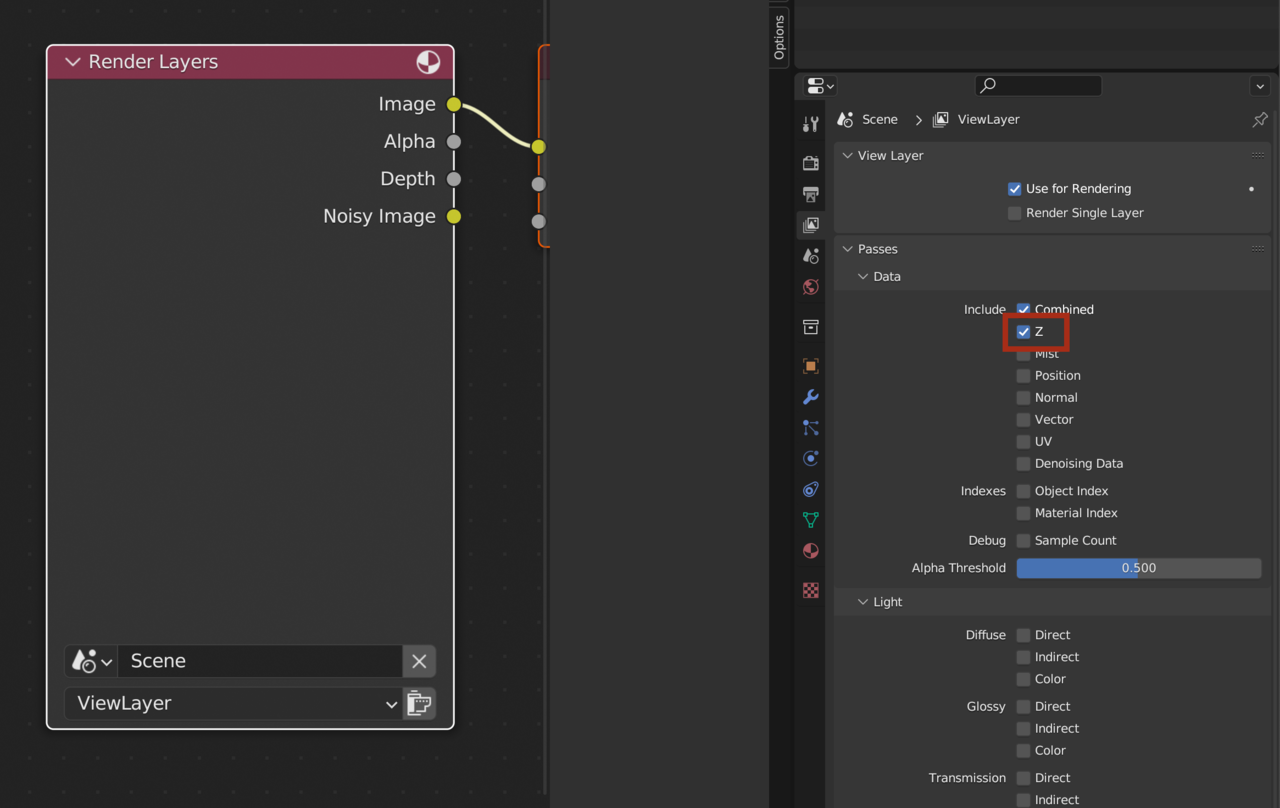
      Hey there. At Minute 36 (Pillars IV), you refer to putting the “Depth” connection to the Vector Blur node. For some reason my Render Layers node doesn’t have that option. I turned on the Vector Data on in the Layer properties and I rerendered the scene. Am I forgetting to do something? Thanks!

      #79703
      Omar Domenech
      Participant

        You have to be in Cycles and enable the Z pass and it will appear as Depth in the node:

        Z pass.png

        #79704
        Kent Trammell
        Participant

          Omar is correct. It’s often referred to as “Z-depth” because a camera’s orientation is X for horizontal, Y for vertical, and Z for forward/backward.

          But wow, this is unintuitive isn’t it…check “Z” to get the “Depth” socket in the render layers node 🤦‍♂️

          #79705
          Omar Domenech
          Participant

            What I do is think of it as Depthz

          Viewing 4 posts - 1 through 4 (of 4 total)
          • The topic ‘Depth option in Render Layers Node’ is closed to new replies.