Ctrl + B to focus on a section but how to undo it

Forum Archive Ctrl + B to focus on a section but how to undo it

Viewing 5 posts - 1 through 5 (of 5 total)
  • Author
    Posts
  • #17148
    Harris Clook
    Participant

      Heya,

      At about 2:20 you crop your view to a section using ctrl + b to help the rendering speed (I figure it’s for when you only need to check on a specific area instead of the whole scene). I see in the text info in the top left it says “Clipped” (Or at least it does on my end when I’ve got the overlay on).

      How do I undo that clipped view? For the life of me I can’t work it out and I don’t know what it’s called so I can’t google it either! As a workaround I ended up reloading the file and didn’t hit ctrl + b and continued on. But I’d be super keen to know how to undo the clipped view as it looks like a really useful feature!

      Cheers

      #82465
      Martin Bergwerf
      Participant

        Hi Harris @Yeehawcowboyletsgo ,

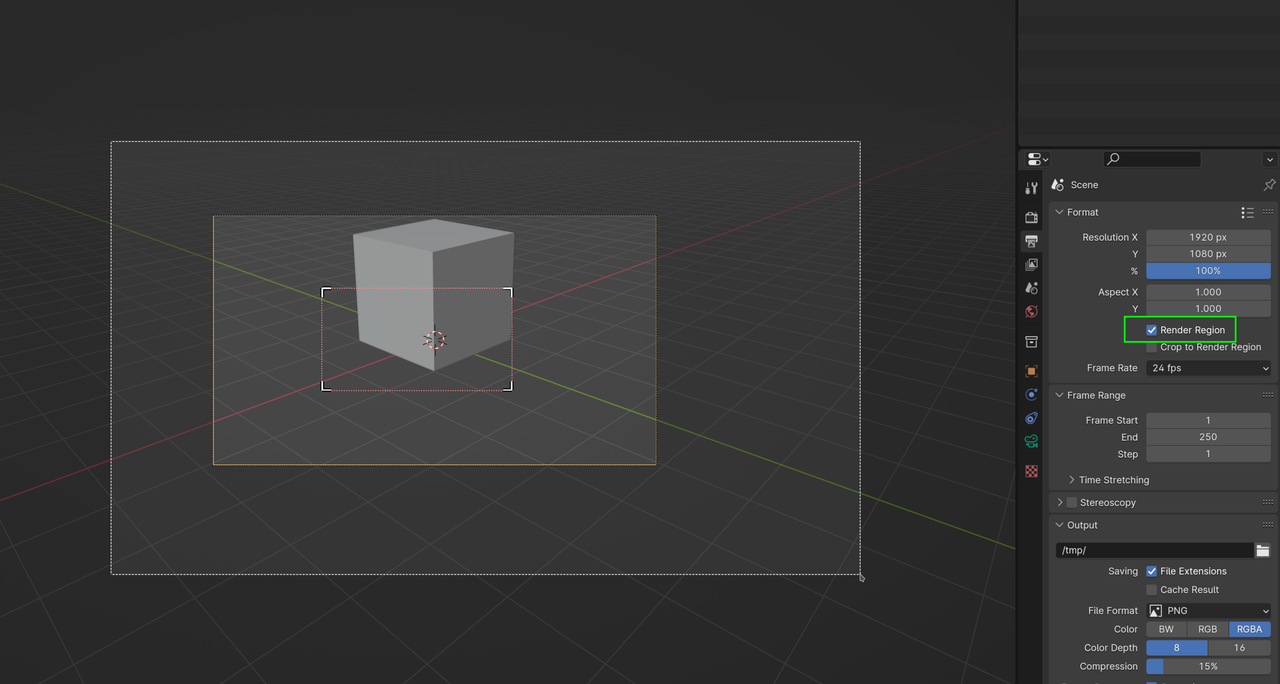
        What I usually do, is to draw another region, larger than the Camera, which overrides the old Render Region.. You can also disable it in the Output Tab (this will Render the whole Camera View, but will ‘remember’ the region you made earlier:

        Region.png

        #82466
        Charles
        Participant

          Alt ctrl B

          more here all about render regions

          https://youtu.be/11_zDd-9WXU?si=dKfm1fV8CJ1moty

          #82467
          Martin Bergwerf
          Participant

            Thanks @thehomme ,

            I didn’t know that one.

            #82468
            Omar Domenech
            Participant

              Another thing that can drive you crazy about render region, as far as I know it doesn’t work on Eevee, only in Cycles. You might be drawing a region and it’s not working and it’s because you are in Eevee. 

            Viewing 5 posts - 1 through 5 (of 5 total)
            • The topic ‘Ctrl + B to focus on a section but how to undo it’ is closed to new replies.