Connecting Verts

Forum Archive Connecting Verts

Viewing 3 posts - 1 through 3 (of 3 total)
  • Author
    Posts
  • #17802
    Callum Firth
    Participant

      Hi all.

      Can someone please help. I am not sure where I am going wrong. 

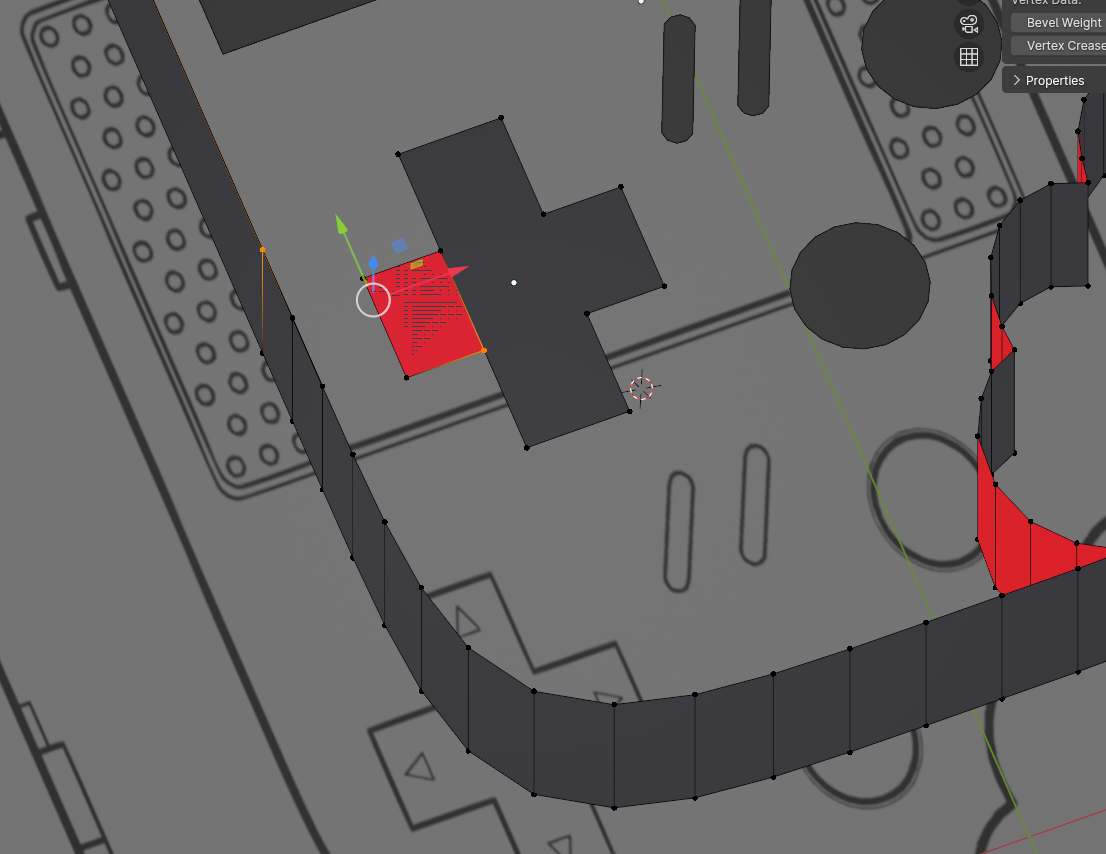
      When connecting verts from the console to the upper left vert on the left D-pad button, I am getting this.
      It seems to be flipping and connecting to the lower right vert. 024-04-13 212013.png

      #85401
      Martin Bergwerf
      Participant

        Hi Callum @CFIRTH ,

        My guess would be, that your D-Pad is actually a different Object than the Console. So you have two Objects in Edit Mode and it is not possible to connect Vertices from two Objects. Now, F is trying to be clever and makes a Face from the one Vertex in the D-Pad (the shading of the Face shows overlapping Faces).

        Solution: Undo the Filling somehow and switch to Object Mode and CTRL+J to make the two Objects into one. (If you can no  longer Undo, Delete the D-Pad Object and with the Console Selected go into Edit Mode and make a new D-Pad.

        I highly recommend to watch (or re-watch) the free Blender Basics: https://cgcookie.com/courses/blender-basics-an-introduction-to-blender-4-x Course.

        #85402
        Callum Firth
        Participant

          Martin, thank you very much, this solved it. 

          I will be honest, I haven’t watched the Blender Basics. I will do that now before moving on with this project.

          Regards,

          Cal. 

        Viewing 3 posts - 1 through 3 (of 3 total)
        • The topic ‘Connecting Verts’ is closed to new replies.