cant snap a group of vertecies at once.

Forum Archive cant snap a group of vertecies at once.

Viewing 8 posts - 1 through 8 (of 8 total)
  • Author
    Posts
  • #16175
    doran yakovi
    Participant

      when i try to snap more than one vert like kent does its moving all of them but snapping only one.

      example: https://drive.google.com/file/d/1sefj8dikEPbB-nYvpUOy3VBbqOVzpH4f/view?usp=sharing

      is it a setting i need to change?

      thanks

      #78397
      Adrian Bellworthy
      Participant

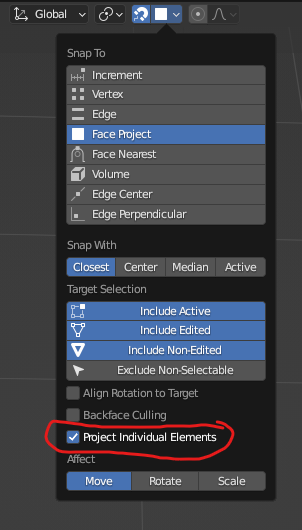
        Can you confirm you are using the correct snapping options?
        Snap.png

        #78398
        Omar Domenech
        Participant

          In Face snapping, be sure to have Project individual turned on:

          po Project Indi..png

          #78399
          doran yakovi
          Participant

            thanks ididnt have project individual elemnts ticked on

            #78400
            Jonatan Lyssens
            Participant

              Does this work differently in Blender 4.1? Snapping worked fine before but now with those larger patches. Snapping seems to work differently. With multiple vertices selected it will move them as a block and not snap them individually. The “Project Individual Elements” is missing. There is an option “Snap Individual Elements To” but it’s not a check box but it toggles it off. I can shift-click on the option that selects both “Face” and “Face Project” but it doesn’t seem to fix it. There is a checkbox: “Project Individual Elements” in the move box in the bottom left corner, but that only appears after the action, checking it doesn’t seem to alter the move.

              1-13 at 20.38.24.png

              #78401
              Martin Bergwerf
              Participant

                Hi Jonatan @JonatanL ,

                Face Project and Face Nearest are two forms of Snap to Face with Individual Elements.

                If you click on Face Project, that gives the ‘old’ Project Individual Elements.

                If you click on Face Nearest, that doesn’t use the View-dependent Projection method, but Snaps a Circle, or Cylinder to an Arm, for instance.

                #78402
                Omar Domenech
                Participant

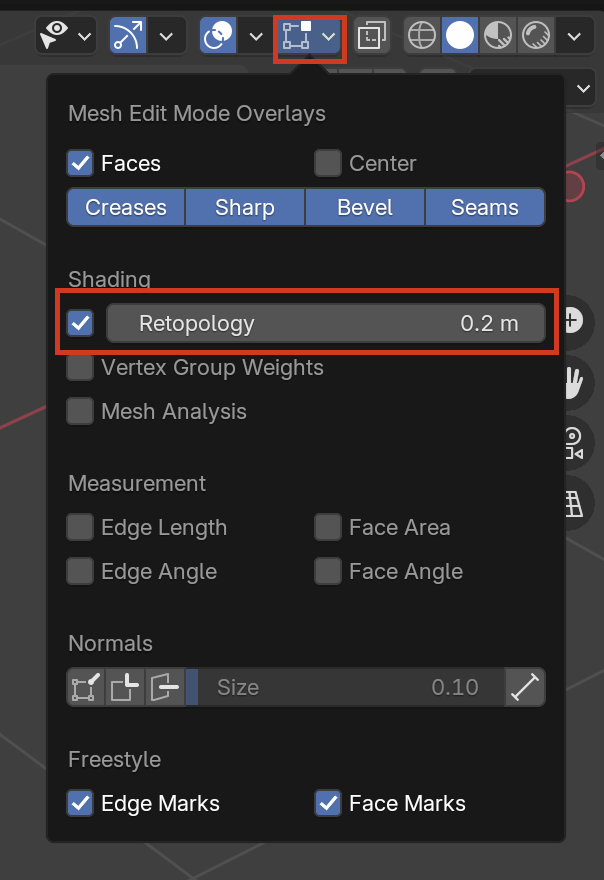
                  Perhaps the biggest change in a while is the “Retopology” check box:

                  Retopo.png

                  But that is more of a convenience for the view so you don’t have to juggle around a thousand options like before. After that the “Face Project” turned on should be enough for all your individual vertices to snap the the target object. You have to be careful since it’s dependent on the viewing angle you are snapping things from.

                  #78403
                  Jonatan Lyssens
                  Participant

                    Thank you for the clarification. It worked. Thank you so much. 

                  Viewing 8 posts - 1 through 8 (of 8 total)
                  • The topic ‘cant snap a group of vertecies at once.’ is closed to new replies.