Course Library
Learning Paths
Free Courses
Learn Blender 3D in the way that’s right for you.
Inner Circle
Where members share progress and help each other learn.
›
The Commons
A free Blender community open to artists of all skill levels.
Forum Archive › Can’t select with square shape anymore (Noob question)
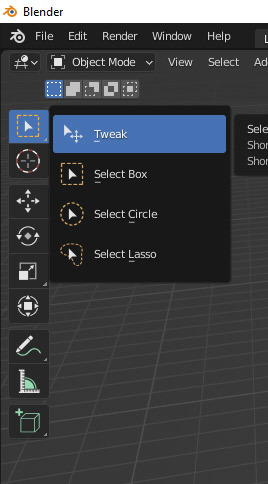
For some reason, I can’t select with the square shape in edit mode. I have no other choice than pressing C. Here is my blender file in edit mode and you will see what is wrong.
If you click and hold the select tool on your tool bar, you can change to different modes of selecting. You might have accidently changed it with the “W” hotkey on your keyboard which is the shortcut to cycle through them.
Thx! 🙂