Can’t find stretching heat map overlay on Blender 2.8

Forum Archive Can’t find stretching heat map overlay on Blender 2.8

Viewing 15 posts - 1 through 15 (of 17 total)
  • Author
    Posts
  • #10729
    Alejandro Escobar
    Participant

       Can’t find that option

      #50987
      Andrea Weikert
      Participant

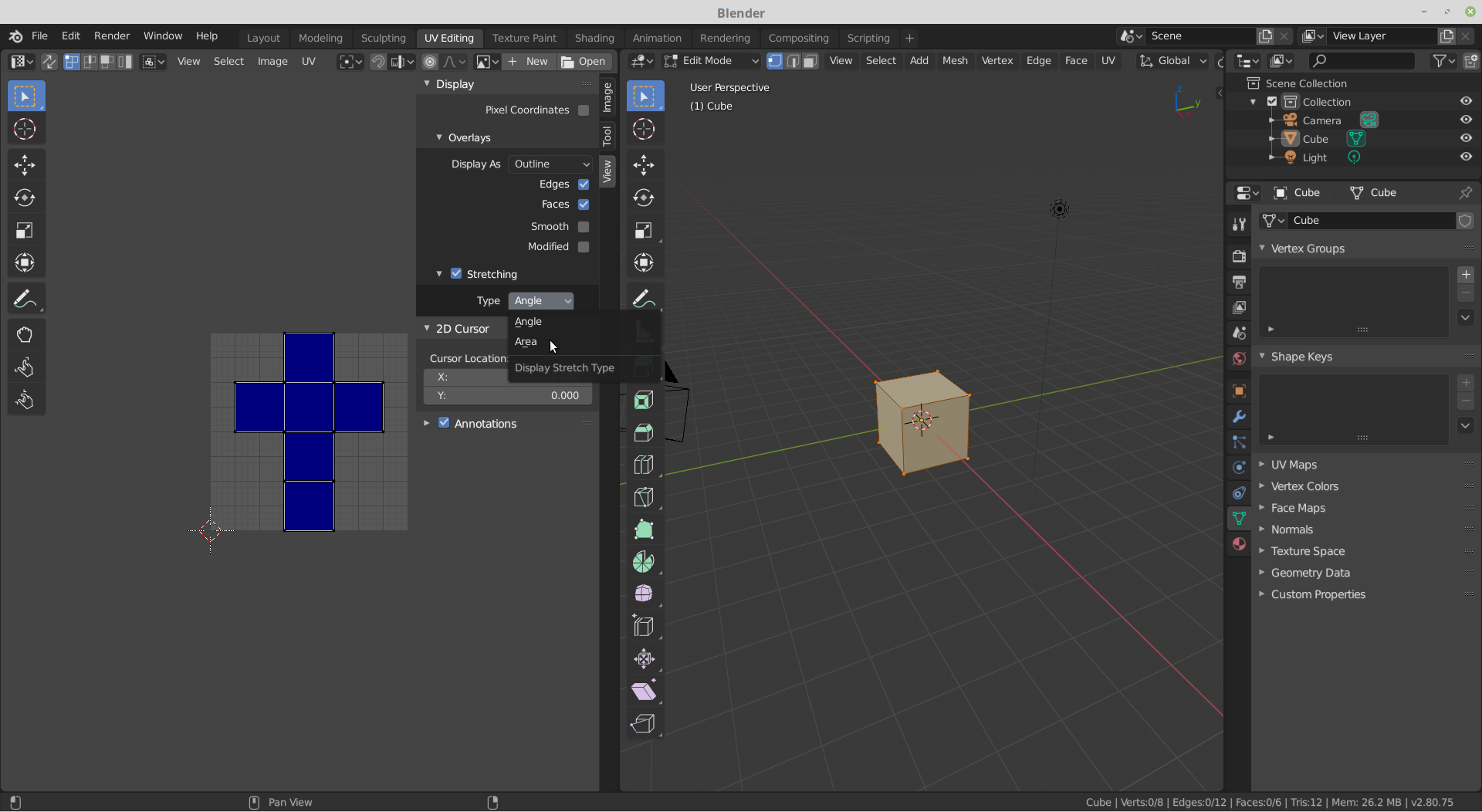
        The heat map overlay is a bit hidden in Blender 2.80. If you go to the UV editor and open the side-panel (with the N-Key) there is Display -> Overlays -> Stretching.

        Below this you can choose Angle or Area.

        #50988
        Alejandro Escobar
        Participant

          Where’s overlays? 

          #50989
          Markus Berg
          Participant

            That would be in the View tab -> Display -> Overlays

            #50990
            Alejandro Escobar
            Participant

              Still can’t see it

              #50991
              Alejandro Escobar
              Participant

                Found it, for some reason I had to change from the tab “4 UV Editing” to the first “Modelling”, that also adds more options to the UV Editor, now my question changed to “Why’s that? It doesn’t make sense”

                #50992
                Markus Berg
                Participant

                  My Blender doesn’t have any numbers in the tabs. Which version of Blender 2.8 are you using?

                  #50993
                  Alejandro Escobar
                  Participant

                    2.8.0 , downloaded from steam

                    #50994
                    Markus Berg
                    Participant

                      Hmm, I see. I’m just surprised that your Blender seem different, to the point where we weren’t able to help you properly. So it says “2.80.75” in the bottom right corner of Blender?

                      #50995
                      spikeyxxx
                      Participant

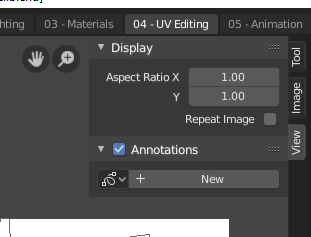
                        Like Markus  said, this is what the official version looks like:

                        Maybe download it from Blender.org

                        #50996
                        Jonathan Lampel
                        Participant

                          It’s probably just preferences carried over from 2.7 – I also organized my layouts like that! It would also explain why the headers are at the bottom. 

                          When opening up a 2.7 file, try un-checking Load UI in the file browser open options so that you get the 2.8 layout. 

                          #50997
                          spikeyxxx
                          Participant

                            Good point @jlampel, but that doesn’t explain the numbers at the Workspaces.

                            I’d guess it’s an old Blender version combined with the Load Ui from 2.79…

                            I have absolutely no idea as to why anyone would prefer to use Steam for Blender???

                            #50998
                            Alejandro Escobar
                            Participant

                              @thebergh @spikeyxxx  I just checked and it says 2.80.75 . I downloaded Blender from Steam just because I always use It, I didn’t think it would be any different from the regular Blender.

                              @jlampel It worked! Also the numbers from the tabs dissapeared,  I’ll take that into account when opening older files from now on.

                              Thank you everyone for your help 🙂

                              #50999
                              Jonathan Lampel
                              Participant

                                Great! 

                                In 2.7 the only way to organize layouts was to number them since they could only be in alphabetical / numerical order. If you want a real blast from the past (with lots of voice cracks probably), here’s a video I made about that topic 6 years ago 😄

                                #51000
                                spikeyxxx
                                Participant

                                  @jlampel You are sooo wise!

                                  I tried opening a 2.79 file in 2.80 without loading the UI, but it probably wasn’t old enough, so I didn’t get the numbered workspaces;)

                                Viewing 15 posts - 1 through 15 (of 17 total)
                                • The topic ‘Can’t find stretching heat map overlay on Blender 2.8’ is closed to new replies.