
Can’t change Blender theme (2.79 version)

Forum Archive Can’t change Blender theme (2.79 version)

Viewing 3 posts - 1 through 3 (of 3 total)
  • Author
    Posts
  • #9168
    Lluís Donat
    Participant

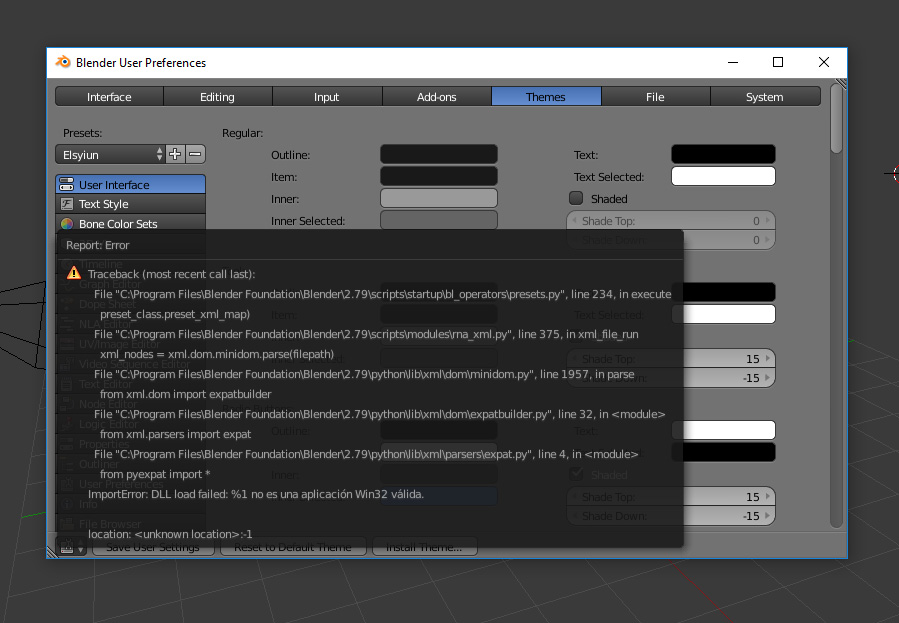
      Hello everybody, I use to work with Elysium theme in 2.78 version, when I have installed 2.79 version, Blender starts with default theme and when I try to switch to any other Blender theme I’m getting this message error .

      Not a big problem at all but just wondering if is there anybody getting it too or just me?

      I’ve downloaded 2.78 version again and 2.8 and everything works ok to me, just getting trouble with 2.79

      Thanks!

      #31477
      Matthew Fricker
      Participant

        I recently upgraded to 2.79 and used the button on the splash screen to copy my previous settings over from 2.78. I used the ubuntu theme (I think it was called that , its purple and dark gray) and I see it is not on the list anymore but it still works, I also tried changing to the elysiun theme and it worked fine…. 

        #31478
        mikecopple
        Participant

          It appears to have been removed from the final release. It may also turn up removed from the final release of 2.8 as well. You may want to submit that to the Blender Foundation, or set it up manually, which is a pain.

        Viewing 3 posts - 1 through 3 (of 3 total)
        • The topic ‘Can’t change Blender theme (2.79 version)’ is closed to new replies.