Cannot Bevel top section of device

Forum Archive Cannot Bevel top section of device

Viewing 5 posts - 1 through 5 (of 5 total)
  • Author
    Posts
  • #15616
    Rimi
    Participant

      Hi there

      I cannot seem to bevel the top part of the device. Part of the bevel seemed to be missing. 

      Video 1

      Video 2

      Please help. Thanks 

      #76256
      Martin Bergwerf
      Participant

        Hi @Rimi ,

        Select the whole Mesh and then: M > Merge > by Distance.

        Followed by SHIFT+N.

        That will probably fix it.

        If not, it would be easiest if you could post a link to your .blend file (via Dropbox for instance).

        #76257
        Rimi
        Participant

          Hi Martin

          It worked, thank you very much.  

          Just a quick question, what is the purpose of shift + N?

          Thank you once again!

          #76258
          Martin Bergwerf
          Participant

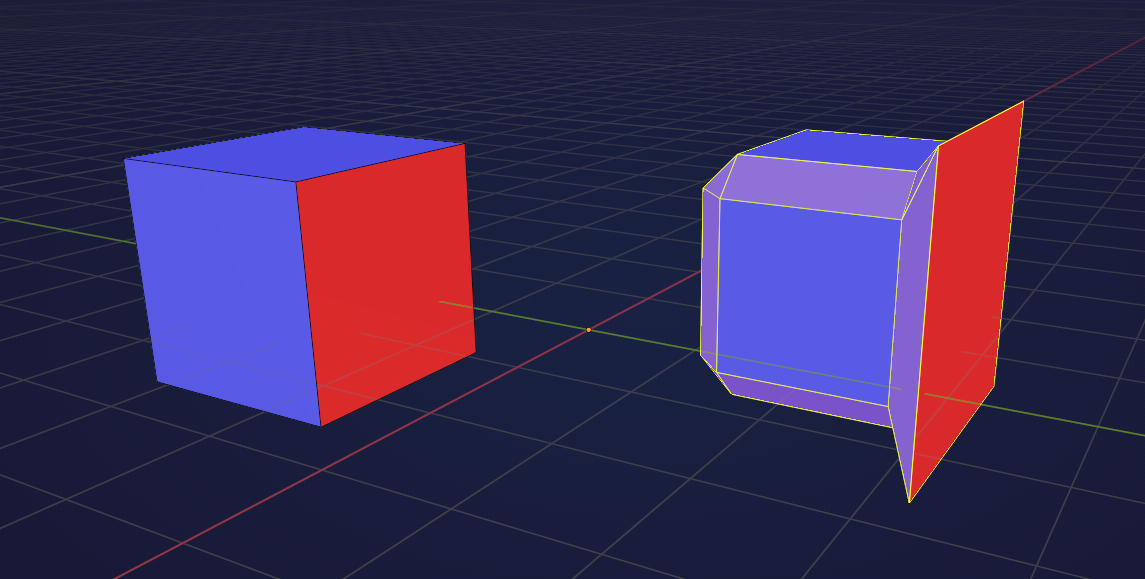
            Each Face has 2 sides, a front and a back. when a model has Faces that are not ‘aligned’, I mean a back Face next to a front Face, weird things might happen (not only when Beveling):

            Normals.png

            In CG we often speak of Normals when discussing the direction of Faces. SHIFT+N makes those Normals consistent.

            #76259
            Omar Domenech
            Participant

              Shift + N is the hotkey for the “Recalculate Normals” operation. You can also find it under Mesh -> Normals where you’ll find some other helpful options. 

            Viewing 5 posts - 1 through 5 (of 5 total)
            • The topic ‘Cannot Bevel top section of device’ is closed to new replies.