Can you change what object an instance is linked to or unlink it altogether?

Forum Archive Can you change what object an instance is linked to or unlink it altogether?

Viewing 4 posts - 1 through 4 (of 4 total)
  • Author
    Posts
  • #15874
    Phil Lewis
    Participant

      Let’s say I made a few instances of an object and want to separate two of the instances from the rest so that I could change their meshes without affecting the rest anymore. Am I able to unlink those two instances from the rest, but have them linked to each other?

      #77264
      Martin Bergwerf
      Participant

        Hi Enviritas,

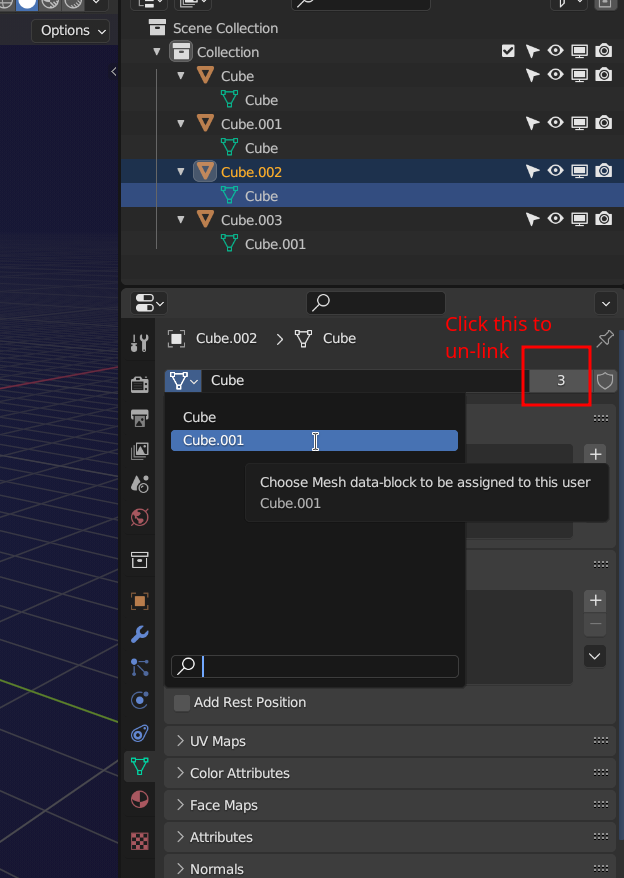
        You can un-link an Object several ways in Blender. What I like to do is go to the Object Data Properties Tab:

        Unlinking.png

        So, what you are looking at: I had 4 Cubes that all used the same Data called ‘Cube’ (they were linked), then with Cube.003 selected I clicked on the number (was 4). That made its data unique (un-linked it): Cube.001. Now, when selecting another Cube, in this case Cube.002, I can change its data to Cube.001, so it uses the same data as Cube.003. That means it is then linked to Cube.003.

        Try it out, that is easier than me, trying to explain it 😉

        #77265
        Omar Domenech
        Participant

          And as you say, apart from unlink, you can change the instance the object is linked to. You can go to the same place where Martin shows in the image and from the drop down menu select the desired object data.

          #77266
          Phil Lewis
          Participant

            Thank you both for the help 🙂

          Viewing 4 posts - 1 through 4 (of 4 total)
          • The topic ‘Can you change what object an instance is linked to or unlink it altogether?’ is closed to new replies.