Can you be more specific on a couple things

Forum Archive Can you be more specific on a couple things

Viewing 6 posts - 1 through 6 (of 6 total)
  • Author
    Posts
  • #21142
    HENRY DUGAN
    Participant

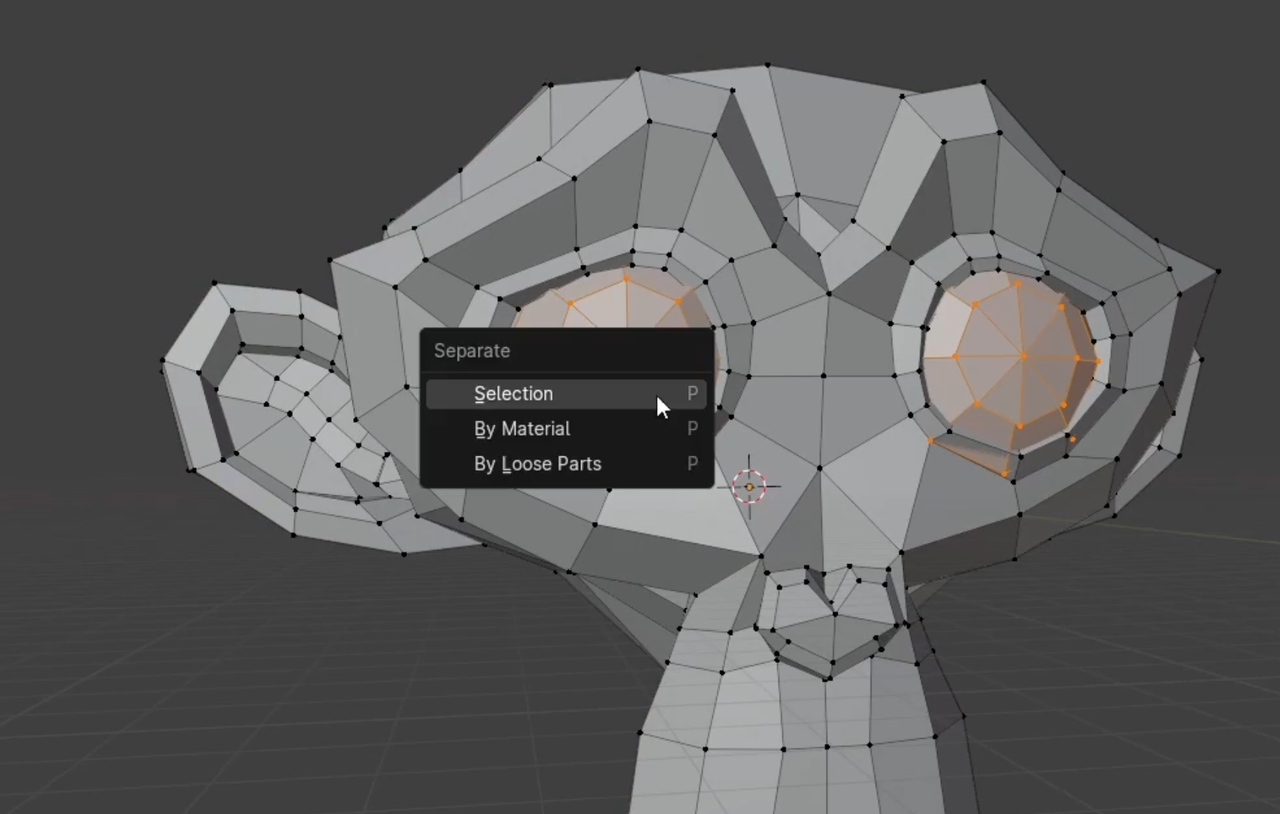
      How specifically did you isolate the eyes? Can you go step by step? I have taken the fundamental classes but didn’t see this and it happens very quickly in the video, i just see you flash into edit mode but that is it. Then what do you choose in menu after the P shortcut? Material, loose parts? Thanks Jim

      #98625
      Omar Domenech
      Participant

        Hello Henry. Can you give us a timestamp? To know exactly which part you are referring to. By the way you describe thing, I might guess he is either using L to select the linked mesh or just going into local view with numpad slash ( / )

        #98626
        Martin Bergwerf
        Participant

          Hi Jim @Dugansz ,

          You can watch the video more than once 😉

          You can also watch it at a lower speed.

          But it’s Separate  > Selection:
          P.png

          Separate > By Loose Parts would work as well.

          And you might want to re-take the Fundamentals of Mesh Modeling in Blender (not just watch it, but do all the exercises as well).

          #98627
          HENRY DUGAN
          Participant

            At the 4 minute mark it  begins… thx Jim

            #98628
            Omar Domenech
            Participant

              Yes he selected the eyes, which are separate meshes, by hovering the mouse over them and hitting L to selected linked. Then P to separated by selection. 

              #98629
              HENRY DUGAN
              Participant

                thank  you very much

              Viewing 6 posts - 1 through 6 (of 6 total)
              • The topic ‘Can you be more specific on a couple things’ is closed to new replies.