Blender bump map – Neutral grey issue [Solved]

Forum Archive Blender bump map – Neutral grey issue [Solved]

Viewing 5 posts - 1 through 5 (of 5 total)
  • Author
    Posts
  • #9779
    polygondust
    Participant

      When I create a perfect grey in photoshop:
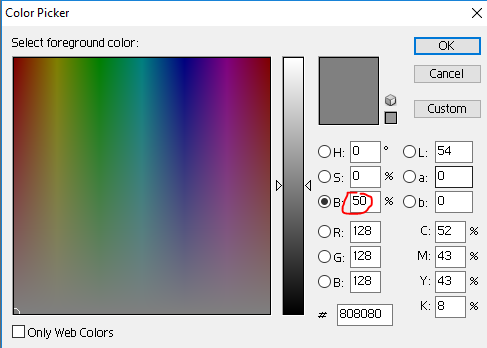
      It becomes a slightly different value in Blender due to gamma correction.
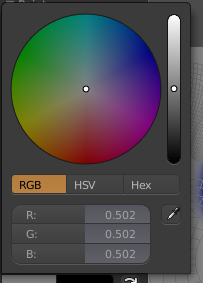
      This is also a HSV of 0,0,.502

      Will this be a problem for my bump map? Does it have to be a perfect neutral gray base to work? The value should be .5 to be true neutral. However, I already did a bunch of work based on the .502 base photoshop generated. Tweaking the brightness always slightly over or undershoots. Somehow, photoshop is unable to generate the exact value Blender uses for neutral.

      Does anyone with a good technical understanding of Blender know if this small difference will cause problems down the line?

      @theluthier
      @jlampel 

      #37399
      panboy
      Participant

        Since your amount of bump is going to be relative to the colours around it, its not likely that this will cause any real visible difference, plus the discrepancy is so small its would have little impact either way.

        Also its probably just a rounding error caused by file compression. are you using jpgs? 

        Use PNGs or Tiffs to make sure your textures are lossless. 

        #37400
        polygondust
        Participant

          @panboy Thank you for the response! I am using .pngs, so I think the strange rounding issue is because of “gamma correction” or some option that blender has for color correction that photoshop doesn’t. 

          Anyway, I think this will be good enough then. Thank you for the response! Whether the amount of bump was relative to surrounding colors, or some sort of absolute value based on the local pigment was just the answer I was looking for. As long as its relative, having the wrong base color shouldn’t mess up the seams or anything.

          #37401
          panboy
          Participant

            @polygondust Oh another thing I just remembered, make sure to set your bump map textures to non-colour data.

            #37402
            polygondust
            Participant

              @panboy Good point! I will check that.

            Viewing 5 posts - 1 through 5 (of 5 total)
            • The topic ‘Blender bump map – Neutral grey issue [Solved]’ is closed to new replies.