
Blender 3.6 crashing frequently

Forum Archive Blender 3.6 crashing frequently

Viewing 8 posts - 1 through 8 (of 8 total)
  • Author
    Posts
  • #17006
    Charles
    Participant

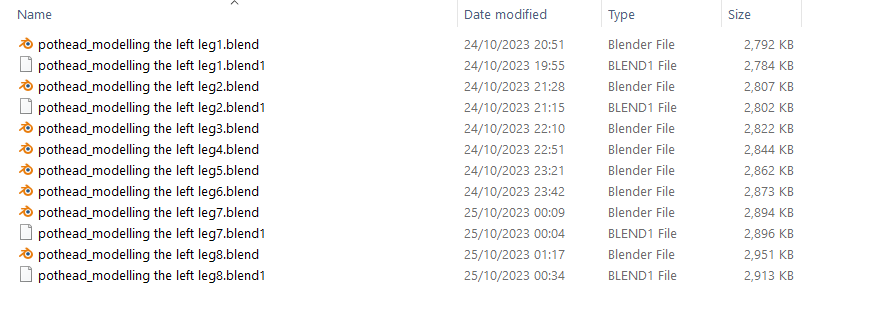
      I’m getting a lot of fatal crashes from Blender. No warning… not linked to any specific action. I’ve set my undo’s to 75. You can see from the timestamps of the .blend1 files when the crashes happened. 2 crashes while working on evening of 24th and 2 the following evening.

      Is this common or more likely my PC? I’m only modelling the Pothead so not exactly maxing out Blender with tons of materials etc.

      • Processor AMD Ryzen 9 3950X 16-Core Processor 3.49 GHz
      • Installed RAM 32.0 GB
      • System type 64-bit operating system, x64-based processor
      • Win 10 V22H2

      crashing.png

      #81820
      Omar Domenech
      Participant

        It’ not common but it’s not uncommon, crashes happen. I get crashes in simple scenes and in complex scenes, just computers being computers. What I usually do and it ends up working most of the time is to copy paste all my things into a brand new Blender scene and most of the times the bug stays behind.

        #81821
        Charles
        Participant

          Ahh ok. I’ll try that. Even tho all these files have different Names they are all still versions from the same original scene file. Thanks

          #81822
          Stephen Swaney
          Participant

            Traditionally, Blender crashes for 2 reasons – out of memory and bad video drivers.  With 32 GB, memory is probably not the issue.  General rules for video drivers:

            1) the card manufacturer’s driver is better than the operating system driver.  (Looking at you here, Windows!)

            2) Updated drivers are good.  Usually.

            tl;dr:  make sure you have the latest AMD driver for your card

            #81823
            Dennis Charles
            Participant

              If your using a AMD GPU, make sure your updated your motherboard chipset driver. I agree on trying a different GPU driver, trying a fresh, clean gpu driver install as well. Double checking your Windows driver, turn off auto updated for Windows, install all drivers your self.  Double check your openGL and openCL modes…

              #81824
              Charles
              Participant

                I’ve updated to the latest Nvidia Studio Driver and the AMD Ryzen Master. I hate the PC and don’t understand its world of drivers etc. so don’t know what to do beyond this. I’ll first see if this seems to make any difference and then ask back if it’s still crashing. THanks

                #81825
                Dennis Charles
                Participant

                  I would try a clean gpu driver install, there is an option during the first part of the driver install to perform a clean install.  I would recommend the Game Ready Driver vs the studio. 

                  #81826
                  Charles
                  Participant

                    OK thanks. Now clean installed the Game Ready Nvidia driver. Will see how Blender behaves during this week

                  Viewing 8 posts - 1 through 8 (of 8 total)
                  • The topic ‘Blender 3.6 crashing frequently’ is closed to new replies.