blender 2.8 pencil’s xray

Forum Archive blender 2.8 pencil’s xray

Viewing 5 posts - 1 through 5 (of 5 total)
  • Author
    Posts
  • #12454
    mekg
    Participant

      where is the pencil’s xray ?

      #59157
      Jonathan Lampel
      Participant

        I don’t think the annotation tool has that feature, so to get that effect you could add a new grease pencil object and draw the details that way. 

        #59158
        Ingmar Franz
        Participant

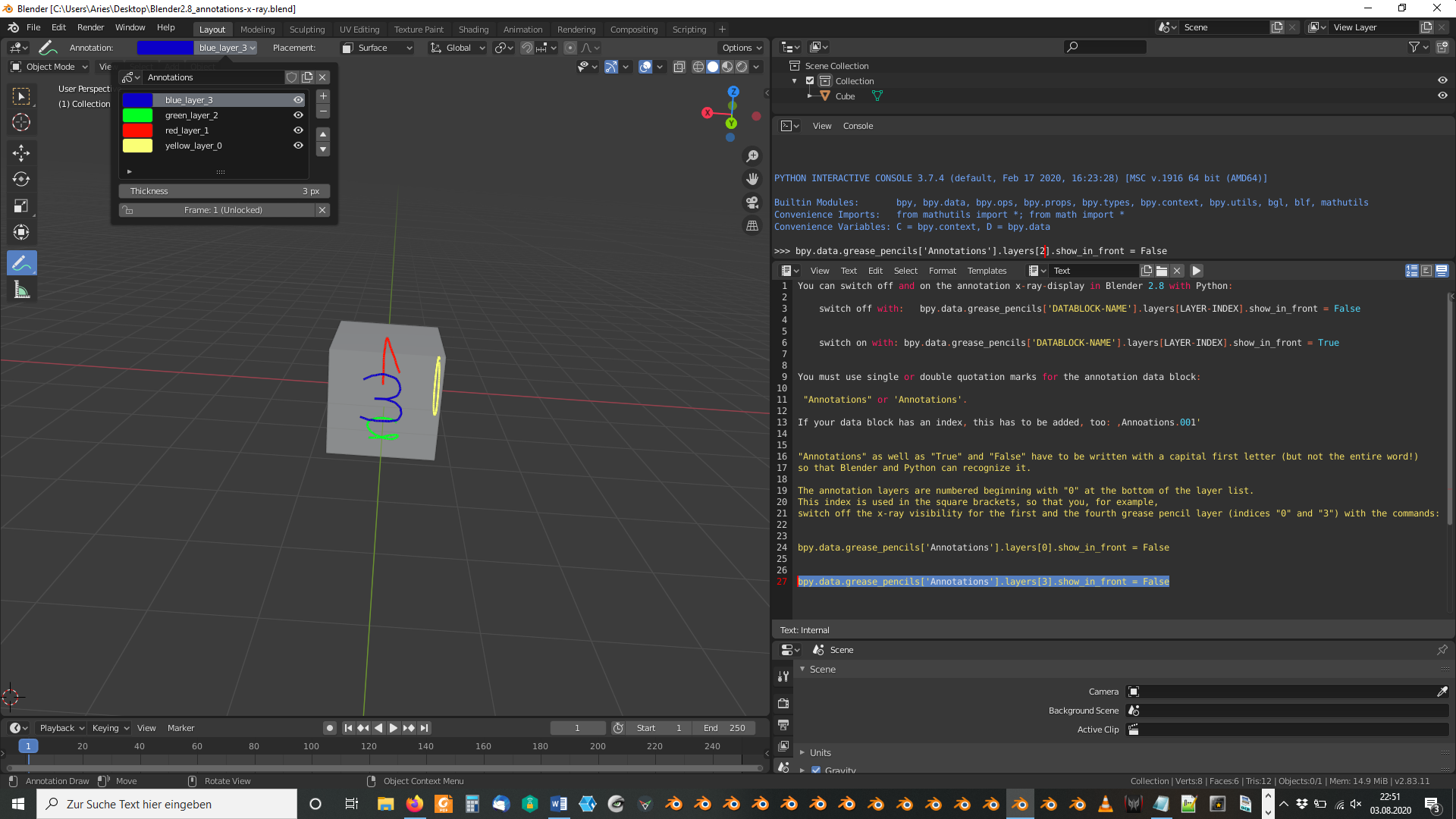
          You can switch off and on the annotation x-ray-display in Blender 2.8 with Python:

          • switch off with:   bpy.data.grease_pencils[‘DATABLOCK-NAME’].layers[LAYER-INDEX].show_in_front = False

          • switch on with: bpy.data.grease_pencils[‘DATABLOCK-NAME’].layers[LAYER-INDEX].show_in_front = True

          You must use single or double quotation marks for the annotation data block:

           “Annotations” or ‘Annotations’.

          If your data block has an index, this has to be added, too: ,Annoations.001′

          “Annotations” as well as “True” and “False” have to be written with a capital first letter (but not the entire word!) so that Blender and Python can recognize it.

          The annotation layers are numbered beginning with “0” at the bottom of the layer list. This index is used in the square brackets, so that you, for example, switch off the x-ray visibility for the first and the fourth grease pencil layer (indices “0” and “3”) with the commands:

          bpy.data.grease_pencils[‘Annotations’].layers[0].show_in_front = False

          bpy.data.grease_pencils[‘Annotations’].layers[3].show_in_front = False

          An example file is here. To switch x-ray off for the third layer (green color with layer index 2, type in:

          • bpy.data.grease_pencils[‘Annotations’].layers[2].show_in_front = False

          #59159
          spikeyxxx
          Participant

            Thanks @duerer , that is so cool!

            A little additional information (that nobody will want to know…):

            Why in programming languages do they start counting the indices at 0 ???

            Well, if you have for instance an array called ‘layers’, then there is a lookup table (made by the compiler?) which tells the computer the memory address of the first Byte of where that array is stored. What is called the index, is actually an offset from that starting point;

            so, the first element would start at the address:[ layers + (0  times sizeOfElement)], the second at [layers + (1 times sizeOfElement)], etc.

            So every time you see a variable in a program, that is actually an address and changing the value of that variable only changes what is stored at that address, it doesn’t change the address. Constants are different, because they are just assigned a ‘value’, not an address  and are therefore a lot faster to access (in general).

            #59160
            Ingmar Franz
            Participant

              Thank you, @spikeyxxx, for this profound explanation 😀!

            Viewing 5 posts - 1 through 5 (of 5 total)
            • The topic ‘blender 2.8 pencil’s xray’ is closed to new replies.