black color not black?

Forum Archive black color not black?

Viewing 5 posts - 1 through 5 (of 5 total)
  • Author
    Posts
  • #15588
    Kevin Mather
    Participant

      OK, I must be missing something really obvious. [Unfortunately I can’t see a way to include images in a question, only video.]

      If I set the tire material to Diffuse, color=(0,0,0), it appears and renders black (left).

      If I set the tire material to Principled, rough=1.0, color=(0,0,0), it appears and renders brown (right).

      I have temporarily disabled Bloom, which had a small effect. Results seem to be the same for either Eevee or Cycles. BTW, using Blender 3.1.2.

      #76103
      Omar Domenech
      Participant

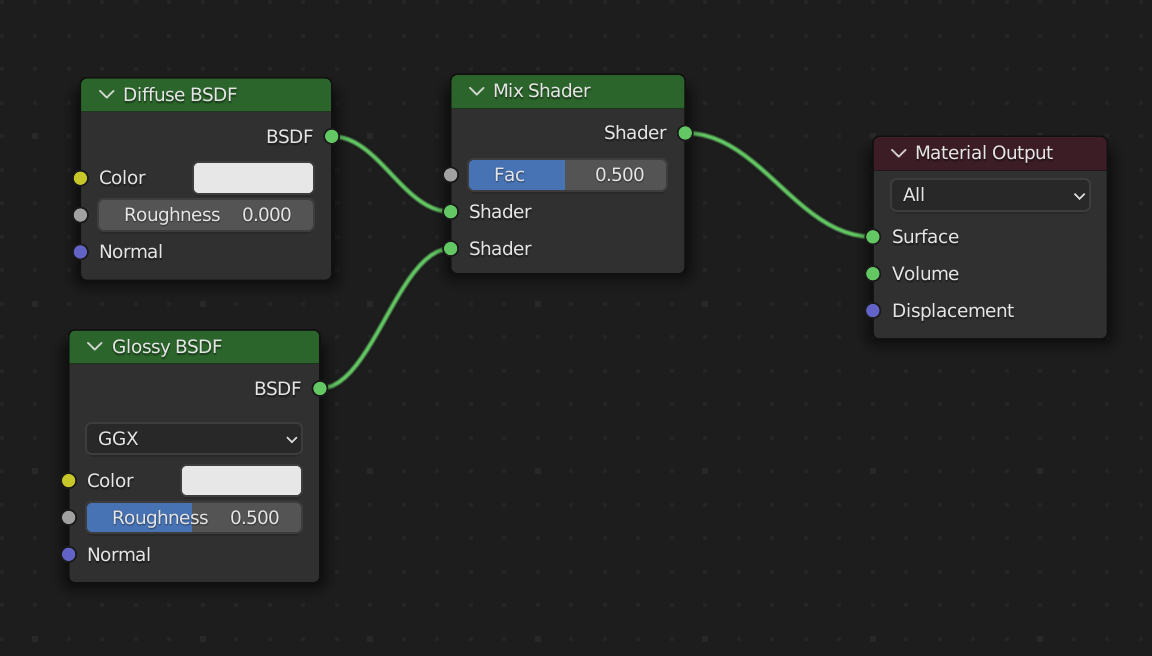
        I think that is because with the diffuse BSDF only, there is no glossy component. That is why before the Principled node ever existed, people used to mix diffuse with glossy always. But with the principled node you have lots of things integrated by default, that is glossiness and fresnel and all those kinds of good stuff. So probably the wheel on the right is not totally black because it is reflecting your environment.

        Try mixing your diffuse and glossy and you’ll probably get a result similar to the principled.

        Mix Nodes.png

        #76104
        Kevin Mather
        Participant

          Thanks @dostovel , it seems to be something like that.

          If I mix (diffuse-black rough=1.0) with ((glossy-white rough=1.0) x 0.04) I see something very similar to Principled.

          I’ve been trying (in the spirit of the challenge) to change materials/textures only, not touching anything else. I guess what I am seeing is “correct”, even though a little confusing. I guess I can live with it, or dig deeper into lighting/color adjustments…

          #76105
          Kevin Mather
          Participant

            Update: digging into the lighting/environment, there is a Sun “Sunset”, orange, strength=50 which seems to be responsible. For now, I will disable it. Hope the exercise/challenge is still valid.

            #76106
            Martin Bergwerf
            Participant

              @techworker1 ,

              Omar is absolutely right; the Principled Shader does a lot more than a simple Diffuse Shader.

              It has a Specular slider (set to 0.5 by default) and that is related to the Latin word Speculum, meaning mirror and that is related to light (here: environment) reflecting properties of materials (everything reflects some light, apart from black holes) and the Specular Value is directly related to the IOR of the material (unimportant, but the formula is: (((IOR -1)/(IOR+1))^2)/0.08.)

              Setting the Specular in the Principled Shader to 0 (corresponding to an IOR=1), would give you a Diffuse (if you don’t use Subsurface, Sheen, Clearcoat or Transmission…) Shader.

            Viewing 5 posts - 1 through 5 (of 5 total)
            • The topic ‘black color not black?’ is closed to new replies.