Beveling Issue

Forum Archive Beveling Issue

Viewing 4 posts - 1 through 4 (of 4 total)
  • Author
    Posts
  • #16609
    Patrick Jones
    Participant

      I was doing good w the 3D model till I got to 12:00 mins completely messing everything up trying to follow the beveling steps. I don’t think I can go back and I have a feeling I have to start everything over from scratch.https://drive.google.com/drive/folders/1RJQM43yspgqvoNnC15dEAhaIT-91qUVn?usp=share_link

      #80188
      Omar Domenech
      Participant

        Do it, don’t think about it, start over if you feel you need to. You’ll see how the second or third time around you arrive faster and better to where you left off.

        #80189
        Martin Bergwerf
        Participant

          Well Patrick @patthevisionary ,

          Maybe it still can be saved in your case…

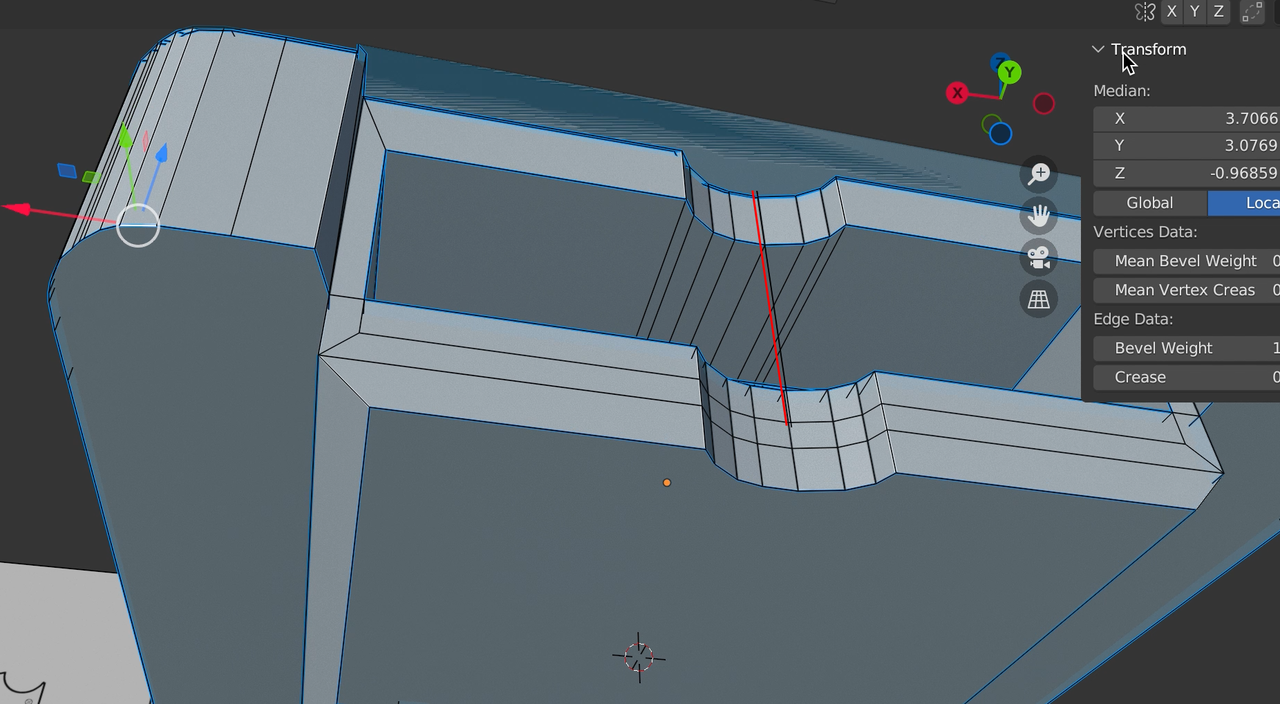
          There seems to be a rogue Edge here:

          Bevel_issue.png

          Delete that and also try the good old combo:

          M > Merge > By Distance,

          followed by:

          SHIFT + N.

          (In that order; Merging Vertices might create inconsistent Normals!)

          If that doesn’t fix things, please upload your .blend file and post a link.

          #80190
          Omar Domenech
          Participant

            Yes it’s not that bad, yet I still think a do over is immensely beneficial. You’ll feel like Neo, developing the eye to see in code, but it’s more like you can see the wireframe and the pitfalls in advance, you’ll get to the finish line three times faster and you’ll see where was it that you made a wrong turn. Then you can move on to another course and make other awesome stuff.

          Viewing 4 posts - 1 through 4 (of 4 total)
          • The topic ‘Beveling Issue’ is closed to new replies.