Beveling Edges Issues

Forum Archive Beveling Edges Issues

Viewing 6 posts - 1 through 6 (of 6 total)
  • Author
    Posts
  • #16565
    dashlaru
    Participant

      So I was able to apply the Mean Bevel Weight just fine to the buttons on the front, but when it came time to bevel the edges on the back, selecting the edges and applying the Mean Bevel Weight seemed to do nothing, the lines changed blue to indicate that beveling should be applied, but I saw no difference on the model, no matter how I was viewing it.  What could I be doing wrong?

      #80023
      Martin Bergwerf
      Participant

        Can you post a screenshot, or even better a link to your .blend file (via Dropbox, Googledrive, or so) please?

        #80024
        Brad Wheeler
        Participant

          Hi,

          This is just a suggestion, I found at times the Clamping restricted the beveling, due to the bevel would distort the geometry and clamping stops that from happening. Try turning off clamping tick box and then adjusting the bevel size down to where it  the bevel works and you’ll probably find a really low value.

          You probably didn’t use the modifier for the bevel weight but I believe Blender has an internal clamping due to you may have edge loops too close to the edge that stops the bevel from working, maybe try moving any close by edge loops back a bit and see what that does.

          Another thing is maybe the scale needs to be applied.

          I hope I understood correctly and this may help.
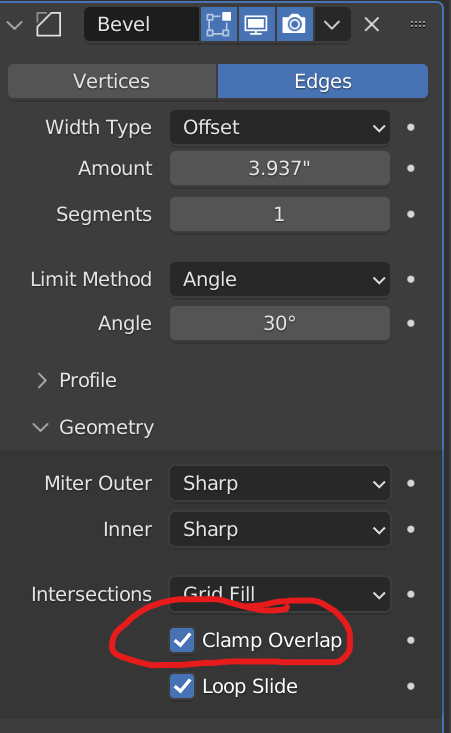
          Bevel Clamping.png

          #80025
          Omar Domenech
          Participant

            When that happens most of the time the model has doubled vertices. So in edit mode select everything with A and M to merge by distance.

            #80026
            dashlaru
            Participant

              Ah-ha!  The double vertices were most of the problem.  By merging them I was able to resolve most of the issue.  I was using the Bevel Modifier (what a time saver!) but my version of Blender is 2.83.4 (don’t ask, I’m running on an older operating system) so my Bevel Modifier looks dated.  I got it working around most of the edges until I got to the little mofo below.  Every time I apply the Mean Bevel modifier to that edge, it doesn’t bevel and it takes away all my other bevels.  Tried the Merge on the verts but still the same issue, just with those particular edges.  That’s when I unclicked Clamp overide, and “Valour!” Schmoov bevels all around.  However when I re-click Clamp overide, I loose the bevels, and I don’t want that to screw me up later in the modeling.  Anyhow, thanks for all the advice, and I guess I’ll see if the Clamps gives me the hams later.6_28_23__7_36_PM.png

              #80027
              Omar Domenech
              Participant

                Lol, funny post. That edge that wont bevel is not blue, so it’s not marked sharp. Check if that’s the issue. 

              Viewing 6 posts - 1 through 6 (of 6 total)
              • The topic ‘Beveling Edges Issues’ is closed to new replies.
