bevel problem

Forum Archive bevel problem

Viewing 5 posts - 1 through 5 (of 5 total)
  • Author
    Posts
  • #21680
    giannis ouzounis
    Participant

      why does the beveling in the video moves so much even with 0.1cm of bevel for me i need to make it to go up to 1 to 2 cm for the same effect although it causes some problems with the mesh whitch is some random black lines i have the exact same dimensions as they are in the video why does this happen?

      #100754
      Dwayne Savage
      Participant

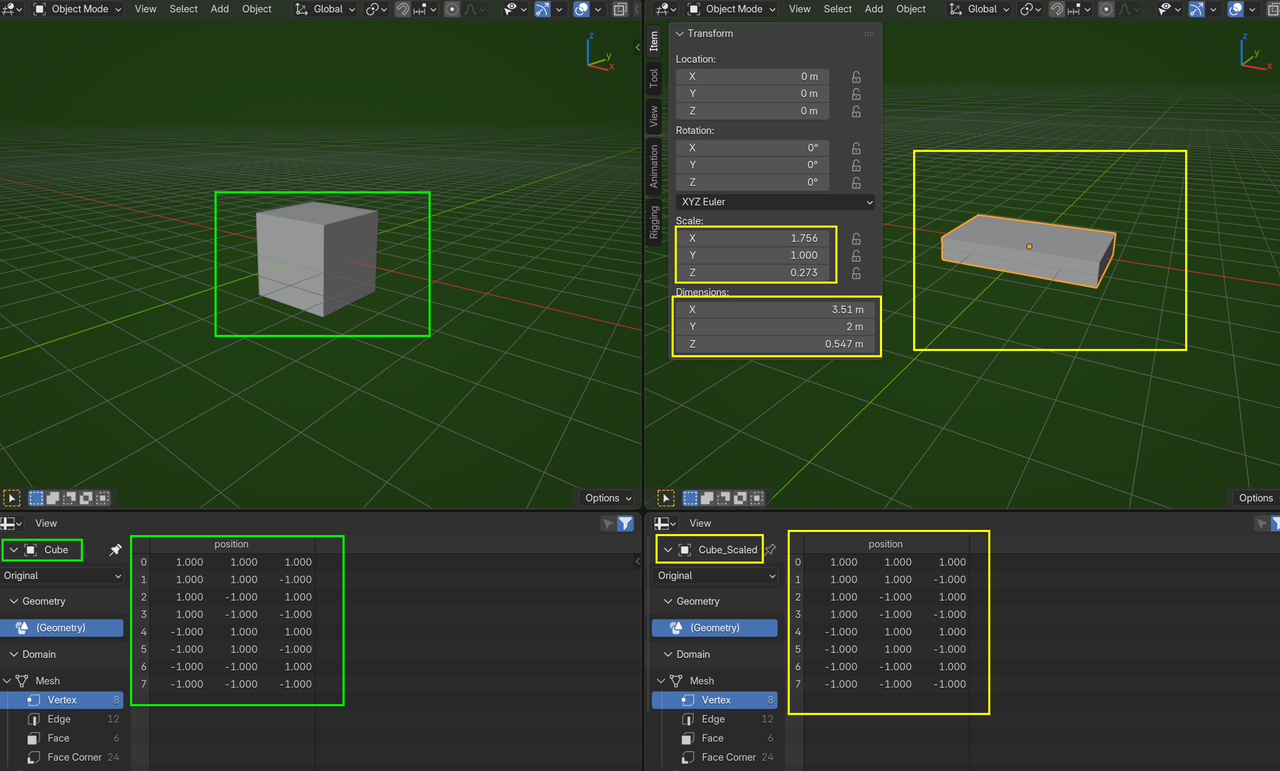
        First guess is you probably need to apply scale. In object mode, press Ctrl+a->Scale. 

        Second guess is duplicate vertices AKA double verts. In edit mode, press A to select all and then press M->By Distance. 

        #100755
        giannis ouzounis
        Participant

          yep looks like it was the scaling thing! such a weird problem. thanks for the help!

          #100756
          Grady Pruitt
          Participant

            Non-uniform scale causes so many issues 😀 So much, in fact, that if something is acting weird, it’s almost always the first thing to check 😀 

            #100757
            Martin Bergwerf
            Participant

              It’s not weird, if you know, that Scaling in Object Mode, Scales the Object’s Coordinate System, not the Position of the Vertices of that Object:

              Scaling.png

            Viewing 5 posts - 1 through 5 (of 5 total)
            • The topic ‘bevel problem’ is closed to new replies.