Bevel Edges Back to Straight Edges

Forum Archive Bevel Edges Back to Straight Edges

Viewing 4 posts - 1 through 4 (of 4 total)
  • Author
    Posts
  • #17859
    Quantay Peoples
    Participant

      What is the process for switching back to straight edges after I bevel the edges (and ran out of undo steps)?

      #85577
      Omar Domenech
      Participant

        You would basically have to remodel it. One tricky way would be, if you double tap G you go into edge slide mode, and then if you hit C you get an extension of the slide and that way you can get the beveled vertices back to where they meet up.

        Also there is an addon that has a lot of useful tools to unmake this kind of bevel and other things. It’s called Mesh Machine, linking you up:

        https://blendermarket.com/products/meshmachine

        #85578
        Adrian Bellworthy
        Participant

          There are several ways to remove do this,

          Edge slide as Omar said is one, but also snapping helps. If you have an object like a cube, you can use vertex snapping to line up the vertices to restore the correct shape, obviously wont work always.

          Top Tip: Save often, Save Incrementally.

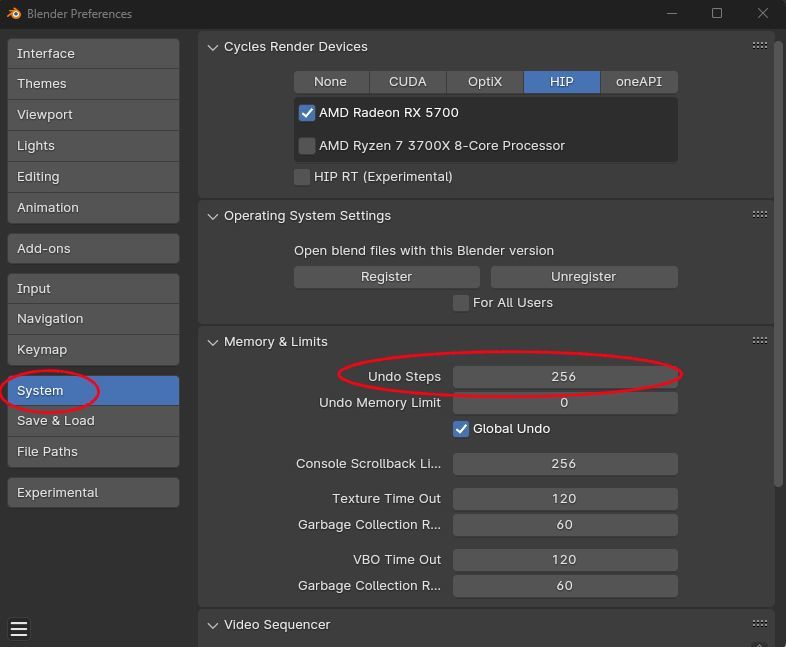
          Did you know you can increase the number of undo steps?

          The default is 32, the max is 256.

          UndoSteps.jpg

          #85579
          Dwayne Savage
          Participant

            You can select the edges of the bevel that you want to remove and use dissolve edges. Note: if you’re in edge select mode you can use Ctrl+x instead of pressing X and clicking dissolve edges. 

          Viewing 4 posts - 1 through 4 (of 4 total)
          • The topic ‘Bevel Edges Back to Straight Edges’ is closed to new replies.