// Beginner // what did i wrong // More than one Mesh moves with moving one

Forum Archive // Beginner // what did i wrong // More than one Mesh moves with moving one

Viewing 3 posts - 1 through 3 (of 3 total)
  • Author
    Posts
  • #14253
    akiran
    Participant

      Hej everyone im new here and very motivated, im learning  since 2 days and i love to leran more, i think i will get a year after that first month, but enough bla bla…. here is my question:

      im creating this lowpoly rocket in the Trainingflow and now im at the animationpart. I had to move my rocket for the first time and just noticed that if i move one mesh, that another one starts moving aswell and i dont know how to fix this 🙁 i think i did something wrong, did i? i added a small video of the issue and i hope someone can help me to fix this 😀 

      thank you for your help everyone 😀 

      (https://gyazo.com/1eebe5eacb30643e12f81b17e85f4854) link to the video on gyazo

      #69995
      Adrian Bellworthy
      Participant

        Hey @akiran ,

        Welcome to CG Cookie,

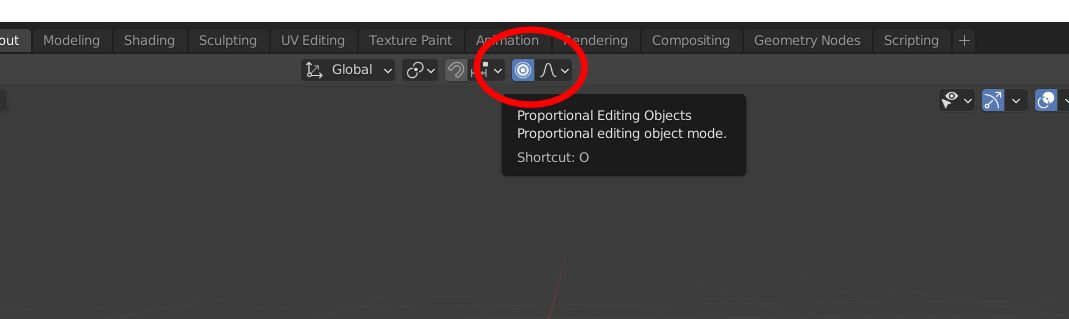
        It looks like you might have proportional editing turned on.

        At the top of the screen is the button to toggle it on and off and also the hotkey is ‘O’, Its easy to press it my accident.

        If its blue like this its on, click it to turn it off or use the hotkey as mentioned.

        hope this helps, let me know if you need anymore help 👍

        #69996
        akiran
        Participant

          thank you so much !!!!! 

        Viewing 3 posts - 1 through 3 (of 3 total)
        • The topic ‘// Beginner // what did i wrong // More than one Mesh moves with moving one’ is closed to new replies.