
BC4-1810 Homework, Zsolt Cseh
Forum Archive › BC4-1810 Homework, Zsolt Cseh
- This topic has 41 replies, 11 voices, and was last updated 7 years, 10 months ago by
Zsolt Cseh.
-
AuthorPosts
-
October 15, 2018 at 11:18 am #43220
@swikni Ah no worries then my man, just wasn’t sure, thought it best to play safe lol.
October 15, 2018 at 1:22 pm #43221@csehz Thats a really nice taxi.
October 15, 2018 at 11:28 pm #43222@csehz Another person who loves Eevee! 😄 I really like what you’ve done with your taxi, I think it looks great 😊 Good attempt on the light match too.
October 16, 2018 at 11:57 am #43223@csehz Late to the party. I agree with the critiques. Good work.
October 21, 2018 at 6:31 pm #43224Oops I did (tweaked long, so struggled, in this way learnt a lot, but been swept away) again..
Hopefully once can post also the character lighting, at the moment it is sitting in the recycle bin 😀
Week3 – Lighting Match
Goal
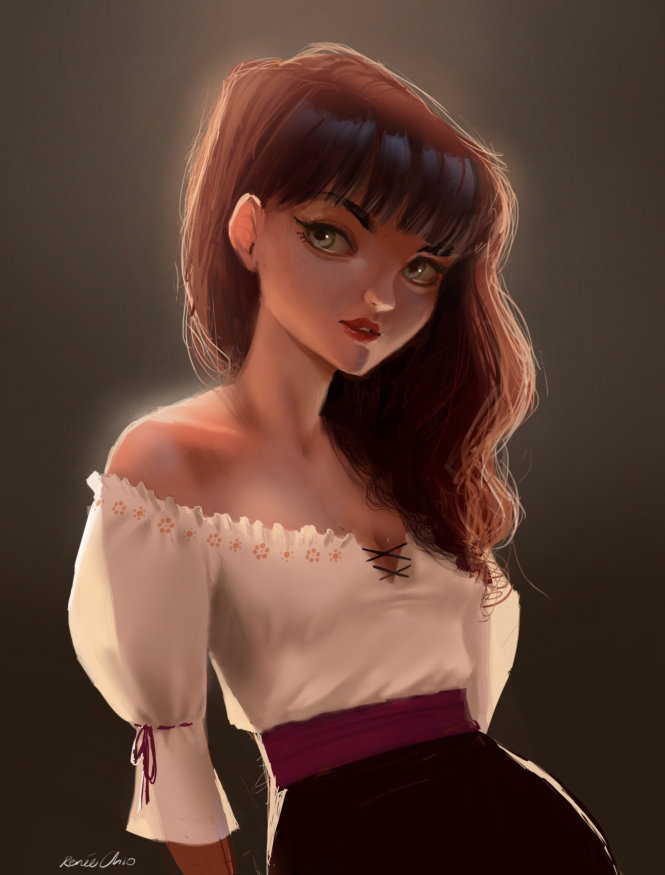
Match
 October 22, 2018 at 12:50 am #43225
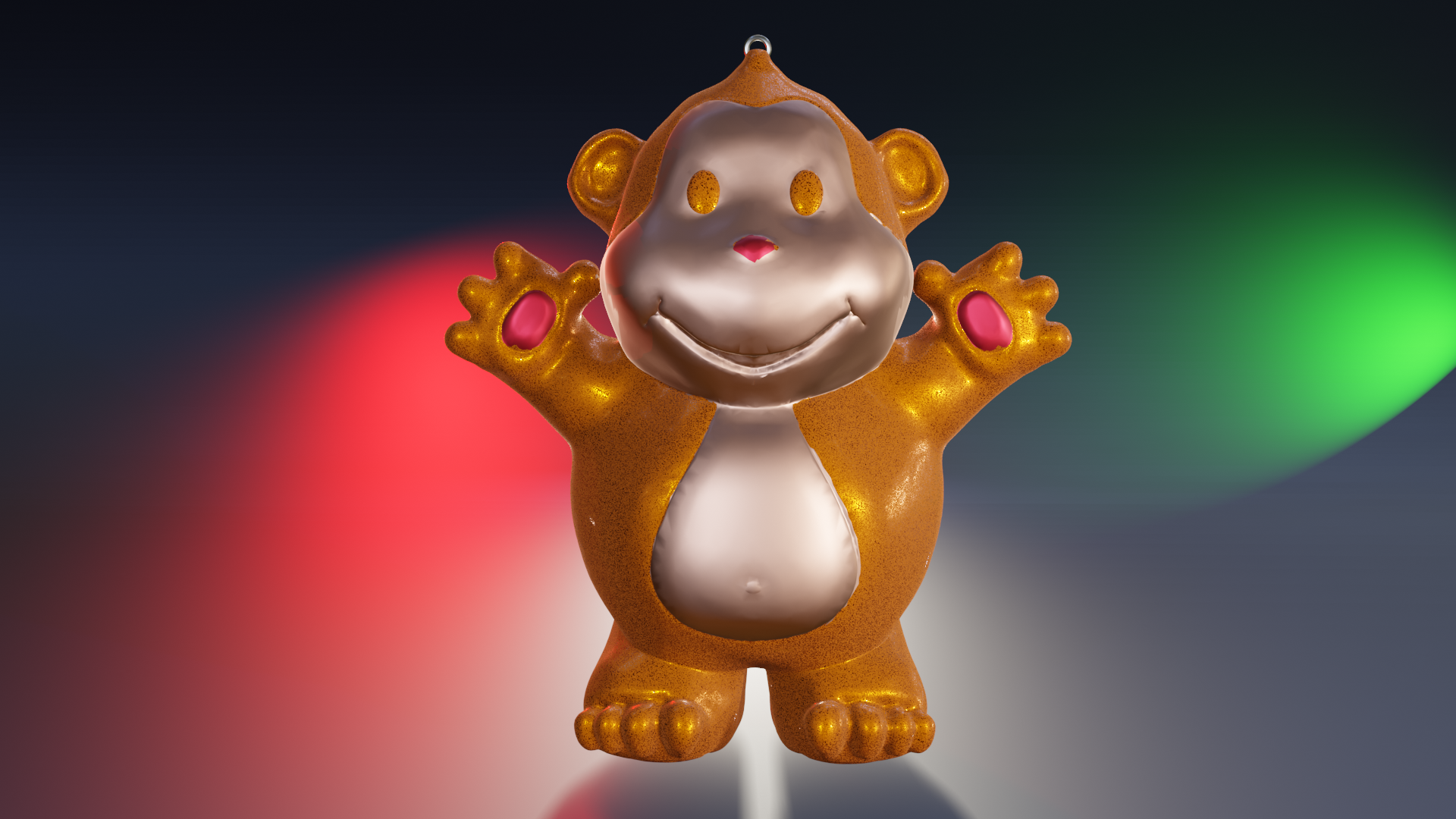
Okay it is Monday morning so at least can describe the things regarding the WIP monkey from the recycle bin..
Week3 – Character Lighting
So basically the concept of turning the “Buddha Monkey” to a “Christmas Ornament” I liked quite fast, but then run into two serious issues which just ate my time:
1) assigning separate materials to the sculpted object, it is quite hard to do precisely plus in Edit mode also very slow (plus the shading of course showed some issues with the model again :D)
2) creating an appealing background, the idea was that the ornament would be hanging maybe on the christmas tree or at least a kind of atmosphere about christmas, well, it was way too ambitious in my timeframe
 October 22, 2018 at 2:32 am #43226
@csehz Too Cute. Great job in not overpowering the scene with the lights and making it look fun
October 22, 2018 at 6:32 am #43227@csehz I love the monkey! ❤️
October 22, 2018 at 8:24 am #43228@csehz Just curious… is the monkey in Eevee? he kind of looks like he’s floating like you left Ambient Occlusion and/or contatct shadows for the lights off… I a shadow for the backlight from the front facing one, but there’s a bit of a glow around his feet so that it looks like he’s floating.and not sure if I’m seeing a shadow at all on the side view. Otherwise, I really like how that one turned out
October 22, 2018 at 9:33 am #43229@gradyp I think it is, Zsolt loves eevee just like me 😃
October 22, 2018 at 9:53 am #43230@csehz Good work this week @csehz! I really like that you used a 2D illustration as your lighting reference. Because it’s totally a valid source and it challenges us on the 3D side. That said it’s still a similar issue for me as week 2’s LM where the subject is significantly different than the source: Stylized, waist-up character portrait VS full bodied toy giraffe. It doesn’t mean the lighting is bad or not a close match but just that it’s more difficult to judge. What I can tell is that the rim light is great. The giraffe really pops off the background well. Perhaps it’s more blown out (strong) compared to the source but that’s nitpicking. Background gradient looks nice too.
Overall it’s a B+ from me.
For your character render, I have to give you props for not being timid with your light color choices! It’s a very colorful render that does cater well to the playful nature of the Christmas ornament Buddha Monkey. So in that context, it’s very appropriate.
At the risk of giving you an irrelevant piece of advice – because you may not be going for this – I do have a critique in the context of putting this image on a demo reel or professional portfolio. Similar to the feedback I gave John, the colors are perhaps too much of a good thing. For me the green and red lights are clashing with the orange and silvery ornament with pinkish-red accents. My suggestion: If your model is colorful, consider toning down the colors of your lights. If your model is grey or a single color, consider increasing color of the lights. Having both highly colored can be a negative.
Again that may not be what you’re going for and since I think it works for the context of your model, it’s worthy of an A to me 👍
October 22, 2018 at 5:08 pm #43231@gradyp Yes it is Eevee, although in the most of cases just experimenting and having no idea what I am doing 😀
October 22, 2018 at 5:15 pm #43232@theluthier Thanks for the evaluation, regarding that you mentioned even a portfolio, well really did not think that once I could have such one 🙂 Its possibility is a real compliment itself.
You know my audience is mainly our little girl who sometimes smiling when seeing a giraffe or a monkey on the screen and that means everything for me in the world, this is why the topic selection is often such one, picking up a toy and trying to model 🙂
But I am very glad participating in this Lighting and Shading class, it would be really pity leaving the models grey, so this month tried to cumulate all of them which were participated in the before classes. Also good feeling to know that they are own ones, with all of their mistakes on the road
October 22, 2018 at 11:31 pm #43233@csehz Difficult to say too much about the lighting match when the goal is 2D but what I can say is that I love to see the Giraffe again. Very funny choice to go with goal image like that, didn’t even thought about that. It seems to match pretty well anyways.
Oh yeah I can imagine adding different shaders to a sculpture. I can guess it’s be pretty painful and maybe doesn’t even pay off when some crispiness can be seen where the colors change.
Since understanding colors feels like an important topic for me at the moment, I started to think about Christmas colors. The later image gives a feeling that there is a bright christmas tree behind the Monkey but how to make it feel more christmassy? I think maybe there should be white somewhere between the red and green or something. It can also be difficult to make that with lights because even if Christmas is so happy time the colors are for some reason pretty cold. Well maybe it’s because it’s cold outside, don’t know lol.
Ps. Nice to see you using your own old models even if you have to dig them from the depths of recycle bin.
October 24, 2018 at 11:40 am #43234You know my audience is mainly our little girl who sometimes smiling when seeing a giraffe or a monkey on the screen and that means everything for me in the world
@csehz You’re such a good father, sir. And I’m not sure what kind of teacher I am to grade you by the wrong context…

While I [awkwardly] think it’s the right context for me to grade everyone by a “professional” standard, just know that I highly respect your goal with CG and Blender. It’s just so..pure. Keep it up!
-
AuthorPosts


- The topic ‘BC4-1810 Homework, Zsolt Cseh’ is closed to new replies.