
BC4-1810 Homework Arev
Forum Archive › BC4-1810 Homework Arev
- This topic has 36 replies, 7 voices, and was last updated 7 years, 10 months ago by
Kent Trammell.
-
AuthorPosts
-
October 15, 2018 at 6:07 pm #42338
@arev Looks pretty good. I agree the car paint is kind of creeping into plastic territory, but it’s good work. The match looks pretty good, too.
October 15, 2018 at 11:52 pm #42339Zsolt Cseh: I could probably have cranked up the metalic abit. I ran out of time though.
October 17, 2018 at 9:25 am #42340@arev Your car paint looks really nice! Something about it and the lighting is working great. Good job 👍
With the light match your certainly pretty close. The biggest difference to me is your head seems to be floating and lacking contact shadows with the ground the way the skull is. This suggests ambient occlusion isn’t enabled, which would also help with contact shadows across the entire model.
Unfortunately the source render isn’t that great in my opinion. Not really one to emulate. Still it’s a B from.
October 17, 2018 at 10:24 am #42341@theluthier Ambient oclusion was enabled, not sure why the efect didnt show. Maybe the rest of the lighting was weakening it?
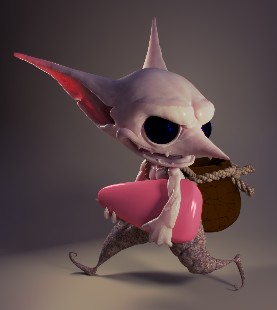
October 21, 2018 at 1:26 pm #42342This weeks homework didnt go very well. I had setup the hole scene and everything looked to be going the right way, then the render turned out quite diferent than in the wievport. The render has a very redish colour and does not look anywhere near what i was trying to achieve. Rooting out this problem took most of the time, i had only time for some simple shading. Despite asking for help on several sites i was unsucessfull rooting out the problem. This is my submision for week 3.
 October 21, 2018 at 1:33 pm #42343
@arev did you posted the problems here too that you ran into
October 21, 2018 at 1:34 pm #42344@yukinoh1989 I asked for help in the class thread, as well as some other sites not asociated with cgcookie.
October 21, 2018 at 2:16 pm #42345@arev Are you using an image texture on the candy corn? maybe it’s not reading it properly.
October 21, 2018 at 2:28 pm #42346@gradyp I have texures on the skin, trousers, ropes and the pot on the back. Not on the candy though. And the red colour was there before i put a red shader on it.
October 23, 2018 at 8:18 am #42347@arev Sorry to hear about the reddish render problem you experienced. I personally don’t see an overwhelming reddish tint in the render you posted..Also, I’m wondering why the render turned out different from the viewport. I can think of 3 possible reasons:
- You had a significantly red object or light source that’s hidden in the viewport but visible in the render.
- A texture is missing its source and flooding the render with pink (not red though)
- You used Eevee in the viewport and Cycles in the render which can produce very different results.
That aside, I really like the effort I’m seeing in your render! Especially the subsurface skin material. SSS is a tricky beast and it’s looking quite good here. The pants and rope texture appear a bit random to me – can’t tell what they are exactly. And the bag still feels like a WIP but the lighting good as well. It’s a B from me based on completion and quality.
I take it the render issue threw off your schedule and you don’t have a light match this week?
October 25, 2018 at 4:20 am #42348@theluthier If i was using diferent render engines for the two resultys, how can i know? Doesnt the wiev port change as well as the render when i change it in the properties?
Anyway, like you say i was thrown of schedule having to figure this out. So i have no lightmatch. I hope for a better result in the archwiz scene.
October 25, 2018 at 10:26 am #42349@arev With 2.8 your viewport could be set to “Look Dev” mode which is Eevee even if you have Cycles enabled:

That’s the only situation I’m aware of where your viewport could be notably different from your render.
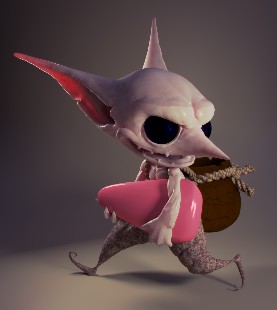
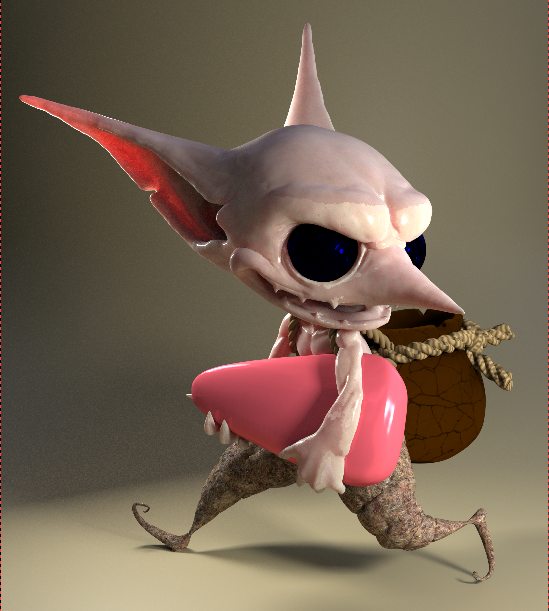
October 25, 2018 at 10:41 am #42350@theluthier Thats not it then, cause i wasnt using look dev mode. Just to show you the diference, here is the render alongside a screenshot of the wievport. The darker one being the render.
 October 25, 2018 at 10:46 am #42351
@arev It looks to me like you have an object(s) (like a lamp) visible in the viewport but not in the render. This happens to me sometimes and I have to go investigating my outliner to determine which object(s) is causing it.
In the outliner the eye icon means visiblility in the viewport while the camera icon means visibility in the render.
October 25, 2018 at 10:59 am #42352@theluthier All lamps are visible in both the wievport and the render,i just switched to a diferent hdri to see if it worked. The result is the same, a much darker render with what i think has a hint of red. This is a mystery to even the wise! It must be a setting of some sort, this doesnt happend to any other file i have. One thing though, it seems to improve abit when using a sun as rimlight instead of an arealamp!
-
AuthorPosts


- The topic ‘BC4-1810 Homework Arev’ is closed to new replies.