Array issue

Forum Archive Array issue

Viewing 8 posts - 1 through 8 (of 8 total)
  • Author
    Posts
  • #17307
    Ellie MacQueen
    Participant

      Test

      #83265
      Chunck Trafagander
      Participant

        Hi @emacqueen !

        Were you having some troubles with arraying? I see your question currently only says “Test”, I wanted to make sure you didn’t accidentally submit before the question was written out!

        Cheers,

        Chunck 🙂

        #83266
        Ellie MacQueen
        Participant

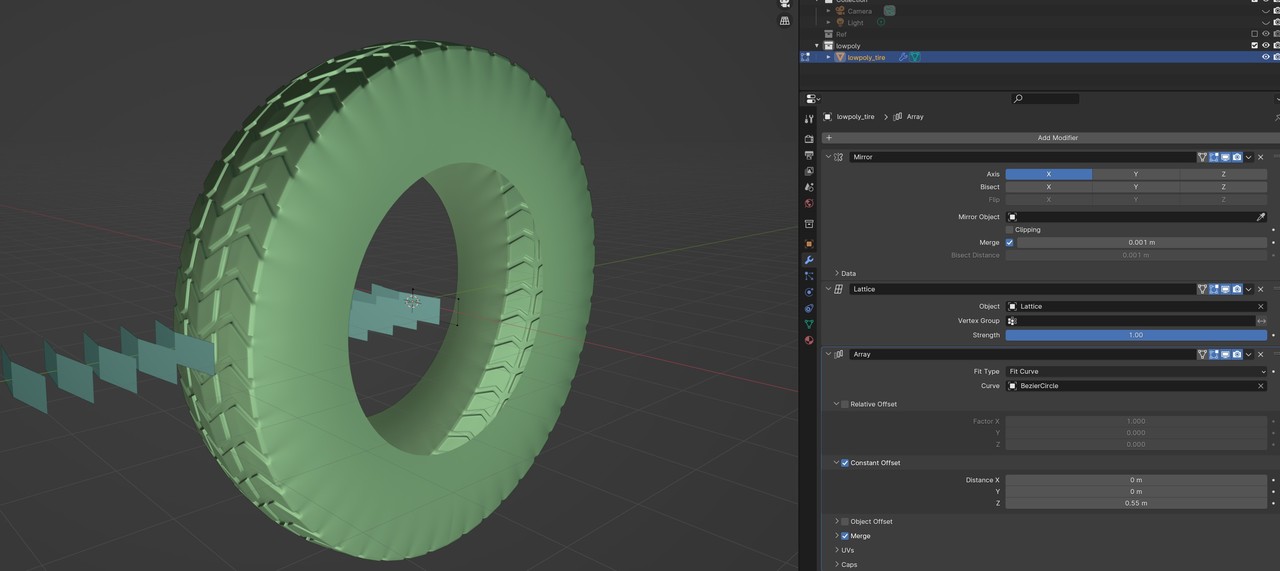
          Hi Chunck! Thanks for the response. Yes, after copying attributes, my plane is going in the wrong direction. I tried rotating the plane itself, but that didn’t work. I also made sure the origin point of the high poly tire and low poly tire were the same.

          024-01-03 004443.jpg

          #83267
          Martin Bergwerf
          Participant

            HI Ellie @emacqueen ,

            It looks like your Plane OBJECT is Rotated, you can either:

            – (best solution) change the Array (Object Offset) Axis from Z to Y, or

            – Apply the Rotation of the Plane (this is done in Object Mode: CTRL+A > Apply > Rotation).

            —————-

            Rotating the Plane in Edit Mode, only changes the Position of the Vertices (relative to the Object’s Coordinate system/Origin), the Object’s Z-Axis will still be pointing along the World’s (Global) Y-Axis.

            Is this helpful, or just confusing?

            #83268
            Omar Domenech
            Participant

              Oh I thought Ellie was just doing some CG Cookie test, work related stuff. Turns out Ellie is rocking the tire. Right one Ellie 🤘🏼

              #83269
              Ellie MacQueen
              Participant

                Kind of both Omar 😀 

                #83270
                Chunck Trafagander
                Participant

                  Sorry for the late response! Martin and Omar are always swooping in with great advice tho, thank goodness!

                  Was Martin’s feedback able to help you out at all, @emacqueen?

                  To me it appears as though it is just an issue with the rotation of your plane and the array axis, but if that didn’t seem to help then we can troubleshoot other ideas.

                  ————————-

                  As well, the shading on your green tire in the image above leads me to believe it may need it’s normals flipped?It doesn’t quite appear correct to me.

                  If you are interested in trying that out, you can do so by selecting every face of that object in EDIT mode, and pressing “Alt + N” to bring up the “Normals” menu. 🙂

                  #83271
                  wrongwright
                  Participant

                    Worked for me after reading this.  Thanks.  Just had to go back before I Shift selected the rubber_high and then Applied the Rotation to the rubber_low. 

                  Viewing 8 posts - 1 through 8 (of 8 total)
                  • The topic ‘Array issue’ is closed to new replies.