
Apply keyframe on setting to multiple objects

Forum Archive Apply keyframe on setting to multiple objects

Viewing 6 posts - 1 through 6 (of 6 total)
  • Author
    Posts
  • #16709
    Martin Aversa
    Participant

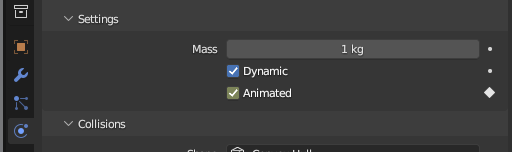
      Hello my dear cookiers, I am stumbling upon this setting:Captura.png

      I have multiple objects that I want to set to “no animated” from frame 30 (e.g.)

      I know I can hold ALT so all of them switch the setting at the same time, but that doesnt seem to work for the keyframe, so I’d have to do all of them by hand. Is there a solution Im not seeing?

      Thanks for your time!

      #80620
      Omar Domenech
      Participant

        Yeah some field in Blender the ALT doesn’t work for some reason. I bet there’s some simple python code that will let you pick all the objects and change the setting. Someone like Martin, Adrian or Shawn would probably know. Summon any of those guys. I’ll tell them on Discord as well.

        #80621
        Martin Bergwerf
        Participant

          Hmmm,

          I wouldn’t know of an easy way to do that, apart from going to Frame 30 (for instance) ALT selecting Animated on allthe Objects you want and then one by one clicking the Animate Property button (‘diamond’).

          You\d really have to ask Shawn if this could be automated via Python, but I wouldn’t get my hopes up too much….Animate Property doesn’t have a Python Tooltip…don’t know if that’s jusst an oversight, or….

          #80622
          Martin Aversa
          Participant

            Yeah, I wouldn’t know a lot on how to do it on python so I’d have to learn that as well (implying it is possible hahah), brute force it is then, thank you guys!

            #80623
            Martin Aversa
            Participant

              I got it! You can animate 1 of them, and then Ctrl+L to Link Animation Data, that does the trick! 😀

              #80624
              Shawn Blanch
              Participant

                Alternatively you could perhaps just let the animation happen at those frames and head over to the graph editor for all of the objects and simply “delete” the keyed frames during that time, eh?

              Viewing 6 posts - 1 through 6 (of 6 total)
              • The topic ‘Apply keyframe on setting to multiple objects’ is closed to new replies.