Any way to turn off auto-continue in the lectures?

Forum Archive Any way to turn off auto-continue in the lectures?

Viewing 5 posts - 1 through 5 (of 5 total)
  • Author
    Posts
  • #9087
    Alexander Tu
    Participant

      Hello cgcookie community!

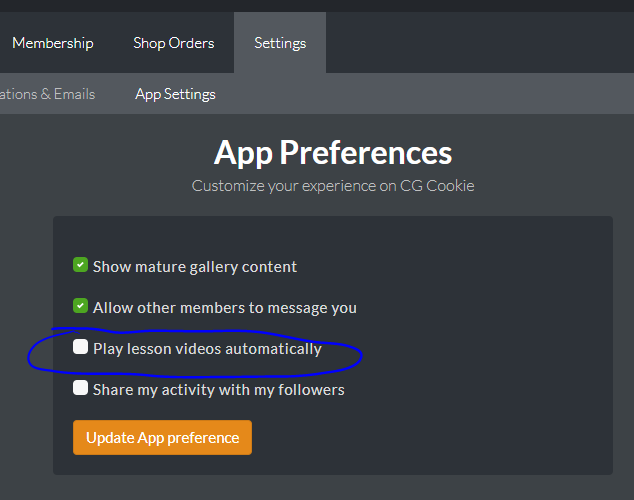
      I’ve just recently joined and would love to deactivate that function as I want to browse some questions and answers after each lecture before continuing. I haven’t seen any options in the “app settings” but maybe I’ve missed this option to turn off automatically loading the next lecture. I can only see one option to deactivate auto-play for the videos themselves.

      Is this option missing or did I simply miss it?

      #31065
      Mark Smith
      Participant

        from your dashboard/settings/app settings…

        uncheck the box…

        #31066
        Alexander Tu
        Participant

          I have that option unchecked by default, but it still automatically goes to the next lecture. Like I said previously, the video doesn’t start up automatically, but it still jumps to the next lecture at the end of a video.

          #31067
          Pablo C.
          Participant

            I would also find this useful. I almost always go back to the finished lecture after it auto-advances, just to check its Q&A.

            Possibly not a lot of people miss this feature, but it would be convenient to stay in the completed lecture’s page if one so wishes. I guess it would also help the site owners save a bit of bandwidth. 🙂

            #31068
            Scott McClellan
            Participant

              I’d like to ditto the request. Sometimes reading the Q&A section gives a lot of information as well as the just looked upon lesson.

            Viewing 5 posts - 1 through 5 (of 5 total)
            • The topic ‘Any way to turn off auto-continue in the lectures?’ is closed to new replies.