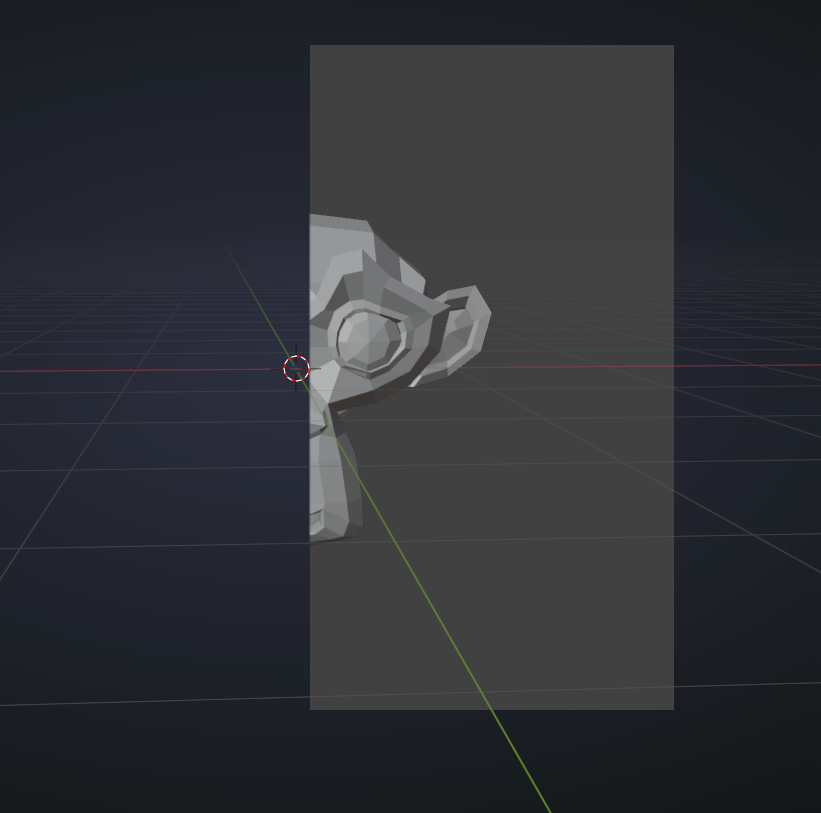
Any idea why I can’t see my objects in Solid mode? If I take a picture from the exact same position, they are visible in both material preview and rendered mode.

Forum Archive Any idea why I can’t see my objects in Solid mode? If I take a picture from the exact same position, they are visible in both material preview and rendered mode.

Viewing 5 posts - 1 through 5 (of 5 total)
  • Author
    Posts
  • #14576
    Alexandra Enescu
    Participant

      #71790
      spikeyxxx
      Participant

        Hard to tell from the screenshot, but it almost looks like you accidentally used the ALT+B hotkey combo. This “clips” the view:

        and when you change the viewpoint now:

        Actually very handy in some situations! (This doesn’t affect Rendered or Material Preview Mode…)

        You can restore from that by again pressing ALT+B.

        #71791
        Alexandra Enescu
        Participant

          Thank you!!! Very useful to know also.

          #71792
          Adrian Bellworthy
          Participant

            Hey @alendomata ,

            Check the eye icon in the properties panel for your objects/collection.

            This is the hide in viewport option, hotkey H and ALT H to unhide. 

            Note: Still visible in rendered and material preview mode.

            And SHIFT H to hide the children of an object, but you don’t really need to worry about this one.

            Hope this helps.

            #71793
            Alexandra Enescu
            Participant

              Thank you @adrian2301 for the response. It was actually what spikeyxxx said, that I had accidentally pressed ALT+B.

            Viewing 5 posts - 1 through 5 (of 5 total)
            • The topic ‘Any idea why I can’t see my objects in Solid mode? If I take a picture from the exact same position, they are visible in both material preview and rendered mode.’ is closed to new replies.